
A handwritten label is a liability, not a system. In a high-pressure commercial kitchen, relying on a felt-tip pen to manage food safety is a gamble with your hygiene standards. You already know the frustration of labels that peel off in the chiller or prep dates calculated incorrectly during a frantic lunch service. These errors are more than just a nuisance. They lead to avoidable food waste and unnecessary stress during a surprise EHO audit.
This guide provides a pragmatic roadmap for implementing a professional food storage label printer system to secure your records and sharpen operational efficiency. We'll examine the regulatory requirements for the 14 statutory allergens, ensuring peanuts and tree nuts are treated as distinct categories. You'll learn how to correctly manage Natasha’s Law for prepacked for direct sale (PPDS) items. We also preview how digital workflows replace manual guesswork with audit-ready precision, helping you maintain rigorous standards whether you operate under the Food Hygiene Rating Scheme or Scotland’s Food Hygiene Information Scheme.
Key Takeaways
- Implement a professional food storage label printer to eliminate manual date calculation errors and ensure legible, moisture-resistant records.
- Understand the specific requirements of Natasha’s Law for prepacked for direct sale (PPDS) items to ensure accurate allergen labelling.
- Categorise the 14 statutory allergens correctly, maintaining the legal distinction between peanuts and tree nuts for every prep task.
- Integrate food waste tracking into your labelling workflow to identify patterns and reduce the financial impact of avoidable waste.
- Assess total cost of ownership when choosing a system, prioritising offline functionality and cloud-based management for operational stability.
The Role of a Food Storage Label Printer in Professional Standards
A professional food storage label printer is a dedicated thermal device. It produces clear, moisture-resistant labels designed for the rigours of a commercial kitchen. Unlike standard office equipment, these units don't use ink or toner. They use heat-sensitive paper to create crisp, durable records that won't degrade in the walk-in fridge or freezer. This technology ensures that vital information remains legible from the moment of prep until the point of service.
Consistency is the primary objective. In a multi-site operation or a kitchen with high staff turnover, every prep container must follow the same protocol. A digital system ensures that a label printed in the morning shift matches the one created at midnight. This uniformity is the foundation of a robust Food Safety Management System (FSMS). It removes the guesswork from staff handovers and ensures that safety standards are maintained regardless of who is on duty.
Why Handwritten Labels are a Liability
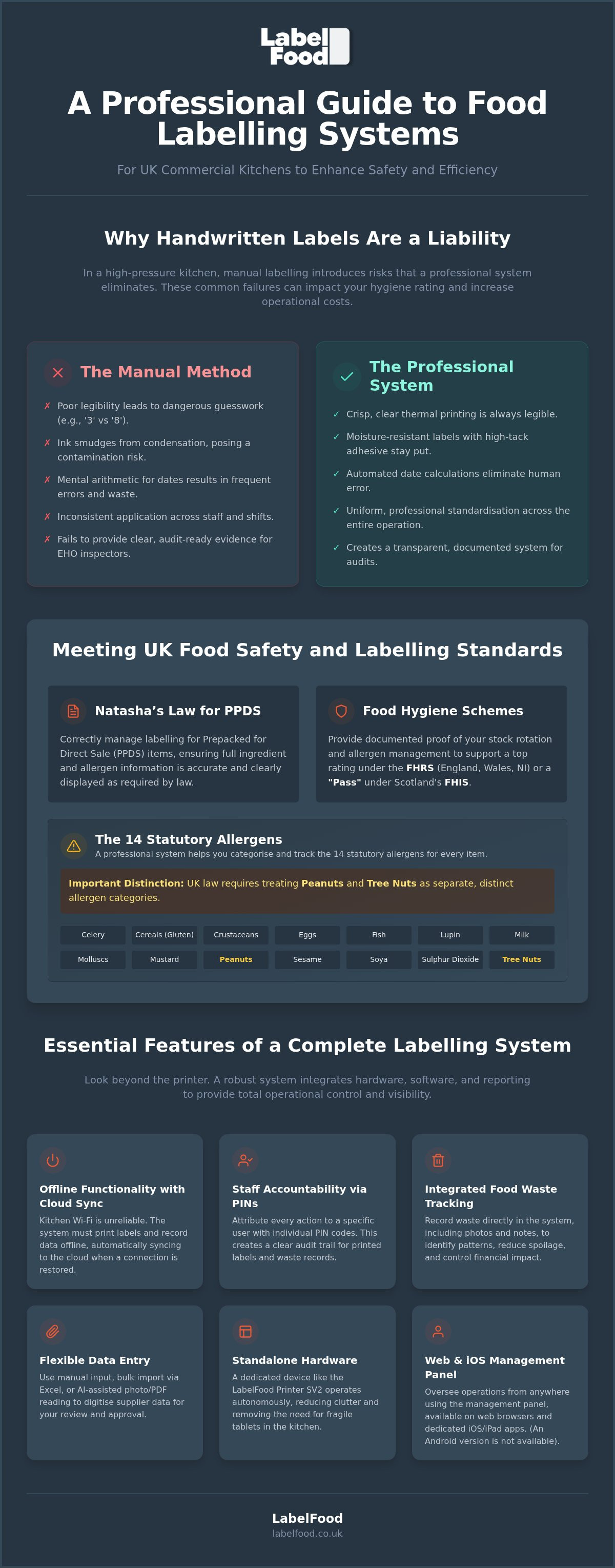
Handwriting is subjective and unreliable. One chef’s "3" often looks like another’s "8" during a busy service. This ambiguity leads to dangerous confusion regarding use-by dates. If an EHO inspector cannot read your labels, they effectively don't exist. Poor legibility is a common point of failure during inspections and can lead to immediate points deductions.
Standard pens also present a contamination risk. Ink from ballpoint or felt-tip pens smudges when exposed to condensation. It can transfer to food surfaces, gloves, or other containers. Beyond the physical mess, manual date rotation relies on mental arithmetic. Busy staff frequently make mistakes when calculating complex shelf lives. These errors result in inconsistent safety margins. Food is either kept too long, creating a safety risk, or discarded too early, which increases costs.
Meeting UK Food Hygiene Standards
UK food safety laws are rigorous and evidence-based. While international food labeling regulations provide the historical context for global safety, UK operators must focus on specific local enforcement. EHO inspectors prioritise clear evidence of date control and allergen management. They look for a system that is transparent and repeatable.
In England, Wales, and Northern Ireland, your labelling accuracy directly impacts your score under the Food Hygiene Rating Scheme (FHRS). Achieving a "5" rating requires organised, legible records that prove you have total control over your stock. In Scotland, the Food Hygiene Information Scheme (FHIS) operates with a "Pass" or "Improvement Required" status. A food storage label printer supports a "Pass" by providing the physical proof of your stock rotation and allergen tracking. It demonstrates to the inspector that your kitchen processes are deliberate, documented, and professional.
Essential Features of a Commercial Food Label Printer
Selecting a food storage label printer requires more than a price comparison. Professional kitchen environments demand specific technical capabilities to ensure reliability. Thermal printing technology is a prerequisite. It removes the logistical burden of managing ink ribbons or toner cartridges in a greasy, high-heat environment. Labels print via direct heat on specialised paper. This results in clear, smudge-proof text that survives the transition from prep bench to chiller.
Adhesion is equally critical. Standard labels often fail in cold or damp conditions. A commercial system must use high-tack adhesives designed specifically for fridges and freezers. These labels stay attached to stainless steel, plastic, and glass containers until they are intentionally removed. Operational continuity also depends on connectivity. Kitchens are notorious for inconsistent Wi-Fi. Systems must offer offline functionality, allowing staff to continue printing during network outages. Data then syncs to the cloud once the connection is restored.
Hardware Durability in High-Pressure Kitchens
Kitchen hardware must withstand heat, steam, and frequent chemical cleaning. A compact footprint is necessary to prevent clutter on crowded prep stations. Standalone devices like the LabelFood Printer SV2 provide total autonomy. They reduce the need for external tablets or bulky laptops at the point of use. This streamlined approach minimises the risk of hardware damage and simplifies the workspace.
Accountability is built into the workflow. Every printed label is attributed to a specific user through individual PIN codes. This feature allows managers to track staff activity and identify training gaps. It ensures that the person responsible for the prep is always recorded, creating a clear audit trail for internal reviews or external inspections.
Software and Cloud Integration
The hardware is only half of the solution. A cloud management dashboard allows for remote menu and allergen updates. When updating ingredients to align with FSA allergen guidance, the software pushes those changes to every printer in the group instantly. This ensures that every site uses the same validated data. AI-assisted data entry tools can read PDFs or photos of supplier invoices to speed up menu setup, though these function as a tool for user review rather than autonomous publishing.
Control remains centralised. Managers can organise product catalogues and monitor waste records from a single interface. It is important to note that these management panels are available on web and iOS/iPad only. There is currently no Android version. For operators seeking to modernise their workflow, investing in professional labelling solutions provides the stability required for high-volume service.
Compliance with Natasha’s Law and Allergen Labelling
Professional allergen management is a legal necessity, not a choice. Natasha’s Law, which came into effect in October 2021, dictates how businesses must label food prepacked for direct sale (PPDS). This includes any item prepared and packaged on the same premises from which it is sold before a customer orders it, such as sandwiches or boxed salads. A standard food storage label printer becomes a vital compliance tool when integrated with allergen management software UK. By pulling data from a central, validated database, you eliminate the risk of transcription errors that frequently occur with manual entries.
Accuracy requires precision across the 14 statutory allergens recognised by UK law. These include celery, cereals containing gluten, crustaceans, eggs, fish, lupin, milk, molluscs, mustard, sesame, soybeans, and sulphur dioxide. Crucially, the law treats peanuts and tree nuts (such as almonds, hazelnuts, and walnuts) as separate categories. Your labelling system must reflect this distinction to remain aligned with UK food labelling regulations. Digital systems ensure these allergens are correctly identified every time a label is generated.
Managing PPDS Requirements Efficiently
Compliance for PPDS food is non-negotiable. Every label must display the full name of the food and a complete ingredients list. Within that list, the 14 statutory allergens must be emphasised, usually through bold, italic, or contrasting text. This ensures customers can make informed safety decisions at a glance. For a deeper breakdown of these standards, see our guide on Natasha’s Law labelling requirements. A digital food storage label printer automates this formatting, ensuring every sticker meets the required visual standards without manual intervention.
AI-Assisted Data Entry and Menu Management
Setting up a comprehensive product catalogue is often the most time-consuming part of kitchen management. Modern systems simplify this via AI-assisted tools. These tools can read PDFs or photos of supplier product specifications to extract ingredient data quickly. It's important to remember that the AI is a support tool, not an autonomous publisher. Every piece of imported data must be reviewed and edited by a competent person before it is committed to the live system.
For large-scale updates, bulk Excel imports remain a reliable and efficient method. This allows managers to organise thousands of SKUs across multiple sites simultaneously. Once the data is validated on the web or iOS management panel, it syncs to all connected printers. This creates a digital audit trail, providing clear evidence of your allergen controls for any internal review or local authority inspection. Note that the management panel is available on web and iOS only, with no Android version currently supported.
Integrating Waste Recording into the Labelling Workflow
Effective stock management doesn't end when a label is printed. It continues until the product is either sold or discarded. Food waste tracking is an essential part of modern digital kitchen compliance records. By capturing waste data at the point of disposal, operators can identify costly patterns and adjust their procurement. A food storage label printer system that includes integrated waste logging transforms a simple sticker into a data point for financial control.
Digital logs replace the unreliable paper-based waste sheets that often become illegible or lost in a busy kitchen. Professional systems allow staff to record the reason for waste alongside photos and notes. This provides context for every loss, whether it is due to spoilage, over-preparation, or equipment failure. This level of detail is vital for accurate auditing and helps justify stock variances during month-end reviews. Capturing a photo of the wasted item ensures that the record is verifiable and reduces the risk of fraudulent entries.
The Benefits of Digital Waste Logs
Data-driven decision making is the only way to combat rising costs. In the UK, the hospitality and food service sector accounts for approximately 1.1 million tonnes of food waste annually, costing the industry over £3 billion. Using integrated food waste recording software allows chefs to see exactly what is being thrown away. If a specific prep item consistently appears in the waste log, prep levels can be adjusted immediately. This proactive management provides clear evidence to stakeholders that the kitchen is operating with maximum efficiency.
Staff Accountability and Reporting
Accountability is maintained through the use of individual PINs. When a staff member records waste, the system attributes the entry to their profile. This allows managers to monitor activity through the Staff Activity report, identifying specific training needs or workflow bottlenecks. If waste is high during a specific shift, managers can investigate the root cause with precise data rather than relying on guesswork. Individual attribution encourages staff to take ownership of their prep and disposal habits.
The system also generates a Compliance Pack report. This provides a high-level summary of all kitchen activity, including prep labels and waste records. It serves as a definitive record of a kitchen's commitment to reducing environmental impact and improving margins. To start tracking your kitchen's efficiency, view our complete food labelling and waste recording systems.
Choosing the Right Labelling System for Your Business
Selecting a food storage label printer is an investment in operational stability. It is not a one-off hardware purchase. You must evaluate the total cost of ownership. This includes the initial device, ongoing label roll supplies, and the software subscription. Generic alternatives often appear cheaper upfront. However, they lack integrated support and fail to address specific UK kitchen regulations. Prioritise a complete commercial kitchen labeling system UK that offers a unified hardware and software package. This ensures your hardware and digital records work in sync.
Reliability is the deciding factor. Choose a provider with UK-based support. They must understand the nuances of the Food Hygiene Rating Scheme and Scotland’s Food Hygiene Information Scheme. A partner that understands local enforcement is a silent asset during an audit. It’s also vital to check hardware compatibility. Most professional management panels are available on web and iOS/iPad only. There is no Android version. Verify that your existing kitchen tablets or office computers can access the dashboard before you commit.
Single-Site vs Multi-Site Requirements
Scale dictates your requirements. A single-site cafe needs a system that is simple to set up and easy to maintain. The focus is on replacing handwritten stickers with clear, durable thermal labels. In contrast, a multi-site catering group requires centralised control. You need to push menu changes to fifty sites as easily as one. Cloud syncing is indispensable here. It ensures every kitchen operates from the same validated product catalogue. This eliminates the risk of local sites using outdated allergen data or incorrect shelf-life margins.
Implementation and Staff Training
Training time is lost revenue. Choose an interface that is intuitive for staff at all skill levels. The system should use individual PINs to ensure every label is attributed to a specific person. This creates a culture of accountability from day one. Professional systems should also provide onboarding support to help organise your initial data. This might include using AI tools to read supplier spec sheets, provided a competent person reviews the final output for accuracy.
Maintenance must be frictionless. Regular software updates are essential. They ensure your records remain aligned with evolving UK food safety expectations without requiring manual hardware upgrades. A robust food storage label printer system should work offline. This allows your team to continue prep during a Wi-Fi outage. Once the connection returns, all data syncs to the cloud automatically. This prevents gaps in your audit trail and keeps your kitchen moving.
Modernising Your Kitchen Labelling Standards
A manual approach to food safety is no longer sufficient in a high-pressure commercial environment. Transitioning to a digital food storage label printer system removes the risk of illegible handwriting and manual date calculation errors. It ensures your kitchen stays ready for an EHO inspection, whether you operate under the Food Hygiene Rating Scheme or Scotland’s Food Hygiene Information Scheme. By automating Natasha’s Law requirements for PPDS food and identifying the 14 statutory allergens, you protect both your customers and your business reputation.
The LabelFood system provides a complete solution for stock rotation and waste management. It includes the standalone SV2 hardware with every subscription. You can record food waste with photo evidence and notes, creating a transparent audit trail. Individual staff PINs ensure accountability across every shift. This integration of hardware and cloud-based reporting allows you to focus on service rather than paperwork. Take the first step toward total kitchen efficiency and explore the LabelFood Printer SV2 for your kitchen. Secure your standards today.
Frequently Asked Questions
Does Natasha’s Law apply to all food sold in my kitchen?
Natasha’s Law applies exclusively to prepacked for direct sale (PPDS) food. This includes any item packaged on the same premises from which it's sold before a customer orders it. Examples include sandwiches or salads placed in a chiller for grab-and-go service. Food prepared to order after a customer makes a request doesn't fall under this specific regulation. However, you must still provide allergen information for all food served.
Can I use a standard office label printer for food storage?
Standard office equipment is unsuitable for a commercial kitchen. These devices use ink or toner that smudges when exposed to steam or condensation. They also lack the high-tack adhesives required for walk-in fridges and freezers. A dedicated food storage label printer uses thermal technology to produce moisture-resistant, durable labels. This ensures that shelf-life and allergen information remains legible throughout the entire stock rotation cycle.
What are the 14 statutory allergens I need to label in the UK?
UK law requires the declaration of 14 specific allergens. These are celery, cereals containing gluten, crustaceans, eggs, fish, lupin, milk, molluscs, mustard, sesame, soybeans, and sulphur dioxide. You must distinguish between peanuts and tree nuts (such as almonds, hazelnuts, or walnuts) as two separate categories. A professional labelling system helps you manage these specific requirements across your entire menu, reducing the risk of manual transcription errors during prep.
Do I need a constant Wi-Fi connection to use a food label printer?
A constant connection isn't required. The LabelFood Printer SV2 is designed with offline functionality to handle the realities of kitchen environments. Staff can continue to print labels even if the Wi-Fi signal drops. Once the connection is restored, the device syncs all activity to the cloud management dashboard. This ensures that your digital records and staff activity reports remain complete without interrupting the prep workflow.
How does a digital system help with my EHO Food Hygiene Rating?
Digital systems provide the organised evidence EHO inspectors look for during an audit. Clear, printed labels prove that you have a consistent system for date control and allergen tracking. This supports your Food Safety Management System (FSMS) in England, Wales, and Northern Ireland under the Food Hygiene Rating Scheme. In Scotland, it helps demonstrate compliance for the Food Hygiene Information Scheme. It replaces messy, unreliable paper logs with professional, audit-ready records.
Is there an Android version of the LabelFood management dashboard?
There is no Android version of the management dashboard. The system is designed for use via a web browser or through the dedicated iOS and iPad application. Kitchen managers can access the cloud-based dashboard from any desktop computer or Apple mobile device to update menus, review waste records, or download compliance reports. This focus on specific platforms ensures a stable and secure environment for managing sensitive food safety data.
Can I import my existing product list from Excel into the labelling system?
You can import product catalogues via bulk Excel upload to speed up the initial setup. The system also features AI-assisted data entry that can read photos or PDFs of supplier specifications. It's important to remember that the AI functions as a tool for your review and editing. A competent person must always validate the imported information before it's published to the live printers to ensure total accuracy across your estate.
What is the difference between PPDS and standard food labelling?
PPDS labelling requires a full ingredients list with allergens clearly emphasised on the packaging. This applies to food packaged on-site before being ordered. Standard labelling for food prepared to order only requires that you provide allergen information upon request. This can be done through menus, allergen matrices, or verbal communication. Implementing a food storage label printer ensures that both prep containers and PPDS items meet their respective legal standards.