
What should a kitchen food safety dashboard actually help your team manage? A useful kitchen food safety dashboard UK operators can rely on connects product information, label printing and staff records, rather than simply moving paperwork onto a screen.
If allergen details sit in one file, labels in another and daily records on paper, staff can lose time finding information or recording who completed an action. A digital system can bring these tasks into one workflow, but it cannot guarantee that your operation meets its legal duties. Your team still needs accurate information and consistent routines.
This guide explains which records and labelling workflows may matter to your kitchen, including the specific scope of Natasha’s Law for prepacked for direct sale (PPDS) food. It also covers how to assess usability, staff attribution and reporting, and why food hygiene schemes differ between Scotland and England, Wales and Northern Ireland. Use it to judge whether a dashboard fits your operation and can be used reliably during preparation and service.
Key Takeaways
- A kitchen food safety dashboard UK operators assess should connect product information, labels and relevant records while supporting, not replacing, safe kitchen routines.
- Natasha’s Law applies to prepacked for direct sale food, and UK food information rules recognise 14 statutory allergens. Peanuts and nuts are separate categories.
- Compare dashboards against your actual workflow, including data entry, staff attribution, offline use, reporting and waste records.
- Test a small workflow first, then review how well the system works across preparation, service and staff shifts.
- LabelFood brings product data, label printing and waste records together in a complete food labelling system, with the Printer SV2 included with subscriptions.
What should a kitchen food safety dashboard manage in a UK kitchen?
A kitchen food safety dashboard is a shared digital view for organising product information, food labels and selected kitchen records. Its practical value is straightforward: staff can find relevant information in one place instead of piecing it together from paper sheets, spreadsheets and separate files. During a busy service or shift handover, that can make it easier to locate current product details and related records.
A dashboard supports kitchen routines, but it does not take responsibility for them. Food business operators remain responsible for safe food handling and for keeping the information they use accurate. Staff need to enter, check and maintain records. A digital screen can organise information, but it cannot confirm that a task was completed correctly or that a record reflects what happened.
Useful records should connect with the operation’s own food safety procedures. For background, Hazard Analysis and Critical Control Points (HACCP) describes a systematic, preventive approach to food safety. A dashboard may help organise selected information used in kitchen routines, but it is not a substitute for the procedures themselves.
Which kitchen tasks can a food safety dashboard bring together?
Start with the information staff need repeatedly. Product data can support consistent food label preparation, while selected digital records can keep operational details organised and easier to review. The records you need will depend on your kitchen’s processes, products and existing food safety arrangements.
For example, if product details are split between a paper recipe folder and a separate labelling file, staff may have to search both before preparing a label. Bringing relevant information together can reduce that friction. The benefit depends on good habits: staff must enter details carefully, check them against the product and update them when something changes.
Who benefits from a shared dashboard in a commercial kitchen?
Chefs and kitchen managers can use a shared view to coordinate preparation and handovers across shifts. It can help staff work from the same organised product information, rather than relying on someone to remember where a particular sheet or file is stored.
The workflow will vary. A restaurant may focus on service preparation, a bakery on its product range, and a food manufacturer on information relevant to production. A London kitchen has the same need for clear, accessible information as other UK commercial kitchens, but its specific records and routines should reflect its own operation.
How UK food labelling rules shape dashboard requirements
Food labelling requirements affect what information a kitchen needs to organise and check. A dashboard can help staff access product and allergen details when preparing labels, but it cannot verify that those details are correct or replace the kitchen’s procedures. Start by understanding which rules apply to the food being sold.
When does Natasha’s Law apply to food labels?
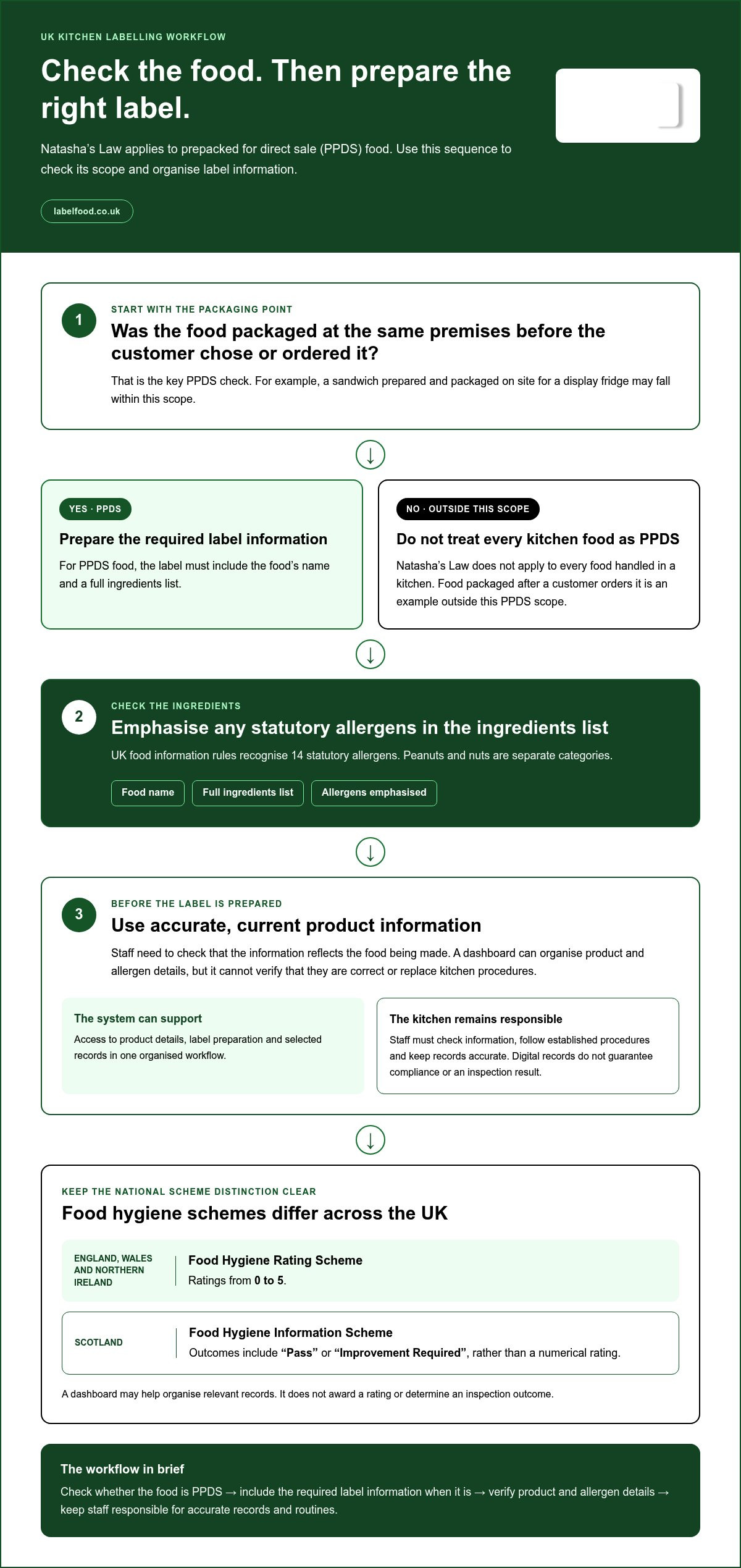
Natasha’s Law applies to food that is prepacked for direct sale (PPDS). This means food packaged at the same premises where it is offered for sale, before a customer chooses or orders it. A sandwich prepared and packaged on site for a display fridge may fall within this scope. The rule does not apply to every food handled in a kitchen, such as food packaged after a customer orders it.
For PPDS food, the label must include the food’s name and a full ingredients list, with any of the 14 statutory allergens emphasised. Peanuts and nuts are separate allergen categories. Staff need accurate, current product information before preparing labels. A dashboard can organise that information, but the business must ensure it reflects the food being made. Read more in this Natasha’s Law labelling requirements guide.
What can a dashboard support, and what remains a kitchen responsibility?
A kitchen food safety dashboard UK operators assess should help organise relevant product details, label preparation and selected records. Staff still need to check information, follow established procedures and keep records accurate. The Food Standards Agency’s official guidance on food safety management explains the role of a food safety management system. Digital record-keeping supports that work; it does not guarantee compliance or a particular inspection result.
Food hygiene schemes also differ by nation. The Food Hygiene Rating Scheme is used in England, Wales and Northern Ireland, with ratings from 0 to 5. Scotland uses the Food Hygiene Information Scheme, which reports outcomes such as “Pass” or “Improvement Required” rather than a numerical rating. A dashboard may help organise records relevant to your operation, but it does not award a rating or determine an inspection outcome.
For kitchens reviewing how product information connects with label preparation, a complete food labelling system can bring those tasks into a shared workflow while leaving staff responsible for checking the information they use.
How to compare kitchen food safety dashboards without overbuying
Choose around the work your team needs to do, not the length of a feature list. A kitchen food safety dashboard UK operators compare should make key tasks practical during preparation and service. Assess data entry, staff attribution, offline access, reporting and waste records separately. Mark each as essential or optional for your operation before comparing platforms.
| Area | What to assess | Why it matters |
|---|---|---|
| Product data entry | Manual input, spreadsheet import, or assisted reading of photos and PDFs | Choose methods that fit how your team receives and maintains product information. |
| Staff attribution | Individual logins or PINs, plus an activity report | Helps identify who entered information without proving the entry is accurate. |
| Offline use | Whether work can continue offline and sync to the cloud later | Useful if connectivity is interrupted in parts of the kitchen. |
| Reporting | Which reports are available and what information they show | Reports should help review records relevant to your routines. |
| Waste records | Whether staff can record waste with useful supporting details | Can help keep waste information organised alongside other kitchen records. |
Start with essential tasks. A bakery may prioritise product data and label preparation; a restaurant may place more weight on shift handovers and staff activity. Extra platform functions are optional unless they solve a real operational need. For labelling workflows, check the UK food labelling rules against your process, then decide what information staff need when preparing labels.
Can staff identify who entered or changed kitchen information?
On shared devices, individual PINs can help attribute activity to a staff member rather than leaving entries under a general kitchen login. A Staff Activity report can support a review of who used the system. It does not verify a product detail’s accuracy or confirm that a task was carried out correctly. Consider how staff will sign in and out during busy handovers.
Does the dashboard fit the devices and data your team uses?
Compare manual entry, Excel import and AI-assisted reading of photos or PDFs. AI-assisted reading should prepare information for staff to review and edit, not publish product data autonomously. Check device access too: LabelFood’s management panel is available on web and iOS/iPad, not Android. The system supports offline functionality with cloud syncing.
Software can organise records, but it cannot guarantee legal compliance or a food hygiene rating. LabelFood combines product data, label printing and records in a complete food labelling system, with the LabelFood Printer SV2 included with subscriptions. Explore the food labelling system to see how those workflows connect.
How to put a food safety dashboard into a kitchen’s daily workflow
Introduce the system around a task staff already do, such as checking product details before preparing labels. A small trial shows whether the steps fit the pace of the kitchen before you extend the workflow across shifts or sites. Assign someone to maintain product information and someone to review entries, so updates do not become everyone’s job and no one’s responsibility.
- Map current records. Note where product details, labels and relevant records are kept. Identify which information staff need during preparation or handover.
- Organise product data. Decide which products to enter first and agree who checks details before staff use them.
- Assign staff access. Set up individual PINs so activity can be attributed to staff, including when a device is shared.
- Test one workflow. Use a small product range or one routine across a shift. Check whether staff can find, enter and review information without disrupting the task.
- Review before expanding. Gather staff feedback, correct unclear information and adjust the routine before extending it across more shifts or sites.
How should a kitchen prepare product information for digital use?
Choose an input route that suits the information you already have: manual entry, Excel import, or AI-assisted reading from photos or PDFs. AI-assisted reading provides a draft for staff to review and edit. Staff must check the extracted details before they are used. Set a clear owner for updates, and make sure relevant product information is checked when recipes or ingredients change. For wider context on connected labelling workflows, read the commercial kitchen labelling solutions guide.
How can teams use records without adding unnecessary admin?
Attach record-keeping to an existing routine. Staff might enter relevant information during preparation or add waste details as part of close-down, rather than creating a separate task at an unrelated time. Waste records can include photos and notes, giving managers context to review later. Keep ownership clear: staff record the activity, and a manager reviews entries at an agreed point in the kitchen’s routine.
Use reports to inspect recorded activity, not as proof that every task was completed correctly. LabelFood includes the Compliance Pack, Label Report and Staff Activity reporting tools. A kitchen food safety dashboard UK operation adopts should support review while leaving accuracy and food safety procedures with the team. To see how product information, labelling and records can sit in one workflow, explore LabelFood’s food labelling system.
How LabelFood connects a dashboard with food labelling and waste records
LabelFood is a complete food labelling system for commercial kitchens, not just a printer. Its cloud management dashboard brings product information, label preparation, staff activity and waste records into one workflow. The LabelFood Printer SV2 is included with subscriptions, connecting digital product data with label printing in the kitchen.
How does LabelFood link product data, printing, and staff activity?
Teams can enter product information manually, import it from Excel, or use AI-assisted reading of photos and PDFs. This AI-assisted reading gives staff information to review and edit. It does not publish product data on its own. Staff remain responsible for checking that details are accurate before using them to prepare labels.
Individual staff PINs attribute activity to staff members, which can help managers understand who entered information during a shift or handover. LabelFood includes three named reporting tools: Compliance Pack, Label Report and Staff Activity. These support review of relevant records and activity. They do not validate the accuracy of an entry or guarantee compliance with food safety requirements.
How do offline use and waste records support kitchen routines?
Kitchen connectivity can be interrupted. LabelFood supports offline functionality with cloud syncing, so information can sync when a connection is available again. Waste records can include photos and notes, adding context for a manager reviewing what was recorded. These records help organise information; they do not automatically reduce waste or confirm that every entry is complete.
The management panel is available on web and iOS/iPad. There is no Android version, so consider device access when planning how staff will use the dashboard. A kitchen food safety dashboard UK operation chooses should fit both its day-to-day workflow and the devices available to its team.
Product information, labels, staff attribution and waste records work best when staff have clear routines for entering and reviewing data. LabelFood provides tools to support those routines, while responsibility for accurate information and safe food handling remains with the business.
Explore LabelFood’s food labelling system to see how the dashboard, label printing and waste records connect in one system.
Choose a workflow your team can use consistently
A kitchen food safety dashboard UK operators choose should bring useful product information, labelling and selected records into a workflow staff can follow. Match its features to your operation, assign responsibility for checking information, and test the process before rolling it out across shifts or sites.
LabelFood connects product data with label printing, staff activity and waste records. The LabelFood Printer SV2 is included with subscriptions. Offline functionality with cloud syncing supports kitchen use when connectivity is interrupted, while waste records can include photos and notes. Individual staff PINs attribute activity, and the Compliance Pack, Label Report and Staff Activity provide named reporting tools. These features support organised record-keeping. They do not replace staff review or guarantee compliance or a particular food hygiene rating.
Explore LabelFood’s complete food labelling system to see how these tasks can work together. Start with the workflow your team needs most, then build from there with clear ownership and practical routines.
Frequently Asked Questions
What is a kitchen food safety dashboard?
A kitchen food safety dashboard is a shared digital view for organising product information, label preparation and selected kitchen records. It can help staff find relevant details without searching across separate paper sheets and files. For a London restaurant, bakery or food manufacturer, its usefulness depends on whether the information matches actual kitchen routines and staff keep it accurate. It supports record-keeping; it does not take responsibility for safe food handling.
Does a food safety dashboard guarantee legal compliance or a high hygiene rating?
No. A dashboard can help organise product details and records, but it cannot guarantee legal compliance or a particular food hygiene rating. The business remains responsible for accurate information, safe food handling and following its procedures. In England, Wales and Northern Ireland, the Food Hygiene Rating Scheme uses ratings from 0 to 5. Scotland has a separate Food Hygiene Information Scheme, which uses statuses such as “Pass” and “Improvement Required”.
Does Natasha’s Law apply to all food prepared in a commercial kitchen?
No. Natasha’s Law applies to food that is prepacked for direct sale (PPDS), not every item prepared in a commercial kitchen. PPDS food is packaged at the same premises where it is sold, before a customer chooses or orders it. For example, a sandwich packaged on site for sale before a customer selects it may be PPDS. Food packaged after a customer orders it is not within this PPDS definition.
How many allergens must UK food businesses identify?
UK food information rules recognise 14 statutory allergens: celery, cereals containing gluten, crustaceans, eggs, fish, lupin, milk, molluscs, mustard, peanuts, sesame, soybeans, sulphur dioxide and sulphites, and nuts. Peanuts and nuts are separate categories. Staff should check product information carefully and keep it current. A dashboard can organise allergen details, but the business must ensure entries accurately reflect the food it handles.
Can a kitchen food safety dashboard work without an internet connection?
Some systems support offline use, but this depends on the dashboard. LabelFood supports offline functionality with cloud syncing, so kitchen work can continue when connectivity is interrupted and information can sync to the cloud when a connection is available. Consider where and how staff will use the system, then check that its offline workflow fits those tasks. Offline access does not remove the need for staff to enter and review information accurately.
Can AI enter food product information into a kitchen dashboard?
AI-assisted tools can read information from photos or PDFs to help prepare product data, but staff must review and edit the result before using it. The AI does not autonomously publish product information. LabelFood also supports manual entry and Excel import, giving teams different ways to add data. Whichever method they use, staff should check details against the product information and update entries when products or ingredients change.
Can staff use the LabelFood management panel on Android?
No. The LabelFood management panel is available on web and iOS/iPad, with no Android version. Plan access around the devices your kitchen team uses, particularly if managers need to organise product information or review records during a shift. For London kitchens with shared devices, agree who can access the panel and how staff will use it as part of preparation and handover routines.