
A waste dashboard can’t reveal a useful pattern if the records behind it are inconsistent. Kitchen waste analytics starts with reliable, contextual entries, not technology alone. If one shift records preparation waste by weight and another logs only what went into the bin, it’s difficult to compare results or decide what to change. For London kitchens handling busy services and varied production routines, a recording process needs to be practical enough for staff to follow consistently.
Staff have limited time for extra logging, and more detail isn’t automatically better. The aim is to capture enough to spot recurring waste without making the process difficult to maintain. Food waste separation requirements also differ across the UK, so use analytics to support operational decisions, not as a substitute for understanding waste collection obligations.
This guide explains what to record, how to choose useful categories and spot patterns, and how to compare manual, digital and more automated approaches. It also covers how to review records consistently and test changes to purchasing, preparation or portions. The focus is a workable process: clear records, relevant questions and decisions your team can put into practice.
Key Takeaways
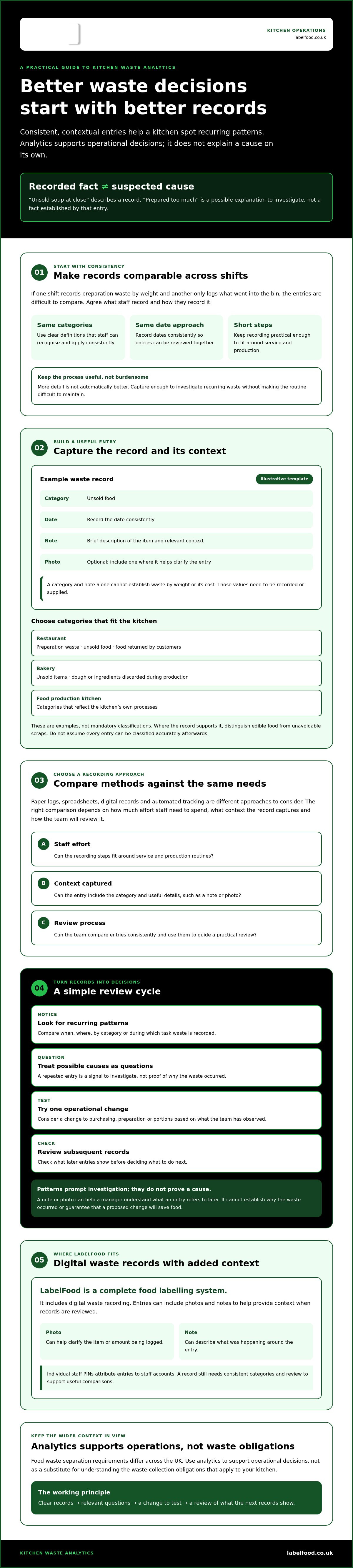
- Separate recorded facts from suspected causes, so kitchen waste analytics supports evidence-based decisions rather than assumptions.
- Use a small set of consistent waste categories, dates and recording steps to make entries easier to compare across shifts.
- Compare paper, spreadsheet, digital and automated tracking by staff effort, the context captured and how records will be reviewed.
- Use a simple review cycle: identify recurring patterns, test one operational change, then check what subsequent records show.
- LabelFood’s complete food labelling system includes digital waste recording, with entries that can include photos and notes.
What kitchen waste analytics means for a commercial kitchen
Kitchen waste analytics is the collection and review of waste records to identify patterns that can inform operational decisions. Recording captures what was discarded. Analysis compares entries over time and considers context, such as when the waste occurred, where it arose and which task was underway.
That distinction matters. One entry might describe a tray of unsold pastries or ingredients discarded during preparation. On its own, it can’t explain why the food was wasted or show that a proposed change will prevent it. The wider global food waste issue has many causes, but useful kitchen analysis starts with records that reflect the operation’s own service, production and stock routines.
Which kitchen waste should operators record?
Start with categories staff can recognise and apply consistently. A restaurant might separate preparation waste, unsold food and food returned by customers. A bakery could record unsold items separately from dough or ingredients discarded during production. Food production kitchens can choose categories that reflect their own processes.
These are examples, not mandatory classifications. Keep the system practical: if staff interpret a category differently, comparisons become less reliable. Where the record supports it, distinguish edible food from unavoidable scraps. Don’t assume every entry can be classified accurately after the fact.
What can a useful waste record tell you?
Repeated entries can show whether waste is associated with a particular time, location, category or task. For example, a London restaurant might notice the same prepared component recorded as leftover after certain services. A bakery might see particular unsold items appearing repeatedly on certain trading days. These are signals to investigate, not proof of a cause.
Context makes an entry easier to interpret later. A short note can describe what was happening, while a photo can show the item or amount being logged. Together, they may help a manager understand what the record refers to. They don’t establish why the waste occurred or guarantee that a proposed change will save food.
Keep the review grounded in what was recorded. If the team suspects an issue with forecasting, portioning or preparation, treat it as a question to check, not a confirmed explanation. Consistent records provide a basis for that investigation. The operational decision comes afterwards, when staff assess the pattern and decide what to test.
Which data makes kitchen waste analytics reliable?
Reliable comparisons depend on recording the same kinds of information in the same way. Define each category, record dates consistently and make sure staff understand what each field means. Otherwise, a change in the records might reflect different recording habits rather than a genuine change in kitchen waste.
Keep observed facts separate from interpretations. “Unsold soup at close” describes what was recorded. “Prepared too much” is a possible explanation to investigate, not a fact established by that entry. Useful kitchen waste analytics depends on maintaining that distinction.
How should staff record waste consistently?
Agree simple category definitions and explain them during staff onboarding. For example, clarify what your kitchen means by “preparation waste” and “unsold food”. Keep the steps short enough to fit around service and production. Ask staff to add a brief note when an entry needs context, rather than expecting a category alone to explain what happened.
WRAP’s UK hospitality food waste resources can also help operators consider how they approach recording and review.
What should a sample waste record contain?
A basic entry can capture useful information without adding fields the team won’t use:
- Category: Unsold food
- Date: DD/MM/YYYY
- Note: Brief description of the item and relevant context
- Photo: Optional, where it helps clarify the entry
This is a template, not a report of actual kitchen performance. To compare waste by weight or estimate its cost, those values need to be recorded or supplied. A category and note alone can’t establish either figure.
How do photos, notes and staff attribution add context?
A photo or note can clarify what an entry refers to when it’s reviewed later. LabelFood waste records can include both. Individual staff PINs attribute entries to staff accounts, which can support a review of recording practices. Attribution doesn’t prove who caused the waste or why it occurred.
LabelFood supports manual data entry, Excel import and AI-assisted reading of photos or PDFs. Staff should review and edit any AI-assisted information; it isn’t published automatically. Choose the method that fits your workflow, then check entries for consistent categories, dates and context. Kitchens considering a digital process can review LabelFood food waste recording as one option.
Manual logs, digital records or automated tracking: how to compare them
Choose a recording method by considering what staff can maintain during service and how managers will review the entries. Paper, spreadsheets, digital records and automated capture each place different demands on the team. None can make unclear categories or unassigned responsibility useful. A dashboard can’t compensate for inconsistent inputs or records that nobody reviews.
The UK's food and drink waste hierarchy gives context for decisions about managing surplus and waste. Whatever method you choose, records should help your kitchen understand what is happening and support a considered review.
| Method | Staff effort and context | Review needs |
|---|---|---|
| Paper log | Staff write entries by hand. Notes can add context, but the team needs a clear place and routine for recording. | Someone must gather and compare entries across shifts. |
| Spreadsheet | Entries are typed into a shared format. Consistent fields can help, but staff still need to enter and maintain the data. | Check how records are organised, accessed and compared, especially across sites. |
| Digital records | Staff enter information in a digital system. Depending on the system, records may include contextual details and staff attribution. | Confirm how the team will check entries and who is responsible for review. |
| Automated capture | May reduce some manual recording steps. Staff still need usable categories and a process for checking captured information. | Clarify what is captured, what needs review and who acts on the findings. |
When are paper logs or spreadsheets enough?
They can be a sensible starting point when the process is limited and staff can record entries reliably. Before settling on a format, ask whether a manager can find records, compare them across shifts and review them without unnecessary effort. If you operate more than one site, check that teams use the same categories and recording rules. No format is automatically cheaper or more accurate; the right fit depends on the kitchen’s workflow and how it is managed.
When should a kitchen consider digital waste records?
Consider digital records if staff need searchable entries, consistent attribution or a shared way to review information. LabelFood supports manual entry, Excel import and AI-assisted reading of photos or PDFs. Staff review and edit AI-assisted information; it isn’t published automatically. LabelFood is a complete food labelling system, with the LabelFood Printer SV2 included with subscriptions. Its management panel is available on web and iOS/iPad, not Android.
For kitchen waste analytics, assess any option by the quality of its records and the routine around them. Automation can change how information is captured, but it doesn’t remove the need to agree categories, check entries and assign someone to review them.
How to turn kitchen waste records into operational decisions
Records become useful when the team reviews them consistently and treats patterns as questions to investigate, not instant explanations. The process doesn’t need to be complicated. Set a review interval your kitchen can maintain, then use the same steps each time.
- Collect the records. Check that entries are complete enough to understand and use consistent categories and dates.
- Look for recurring patterns. Ask when waste occurs, which task it relates to, which category appears and whether it is associated with a particular shift.
- Check the context. Ask the staff involved what was happening. A repeated entry may point to an issue worth investigating, but it doesn’t confirm the cause.
- Choose one change. Make a single practical adjustment so the team can assess it without mixing several different interventions.
- Review again. Record what changed and compare later entries using the same categories and recording process.
How should a kitchen review waste patterns?
Choose a review interval that suits the operation. A small restaurant, bakery and food production kitchen may each have different capacity, so there’s no single schedule that works for every team. Compare categories and periods only when the records were made consistently. If definitions or recording habits changed, note that before drawing conclusions.
Use prompts to guide the discussion: Was the waste recorded during preparation, service or close-down? Which task was underway? Did the entries come from one shift or several? Staff can add operational context that isn’t visible in the figures. Keep that context separate from confirmed details, and don’t treat a correlation as proof of a cause.
How can teams track whether a change helped?
Before making an adjustment, write down the action and what the team will observe. For example, if staff change how a component is prepared, continue recording the relevant waste category in the same way before and after. Note any other operational changes that could affect the comparison.
Review the records after an interval that gives the team enough comparable entries to assess. If the pattern changes, record what you observed. Don’t project savings or claim a result unless your own records support it. If entries are incomplete or the process has changed, improve the record-keeping before deciding what the comparison shows.
For a digital option that supports kitchen waste records, see how LabelFood records kitchen waste.
Where LabelFood fits in a kitchen waste analytics workflow
Once your categories, recording routine and review process are clear, consider whether a digital system suits the way your team works. The tool should support reliable record-keeping. It can’t decide what your kitchen’s patterns mean or replace a manager’s review.
LabelFood is a complete food labelling system, not a standalone printer. Subscriptions include the LabelFood Printer SV2, alongside a cloud management dashboard and digital food waste recording. It can support the recording stage of kitchen waste analytics, while your team remains responsible for reviewing entries and deciding what action to take.
How does LabelFood support waste record-keeping?
Waste records can include photos and notes to retain context alongside an entry. Individual PINs attribute entries to staff, helping identify who recorded them. Attribution supports record review; it doesn’t establish who caused the waste or why.
Staff can enter information manually, import it from Excel or use AI-assisted reading of photos or PDFs. Staff review and edit AI-assisted information before use; it isn’t published autonomously. LabelFood can work offline, then sync entries with the cloud.
The system also includes the named reporting tools Compliance Pack, Label Report and Staff Activity. These names identify available tools, not a promise that they provide a particular waste analysis, recommendation or outcome. Check whether the recording and review process meets your operational needs.
What should operators confirm before choosing a system?
Check the practical fit before changing how the team records waste. Agree the categories staff will use, consider whether the entry steps fit around service, and decide who will review records and how often. For multiple sites, confirm how the same recording approach will be maintained across teams.
Check device access as well. LabelFood’s management panel is available on web and iOS/iPad only; there’s no Android version. Make sure the devices available to your team suit the way you plan to manage the system. A workable process depends on staff being able to record information consistently, not just on having a digital tool.
To review the system’s food labelling and waste-recording features, Explore LabelFood’s food labelling system.
Make your next waste review practical
Effective kitchen waste analytics depends on records your team can maintain and managers can review. Use clear categories, consistent entries and relevant context. Then look for recurring patterns, test one operational change and check what subsequent records show. Treat possible causes as questions to investigate, not conclusions drawn from a single entry.
If you’re considering digital record-keeping, LabelFood combines food labelling with waste recording in a complete system. The LabelFood Printer SV2 is included with subscriptions. Waste records can include photos and notes, with individual PINs for staff attribution. These features can support a review process, while your team remains responsible for interpreting the records and deciding what to change.
Explore LabelFood’s complete food labelling system to see whether its recording options fit your kitchen’s workflow. Start with a process your staff can use consistently, then base decisions on what the records show. Small, well-checked steps give your team a clearer basis for action.
Frequently Asked Questions
What is kitchen waste analytics?
Kitchen waste analytics is the collection and review of waste records to identify recurring patterns that can inform kitchen decisions. Recording an item describes what was discarded; analysis compares entries and considers context, such as the date, task or shift. For a London restaurant, this might help managers decide what to investigate in preparation or service. Records don’t automatically reveal causes or reduce waste. Staff still need to review the evidence and choose any changes.
How do you measure food waste in a commercial kitchen?
Choose categories staff can apply consistently, such as preparation waste, unsold food or returned food. Record each entry with its date and a brief note; add a weight or cost only if you capture or supply those values. Keep the steps practical during service. Review comparable records together and ask staff for context before interpreting a pattern. The method matters less than consistent entries your team can find and use.
Is kitchen waste analytics worth it for a small restaurant?
It can be useful if the records answer a practical question and the routine is manageable. A small restaurant doesn’t need to begin with complex software or extensive categories. Start with a few clear categories, record entries consistently and review them at an interval your team can maintain. If repeated records point to an area worth investigating, test one operational change. Whether the effort is worthwhile depends on what your own records show.
What is the difference between food waste tracking and waste analytics?
Food waste tracking records what the kitchen discards, while analytics reviews those records for patterns and possible decisions. For example, a log might record unsold food on a particular date. Comparing similar entries over time could prompt questions about timing, category or shift. That pattern is a signal to investigate, not proof of a cause. Analytics only helps if the underlying records are consistent and someone reviews them.
Can a digital system track kitchen waste offline?
Some digital systems can record information offline, but this depends on the system. LabelFood can function offline and sync with the cloud when connectivity is available. That can support recording when a kitchen’s connection is unavailable. Check how offline entry and syncing work in the system you’re considering, and make sure staff know how to follow the recording process. LabelFood’s management panel is available on web and iOS/iPad, not Android.
Do kitchen waste analytics tools automatically reduce food waste?
No. A tracking or analytics tool can help organise records, but it doesn’t automatically prevent waste. Staff or managers need to review entries, investigate possible causes and decide whether to test a change. Keep recording the same categories before and after the change, then review what the records show. Don’t assume a tool will deliver savings or a specific result. Outcomes depend on the kitchen’s own practices and evidence.
Can LabelFood analyse kitchen waste data?
LabelFood supports digital food waste recording, but it shouldn’t be treated as an autonomous kitchen waste analytics platform. Records can include photos and notes, and individual PINs attribute entries to staff. Data can be entered manually, imported from Excel or read from photos or PDFs with AI assistance. Staff review and edit AI-assisted information. The system also includes the named tools Compliance Pack, Label Report and Staff Activity; their names don’t imply specific waste analysis.