
A customer asks whether a dish contains an allergen. The answer shouldn’t depend on which chef is on shift or whether someone remembers a recent recipe change. For London kitchens comparing allergen labelling software London options, the first priority is a reliable staff routine, not another screen to manage.
Ingredient details can change, and knowledge can vary between roles and shifts. Staff need clear steps: know where to check current information, pause if an answer is uncertain, and pass the enquiry to someone who can verify it. UK food businesses must provide information on the 14 statutory allergens. Natasha’s Law applies specifically to prepacked for direct sale (PPDS) food, not every meal packaged or served by a kitchen.
This guide covers practical training routines and how to assess whether software can support them. It looks at responding to customer enquiries, keeping ingredient and allergen details consistent, and choosing useful training records without adding unnecessary admin. LabelFood is one complete labelling and record-keeping system to consider. It can support kitchen processes, but it can’t replace staff training or guarantee compliance.
Key Takeaways
- Use a repeatable service routine so staff know where to check information, how to prepare safely and when to escalate an uncertain enquiry.
- Tailor instruction to each person’s kitchen tasks, then use supervised practice to check how the steps work during service.
- Choose briefings, written procedures and digital records for the jobs they need to do. Tools can organise information, but they don’t teach staff by themselves.
- Assess allergen labelling software London options by how they manage product details and support review, not just by how they produce labels.
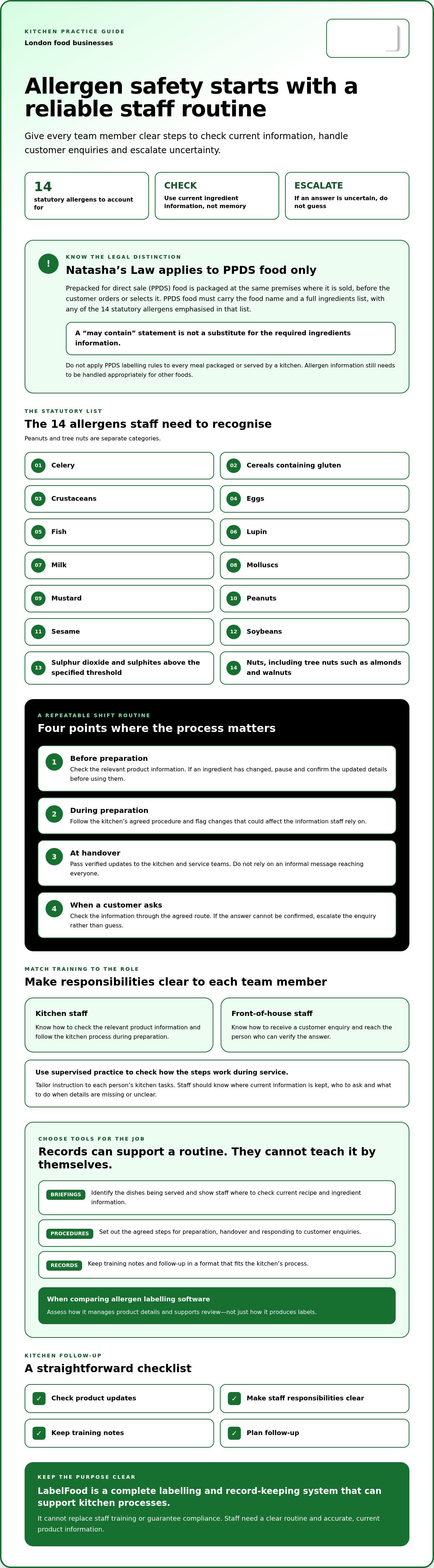
- Build a straightforward checklist for product updates, staff responsibilities, training notes and follow-up, using records that fit your kitchen’s process.
Food allergen safety training in London: what staff need to understand
Allergen-safety training covers the knowledge and actions staff need for their preparation and service tasks. It should help each person find reliable ingredient information, follow the kitchen’s process and respond appropriately when a customer asks about an allergen. A confident answer is only useful when it’s based on accurate, current product details.
London food businesses operate under the relevant England framework. The statutory list covers 14 allergens: celery; cereals containing gluten; crustaceans; eggs; fish; lupin; milk; molluscs; mustard; peanuts; sesame; soybeans; sulphur dioxide and sulphites above the specified threshold; and nuts, meaning tree nuts such as almonds and walnuts. Peanuts and tree nuts are separate categories. The wider UK food information regulations provide background on food labelling, but check current Food Standards Agency guidance for operational requirements.
What allergen knowledge should kitchen staff be able to use?
Staff need to know where the kitchen keeps allergen information and how to check it. That may mean comparing a recipe with ingredient records or supplier information, rather than relying on memory or an old menu. If an ingredient, supplier or recipe changes, check the product data and update relevant information before staff use it to answer enquiries.
Responsibilities differ by role. A front-of-house team member may receive a question and pass it to the designated person. Kitchen staff may need to check the relevant product information and communicate the answer clearly. Agree what staff should do if details are missing or uncertain. They should pause and escalate the enquiry, not guess.
What does Natasha’s Law cover, and what does it not cover?
Natasha’s Law applies to prepacked for direct sale (PPDS) food: food packaged at the same premises where it is sold, before the customer orders or selects it. PPDS food must carry the food name and a full ingredients list, with any of the 14 statutory allergens emphasised in that list. A “may contain” statement is not a substitute for the required ingredients information.
This is distinct from food prepared and served loose, or packaged after a customer orders it. Don’t apply PPDS labelling rules to every food situation. Allergen information still needs to be handled appropriately for other foods, so staff should follow current guidance and the kitchen’s procedure. For a fuller explanation, see Natasha’s Law Labelling Requirements: The Definitive 2026 Guide for UK Kitchens.
How London kitchens can turn allergen knowledge into safe service routines
Training is more useful when staff practise the steps they’ll follow during a real shift. Set a clear sequence for checking menu information, preparing food, handing over details and responding to customer enquiries. The Food Standards Agency allergen guidance is a useful reference when reviewing your kitchen’s process. Check current official guidance for the requirements that apply to your business.
A practical allergen-training sequence for each shift
At the shift briefing, identify the dishes being served and show staff where to check current recipe and ingredient information. Make sure the team knows who to ask if a detail is missing or unclear. Then explain how the process applies to each role.
- Before preparation: Check the relevant product information. If a planned ingredient has changed, pause and confirm the updated details before using them.
- During preparation: Follow the kitchen’s agreed procedure and flag any change that could affect the information staff rely on.
- At handover: Pass verified updates to the people who need them, including kitchen and service teams. Don’t rely on an informal message reaching everyone.
- When a customer asks: Follow the agreed route to check the information. If the answer can’t be confirmed, escalate the question rather than guess.
Keep the sequence consistent, but tailor the instruction. A chef preparing a dish needs to understand the relevant product information and kitchen process. A front-of-house colleague needs to know how to receive an enquiry and reach the person who can verify the answer. Each person should know their part, rather than be expected to perform every role.
Check understanding through practice
A quiz can check recall, but it won’t show whether someone can find the right information under service conditions. Ask staff to demonstrate where they’d check a dish’s details. Then use short scenarios, such as a supplier ingredient changing or a customer asking a question the team can’t immediately answer. Look for the correct action, including who to contact and how to pass on verified information.
Use uncertainty or a missed step to identify practical follow-up. This might mean clarifying the procedure, updating the information staff use or giving someone further instruction. Note the action and revisit it during normal supervision. There’s no need to assume one training record format or a fixed schedule. Keep records that help managers see what was covered and what still needs attention.
If you’re reviewing how digital records fit into this routine, explore LabelFood’s food labelling system as one operational support. Software can help organise information, but staff still need to understand and follow the process.
Compare allergen training methods and software support for London teams
Each training method serves a different purpose. A shift briefing shares immediate menu or ingredient updates. Supervised practice lets a manager observe whether staff can find and use information during a task. Written procedures set out the agreed steps, including what to do when an answer can’t be confirmed. Digital records can organise product information and retain activity, but they don’t teach staff or replace supervision.
For teams working across shifts or sites, consider how updates reach the people who need them. A procedure is useful only if staff can access the current version during service. A record is useful for review when it’s clear what information changed and who entered or reviewed it. Anaphylaxis UK’s allergen management training programmes can also inform how you structure staff learning.
What to assess in allergen labelling software
Compare allergen labelling software London options by following a product update from input to use. Can a manager add or amend product details, check them and make current information available to relevant staff? Can staff access it using the devices and connectivity available in the kitchen? Test the process against a real menu change, not just a demonstration screen.
LabelFood supports data entry through manual input, Excel import or AI-assisted reading of photos and PDFs. AI-assisted data is for staff to review and edit, not to publish autonomously. The system can work offline and sync with the cloud. Its management panel is available on web and iOS/iPad, not Android, so check device compatibility across your team.
Consider what the records can show, too. LabelFood uses individual PINs for staff attribution and offers Compliance Pack, Label Report and Staff Activity reporting tools. These can support operational review, but reports don’t prove that information was accurate or that staff followed the process in every situation.
Questions to ask before adopting a digital system
- Can staff find the relevant, verified product information quickly when a recipe or ingredient changes?
- Is there a clear review step before updated information is used?
- Can managers identify who entered or reviewed information, and follow up on changes?
- Will access work across the kitchen’s devices, shifts, sites and connectivity arrangements?
For multi-site kitchens, check whether teams can follow a shared process while still seeing information relevant to their own menus. Don’t assume every site or borough has a different allergen rule. Focus on consistent records and clear local responsibilities. For a broader look at digital systems, see Allergen Management Software UK: A Guide to Total Kitchen Compliance. Software can support information management and review; staff learning and supervision remain separate responsibilities.
A London kitchen checklist for training, records and follow-up
A checklist makes allergen training easier to apply across shifts. It also helps managers spot gaps when a menu changes, a new colleague joins or a handover is missed. Use it as a working aid, not as a guarantee of compliance or a substitute for checking current official guidance.
Set up a repeatable training and review process
Assign responsibility for maintaining recipes, ingredient information and staff instructions. Make sure colleagues know where current information is kept, who can verify it and what to do if they can’t confirm an answer. For temporary staff, explain the relevant process before they take on tasks involving food preparation or customer enquiries.
- Product information: Check that the recipe and ingredient details staff use reflect current products and menu items.
- Roles: Identify who maintains information, who handles customer enquiries and who staff should contact if details are unclear.
- Briefings and handovers: Share relevant changes with kitchen and service teams, including colleagues starting a later shift.
- Escalation: Make the next step clear when information is missing or a proposed substitution hasn’t been checked.
- Review: Revisit instructions when recipes, ingredients, suppliers, staffing or working practices change. Set a review process that suits your operation rather than assuming a fixed interval is legally required.
Keep the process usable during service. A new ingredient or temporary substitution, for example, should prompt a check of the information staff rely on and a clear handover of any verified update. If details remain uncertain, staff need to know not to guess and whom to ask.
Keep records useful for managers and inspections
There’s no single record format to prescribe here. Choose a method that lets managers see what was covered, which staff took part and whether follow-up is outstanding. A brief note might record the topic, date, participants and any action, such as explaining an updated procedure to a team member.
Keep training notes organised alongside relevant procedures or product information so managers can locate them and review whether actions were completed. For London kitchens, check current Food Standards Agency guidance and contact the appropriate local authority if you need clarification about requirements for your business. Records can support review, but they don’t by themselves demonstrate that every practice was followed correctly.
For more on maintaining kitchen records, see The Future of Professional Standards: Digital Kitchen Compliance Records in 2026. If you’re assessing allergen labelling software London, consider whether it helps keep product details and review records organised without replacing staff instruction. Explore LabelFood’s food labelling system as one option for supporting kitchen records.
How allergen labelling software can support staff training in London
Software can help staff access consistent product information and give managers records to review. It can’t teach a team how to handle an allergen enquiry, replace supervision or guarantee compliance. Treat it as one part of the kitchen’s process: managers check the information, train staff to use it and review how the procedure works in practice.
Where LabelFood fits into an allergen-training process
LabelFood is a complete food labelling system, not just a printer. The LabelFood Printer SV2 is included with subscriptions. Product information can be entered manually, imported from Excel or read from a photo or PDF using AI-assisted input. The AI provides data for users to review and edit. Staff remain responsible for checking information before relying on it.
During training, show staff where to find relevant product details and how those details fit into the kitchen’s agreed steps. Consistent information can support handovers between shifts and help kitchen and service teams refer to the same product data. Individual staff PINs attribute activity, which can help managers review how the system is being used.
The system can work offline and sync with the cloud. Its management panel is available on web and iOS/iPad only; there’s no Android version. Check that these access options suit the devices used in your kitchen before adopting the system.
Managers can use the Compliance Pack, Label Report and Staff Activity reporting tools to review records. These reports can support operational follow-up, but they don’t prove that product information was correct or that staff followed procedures in every instance. Food waste recording is a separate function. Waste records can include photos and notes, which may help managers document and review waste.
Choose support without confusing it with compliance
Before using allergen labelling software, London kitchens should decide who checks product details, how changes are reviewed and how staff are instructed to use the information. Software can organise data and retain records, but managers still need to verify changes and train staff for their roles. An accurate label or report alone doesn’t establish that the full kitchen process is working as intended.
Assess the system against your actual workflow. Can staff reach the information they need? Can managers review attributed activity and identify records that need attention? Do the available devices and offline use fit the way your kitchen operates? These checks help separate useful support from assumptions about what software can achieve.
To review the system’s labelling and record-keeping functions, explore LabelFood’s food labelling system.
Make allergen safety a consistent part of every shift
Reliable allergen handling depends on more than staff knowing the right terms. Teams need current ingredient information, clear steps for checking it and a shared approach to escalating questions they can’t answer. Briefings, practical instruction and useful follow-up records help make those steps part of normal service.
When choosing allergen labelling software London kitchens can use, start with the work it needs to support. LabelFood is a complete food labelling system, not just a printer. The LabelFood Printer SV2 is included with subscriptions. The system can work offline and sync with the cloud, while individual staff PINs and the Compliance Pack, Label Report and Staff Activity reports can help managers review records and activity.
These tools support information management. They don’t replace staff training, manager checks or responsibility for the accuracy of product details. Assess the system against your team’s devices and day-to-day process, then keep instruction clear as ingredients and menus change.
Explore LabelFood’s complete food labelling system and consider how it could support your kitchen’s routines. With clear procedures and the right records, your team can build a more consistent approach to allergen enquiries.
Frequently Asked Questions
Is food allergen training a legal requirement for kitchen staff in the UK?
Food handlers must receive food hygiene instruction, supervision or training that is appropriate to their work, and this should cover allergen handling relevant to their tasks. The exact training needed depends on what each person does. A kitchen manager should check current Food Standards Agency guidance and applicable requirements for their business. Staff need practical instruction on where to find reliable allergen information and what to do if they can’t verify an answer.
What should staff training for food allergen safety cover?
Training should show staff how to check current recipe, ingredient and supplier information, and how to follow the kitchen’s process when preparing food or answering enquiries. Cover role-specific steps, including who verifies details and how to escalate uncertainty. Staff should also know how a change, such as a different ingredient or recipe, is communicated to colleagues. Use practical examples from your menu so people can apply the process during service.
Does Natasha’s Law apply to every meal served in a London restaurant?
No. Natasha’s Law applies to prepacked for direct sale (PPDS) food, packaged on the same premises where it is sold before the customer orders or selects it. It doesn’t apply to every restaurant meal, such as food prepared and plated after a customer orders. PPDS food requires a label with the food name and full ingredients list, with statutory allergens emphasised. Other foods still require appropriate allergen information for customers.
How often should a kitchen provide allergen safety training?
There isn’t a single training interval that suits every kitchen or role. Provide suitable instruction when staff take on relevant tasks, then review their understanding as work changes. A menu update, new ingredient, supplier change or revised procedure may be a prompt to brief affected staff. Managers can also use normal supervision to identify gaps and arrange follow-up. Check current official guidance for requirements that apply to your business.
Can allergen labelling software replace staff training?
No. Allergen labelling software London kitchens use may help organise product details and records, but it can’t teach staff how to check information, prepare food or respond to an uncertain enquiry. Managers still need to verify product data and instruct staff in the kitchen’s procedures. Treat software as an operational support tool. Staff need to know how to use the information and when to stop and seek confirmation.
What records should a London kitchen keep about allergen training?
Keep records that help managers see what instruction was given, which staff took part and whether follow-up is needed. A practical note might include the date, topic, participants and any action agreed. Keep relevant procedures and product information organised so they can be found during review. There isn’t one record format to assume is mandatory. Confirm current record-keeping expectations with official guidance or your local authority.
Can AI read allergen information from a product photo or PDF safely?
AI-assisted reading can help capture information from a photo or PDF, but treat the result as a draft for a person to review and edit. Check the extracted details against the original product information before using them. Pay particular attention to ingredient names and allergen declarations, as a reading error could affect the record. LabelFood supports AI-assisted photo and PDF reading, alongside manual input and Excel import.