
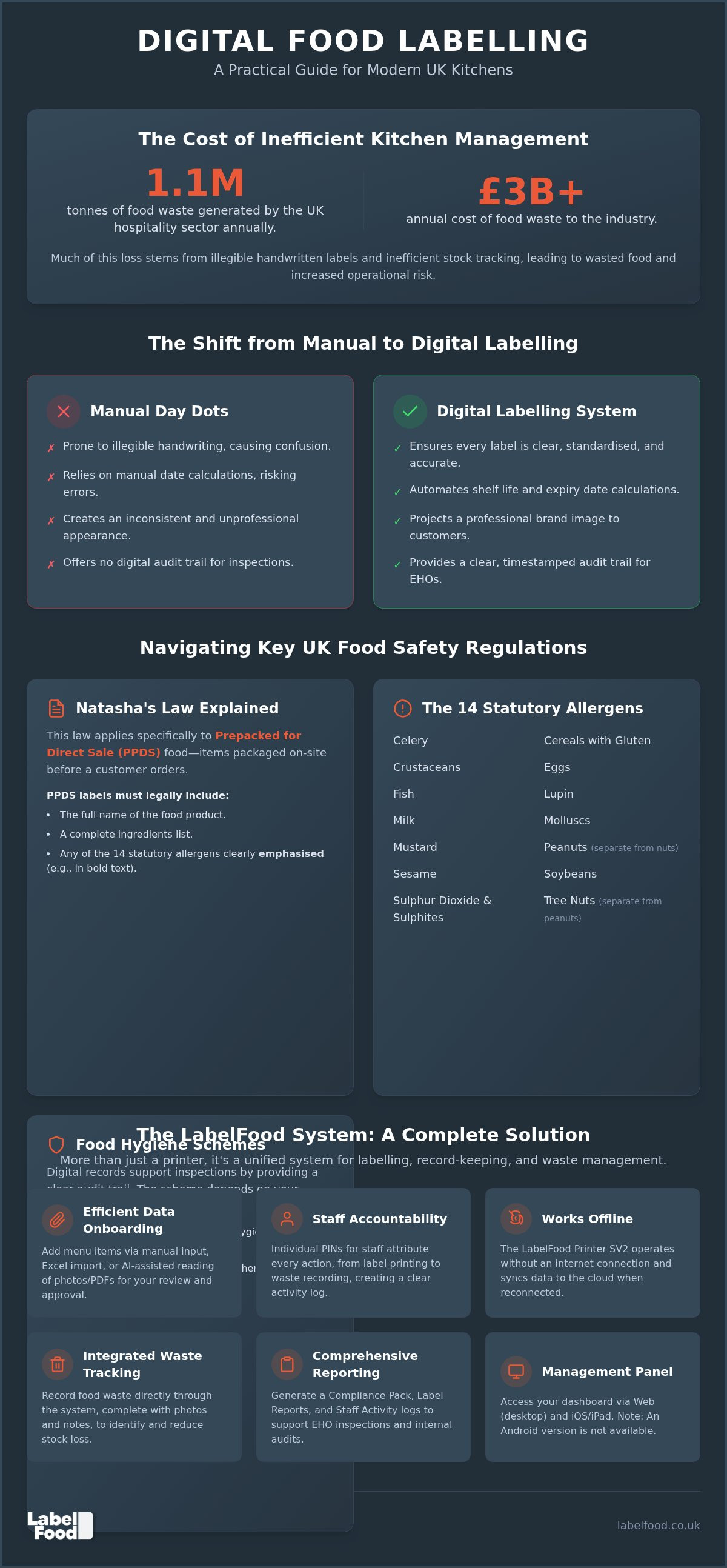
The UK hospitality and food service sector generates approximately 1.1 million tonnes of food waste annually, costing the industry over £3 billion each year. Much of this loss stems from inefficient tracking and illegible handwritten date dots that staff struggle to interpret during a busy service. Adopting a digital takeaway food labelling system is no longer just about modernisation. It's a necessary step for operational control. In a high-pressure kitchen, manual errors lead to wasted stock and safety risks that can jeopardise your business.
Managing the 14 statutory allergens and staying compliant with Natasha’s Law for prepacked for direct sale (PPDS) items is a complex task. You likely feel the pressure of maintaining a high Food Hygiene Rating Scheme (FHRS) score whilst keeping service fast. This guide provides a pragmatic framework for implementing a digital system that supports your record-keeping and simplifies allergen management. We will examine the 2026 regulatory requirements, the transition from manual to automated labelling, and how to use data to reduce food waste across your sites.
Key Takeaways
- Understand the specific requirements of Natasha’s Law for PPDS food and the 14 statutory allergens that must be identified in the UK.
- Learn why a digital takeaway food labelling system is more reliable than manual day dots for maintaining safety and operational speed.
- Identify the hardware specifications required for high-heat kitchen environments, including the standalone features of the LabelFood Printer SV2.
- Explore how AI-assisted menu onboarding allows you to review and edit data quickly for a more efficient system setup.
- Discover how to integrate food waste recording into your labelling workflow to better track and reduce stock loss across your sites.
The Shift from Manual to Digital: Why Takeaway Food Labelling Systems Matter
A professional takeaway food labeling system is more than a simple printer. It is a unified infrastructure consisting of standalone hardware, such as the LabelFood Printer SV2, and a cloud management dashboard. This combination transforms how a kitchen handles data. Traditional handwritten "day dots" are increasingly insufficient for modern UK standards. They rely on the legibility of staff handwriting and manual date calculations; both are common failure points in high-pressure environments.
Digital systems remove these variables. They ensure every label is clear, standardised, and contains accurate safety information. This level of consistency influences kitchen staff behaviour by establishing a disciplined routine. It also projects a professional brand image to the customer. When a takeaway container arrives with a printed, clear label, it signals a high level of care and attention to detail. It shows the customer that your operation prioritises precision.
The Risk of Manual Error in Professional Kitchens
Illegible handwriting is a liability. If a chef cannot read a date, stock is either wasted prematurely or used past its safe limit. Automated systems calculate shelf life based on pre-set product data. This removes the need for mental arithmetic during a busy prep shift. You select the product; the system applies the correct expiry date. It saves significant time during peak hours, allowing staff to focus on food quality rather than calculating dates. Efficiency increases when the system does the thinking for the team.
Meeting EHO Expectations in 2026
Regulatory scrutiny remains high across the UK. In England, Wales, and Northern Ireland, businesses operate under the Food Hygiene Rating Scheme (FHRS). In Scotland, the Food Hygiene Information Scheme (FHIS) applies. Whilst the rating systems differ, the requirement for robust record-keeping is universal. Digital records act as a supporting tool during unannounced inspections. They provide a clear, timestamped audit trail of kitchen activity that manual logs cannot match.
Being "audit-ready" means having instant access to compliance data. A digital takeaway food labeling system allows you to generate reports on staff activity and label history. This transparency demonstrates a proactive approach to food safety. It shows the Environmental Health Officer (EHO) that your kitchen operates with precision. While no system guarantees a specific rating, having organised, digital records provides the evidence needed to support your hygiene claims and demonstrate due diligence.
Navigating UK Regulations: Natasha’s Law and Allergen Requirements
UK food safety standards require absolute precision. Natasha’s Law, which took effect on 1 October 2021, changed the requirements for Prepacked for Direct Sale (PPDS) food. This regulation ensures that consumers have access to full ingredient information for items packaged before they are ordered. A digital takeaway food labeling system helps manage these requirements by automating the formatting and emphasis of allergen data.
Under UK law, 14 statutory allergens must be identified. These include celery, cereals containing gluten, crustaceans, eggs, fish, lupin, milk, molluscs, mustard, peanuts, sesame, soybeans, sulphur dioxide and sulphites, and tree nuts. It's critical to treat peanuts and tree nuts as two distinct categories. Regulatory standards require these allergens to be emphasised on the label, usually through bold text or a different font colour to ensure they stand out from the rest of the ingredients list.
Identifying PPDS Food in Your Takeaway Operation
PPDS food is any item packaged on-site before a customer selects or orders it. Common examples include pre-wrapped sandwiches, boxed salads, or pots of slaw kept in a display fridge. If the food is inside packaging before the point of sale, it requires a label showing the product name and a full ingredients list. This differs from food packed at the customer's request, which has different information requirements. Identifying which items fall under PPDS is the first step in establishing an effective labelling workflow.
Managing the 14 Statutory Allergens
Maintaining accurate ingredient records is the core of natasha's law labelling requirements. Digital software prevents staff from omitting allergen data by requiring specific inputs for every new product added to the catalogue. This systematic approach reduces the risk of manual oversight during data entry. Clear, printed labels also act as a final check against cross-contamination, providing visible cues for both the kitchen team and the end consumer. Using a professional labelling system provides the structure needed to manage these complex data sets across multiple sites without compromising speed.
Hardware Reliability: What Makes a Robust Kitchen Labelling Solution?
Standard office printers cannot survive a commercial kitchen. Heat, humidity, and grease quickly degrade consumer-grade equipment. A dedicated takeaway food labeling system requires hardware built for these specific environmental stresses. Thermal printing technology is the industry standard because it eliminates the need for ink ribbons or expensive cartridges. Heat creates the image on the label. This means fewer moving parts and no risk of ink running or smudging when labels are exposed to condensation or steam. It's a pragmatic choice that reduces ongoing maintenance costs and operational downtime.
Standalone hardware provides a level of stability that multi-purpose devices cannot match. The LabelFood Printer SV2 is designed to function as a fixed point of reliability in a high-pressure workspace. Because it's a dedicated tool, it doesn't suffer from the software conflicts or battery issues common with generic tablets. It's built to do one job with absolute precision. This focus on utility ensures that your labelling process remains a frictionless part of the daily workflow.
Standalone Devices vs. Tablet Integrations
Many generic solutions rely on third-party tablet integrations. These setups often create clutter and increase the risk of damage to expensive consumer electronics. A dedicated device reduces the footprint on prep surfaces and removes the dependency on fragile screens. Built-in software is typically more reliable than third-party app integrations, as it's optimised for the specific hardware. Professional systems should be ready to print immediately upon power-up. This ensures no delays during the start of a shift when speed is essential.
Connectivity and Cloud Synchronisation
Kitchen Wi-Fi is notoriously unreliable. A robust takeaway food labeling system must offer offline functionality. This allows the printer to continue operating and producing labels even if the internet connection drops. Data is managed centrally through a cloud dashboard, then synced to the local device. This ensures that every site in a multi-location business uses the same standardised product data and allergen information. Changes made at the management level are pushed to all printers automatically, maintaining total control over the catalogue.
The management dashboard provides the oversight needed for compliance and reporting. It's accessible via web browsers or a dedicated iOS/iPad app. You should note that there is no Android version of the management panel. This specific platform focus ensures a more stable and secure user experience for managers and owners. By centralising the data layer whilst keeping the printing layer local, you achieve a system that is both scalable and resilient against local technical failures.
Implementing an Efficient Workflow: From Menu Onboarding to Staff Attribution
Setting up a digital takeaway food labeling system requires a logical approach to data management. The transition from paper lists to a cloud-based catalogue is often the most significant hurdle for operators. Modern systems simplify this through versatile data entry options. You can use Excel imports for large inventories or AI-assisted tools to read existing PDF menus. These tools extract text and allergens, creating a draft catalogue for your team to check. Reviewing and editing this data is essential for accuracy. The AI is a tool for drafting; it never publishes data without your direct oversight.
A structured workflow ensures that your kitchen remains productive during peak hours. Once your menu is onboarded, the system handles the complex task of calculating expiry dates and highlighting allergens. This removes the mental load from your chefs and kitchen managers. It allows them to focus on food quality whilst the system manages the technical details of compliance and record-keeping.
Streamlining Menu Onboarding
Centralised management allows you to organise your entire product range from a single dashboard. Updates to ingredients or shelf-life settings sync instantly across all connected printers. This is particularly useful for multi-site operations where consistency is a legal necessity. Integrating allergen management software UK ensures that your data remains accurate and accessible to every staff member. It removes the risk of old, incorrect labels being used after a recipe change. Changes made at the head-office level reach every kitchen prep station in seconds.
Staff Accountability and Performance Tracking
Assigning individual PINs to every team member creates a culture of accountability. Every label printed is attributed to a specific person. The Staff Activity report provides a clear timeline of kitchen productivity. You can see who printed which label and at what time. This data is vital for identifying training gaps or investigating safety incidents. PIN-protected access also prevents unauthorised changes to your core product data. It ensures that only authorised managers can edit sensitive allergen or expiry information. This level of control is essential for maintaining the integrity of your food safety records.
A structured workflow reduces prep time and clarifies staff responsibilities. To see how these tools work in practice, explore our complete food labelling system.
The LabelFood System: Professional Labelling and Waste Management
LabelFood provides a unified platform for kitchen management. It is a complete takeaway food labeling system that integrates hardware, software, and technical support into a single subscription. This ecosystem allows managers to move beyond simple date dots into comprehensive data oversight. The system includes a "Compliance Pack" and specific reporting tools like the Label Report and Staff Activity log. These features are designed to support the high standards required for digital kitchen compliance records in 2026. By centralising these functions, you reduce the administrative burden on your kitchen team.
Unlike generic printers, LabelFood includes integrated food waste recording software. This allows staff to log discarded items directly at the prep station using the same interface. The data is then synced to the cloud dashboard for management review. This integration ensures that food safety and cost control are managed through a single, reliable point of entry.
Digital Food Waste Recording
Staff record waste using the same touchscreen interface used for labelling. This consistency reduces training time and minimises errors. Every entry requires a photo and a brief note to provide context for the waste. This data allows managers to distinguish between accidental damage and stock that has simply expired. Clear waste reports identify costly patterns, enabling more precise stock control across your sites. By capturing the reason for waste at the moment it occurs, you gain the insights needed to reduce unnecessary costs.
A Standalone Solution for UK Hospitality
The LabelFood Printer SV2 functions as a standalone unit. It does not require a separate tablet or PC connection to print. This system is a support tool designed to make the complexities of UK food law manageable. It provides the infrastructure for accurate record-keeping without the clutter of third-party integrations. The management panel is accessible via web and iOS, ensuring that managers can monitor activity from any location. Please note that there is no Android version of the management panel.
Adopting a pragmatic approach to kitchen automation ensures that your safety standards remain high whilst your operations stay efficient. The system acts as a silent partner in your kitchen, providing the precision required for modern takeaway food labelling. It is a reliable tool for professionals who prioritise compliance and operational clarity.
Future-Proofing Your Kitchen Operations
Transitioning to a digital takeaway food labelling system is a strategic shift towards operational precision. It replaces the unreliability of manual day dots with a centralised, audit-ready data layer. By integrating allergen management with automated shelf-life calculations, you reduce the margin for human error during peak service hours. This systematic approach ensures that every label produced is legible and accurate, supporting your kitchen's commitment to high safety standards. It removes the guesswork that often leads to wasted stock or safety risks.
The LabelFood system provides the standalone LabelFood Printer SV2, ensuring your prep station remains functional even during Wi-Fi outages. With dedicated UK support and integrated food waste recording with photo evidence, you gain total control over your stock and compliance records. This transition doesn't just simplify prep; it provides the data needed to identify cost-saving opportunities across your entire operation. Taking a pragmatic approach to kitchen automation now prepares your business for the regulatory demands of 2026 and beyond. Efficiency is the foundation of a professional kitchen.
Request a demo of the LabelFood Printer SV2 and start organising your kitchen today
Frequently Asked Questions
Does a digital labelling system guarantee a 5-star food hygiene rating?
No system can guarantee a specific rating under the Food Hygiene Rating Scheme or Scotland's Food Hygiene Information Scheme. LabelFood acts as a support tool for your record-keeping and due diligence. A 5-star rating depends on the Environmental Health Officer's assessment of your food handling, physical premises, and safety management systems. Digital records help demonstrate organised processes during an inspection, but overall compliance remains the responsibility of the food business operator.
Is Natasha’s Law applicable to all takeaway food items?
Natasha's Law applies specifically to Prepacked for Direct Sale (PPDS) food. This includes any item packaged on-site before a customer orders it, such as pre-wrapped sandwiches or salads in a grab-and-go fridge. It doesn't apply to food packed at a customer's request or loose items. For these PPDS products, your takeaway food labeling system must produce labels showing the full product name and a complete ingredients list with allergens emphasised.
Can the LabelFood system work if the kitchen Wi-Fi goes down?
Yes, the LabelFood system features offline functionality designed for the realities of a commercial kitchen. The LabelFood Printer SV2 stores your product data locally, allowing staff to continue printing labels even if the internet connection is lost. Once the Wi-Fi is restored, the device automatically performs a cloud sync. This ensures that any activity recorded while offline is uploaded to your management dashboard for accurate reporting and oversight.
How many allergens are recognised under UK food safety law?
There are 14 statutory allergens that must be declared under UK law. These include celery, cereals containing gluten, crustaceans, eggs, fish, lupin, milk, molluscs, mustard, peanuts, sesame, soybeans, sulphur dioxide and sulphites, and tree nuts. It's a legal requirement to treat peanuts and tree nuts as two separate categories. Accurate identification of these ingredients is essential for protecting consumers and maintaining the standards required by local enforcement authorities.
Do I need a separate tablet to operate the LabelFood Printer SV2?
You don't need a separate tablet or external device to operate the LabelFood Printer SV2. It's a standalone hardware solution with a built-in touchscreen interface. This dedicated design reduces kitchen clutter and removes the risk of damaging consumer electronics in a high-heat environment. The software is pre-installed on the printer, meaning it's ready to use as soon as it's powered up at your prep station.
Can I import my existing menu from an Excel spreadsheet?
Yes, you can import your existing product data using an Excel spreadsheet. This is an efficient way to set up a takeaway food labeling system for businesses with large or complex menus. Alternatively, you can use the AI-assisted onboarding tool to read PDF menus or photos. This tool creates a draft catalogue for your review. You must check and edit all data before it's finalised and pushed to your printers.
Is there an Android version of the management dashboard?
No, there is no Android version of the management dashboard. The LabelFood management panel is available exclusively via web browsers and a dedicated iOS/iPad app. This specific platform focus ensures high stability and security for managers overseeing multi-site operations. You can access the dashboard on any desktop computer or Apple tablet to update menus, check staff activity reports, or review food waste data from any location.
How does the system help with food waste management?
The system includes integrated food waste recording software that staff access directly on the printer. This allows for immediate logging of discarded stock at the point of waste. Every entry requires a photo and a descriptive note, providing the context needed for management analysis. These digital records help you identify specific patterns of loss, allowing for more precise stock ordering and a reduction in the £3 billion annual cost of hospitality food waste.