
A single illegible date on a prep container can compromise an entire EHO inspection. In a high-pressure commercial kitchen, relying on handwritten 'day dots' is a liability that leads to unnecessary food waste and compliance risks. Manual errors are often the root cause of failed audits. Transitioning to a dedicated kitchen date label printer removes this point of failure by ensuring every label is clear, accurate, and timestamped. It’s the pragmatic choice for operators who prioritise precision over guesswork.
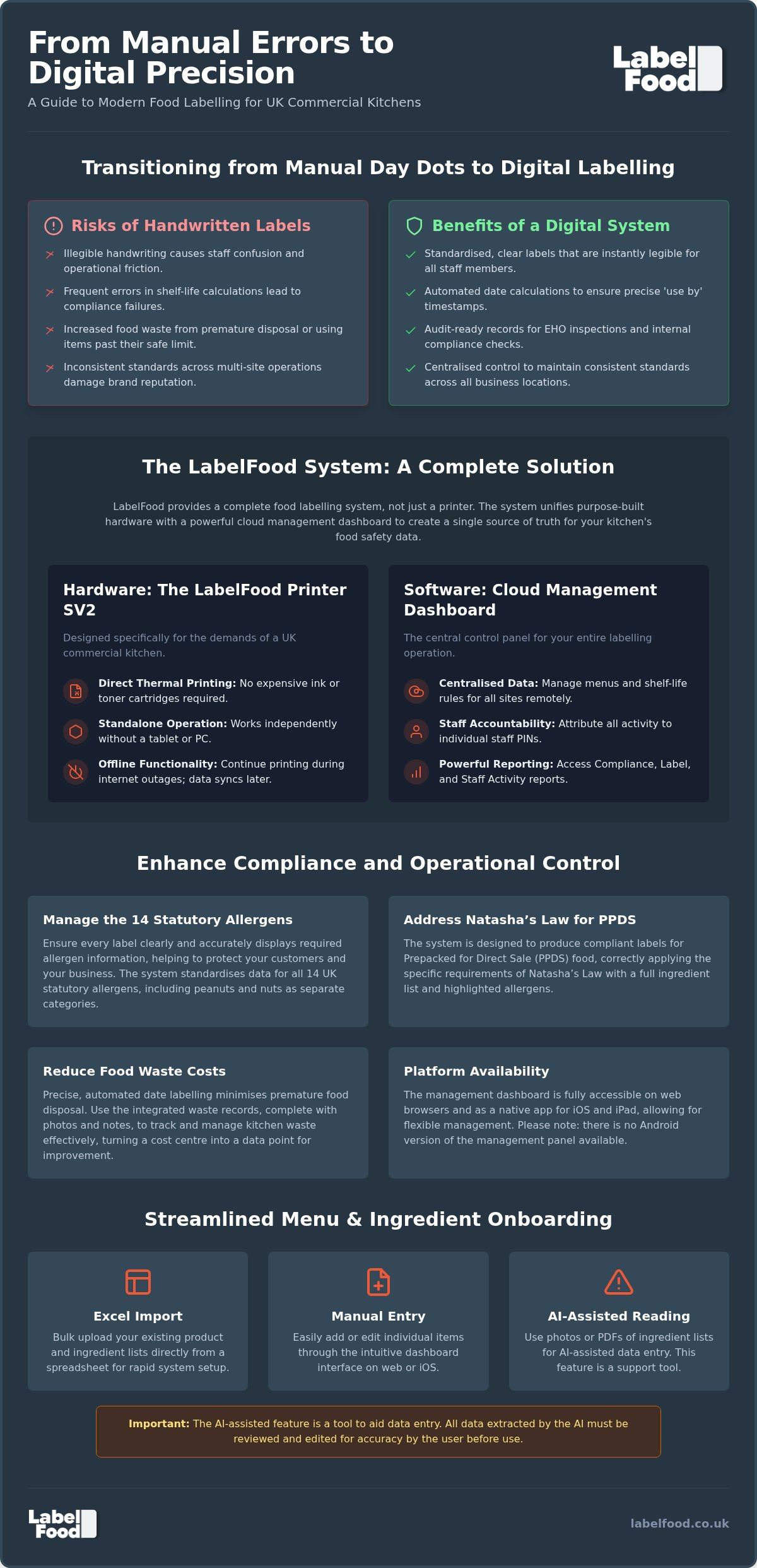
You already know that managing allergen information and tracking shelf life is a significant administrative burden for your team. This guide provides a clear path for UK kitchen operators to move from manual processes to a digital labelling system. We will examine how the LabelFood Printer SV2 integrates with cloud management to create audit-ready records. You will learn to streamline your labelling workflow, manage the 14 statutory allergens, and maintain control over food waste through a unified digital dashboard. We also clarify the specific requirements for Natasha’s Law regarding prepacked for direct sale (PPDS) food.
Key Takeaways
- Learn why manual handwriting increases operational risk and how a digital kitchen date label printer standardises food safety records for better clarity.
- Understand the role of the LabelFood Printer SV2 as a complete system that combines hardware with a cloud management dashboard for total data control.
- Identify the specific legal requirements for Natasha’s Law regarding PPDS food and the correct management of the 14 statutory allergens.
- Improve kitchen accountability through the use of individual staff PINs and integrated food waste recording tools.
- Discover how to streamline menu onboarding using Excel imports or AI-assisted data entry designed for user review and editing.
Transitioning from Manual Day Dots to Digital Date Labelling
Manual labelling is a weak link in food safety. Handwritten day dots rely on tired staff making quick calculations during a busy service. Mistakes are inevitable. A kitchen date label printer automates these calculations. It ensures every container has a precise 'use by' or 'best before' date. This transition reduces the cognitive load on your team. It replaces guesswork with a standardised, reliable process.
Thermal printing technology is the professional standard for commercial environments. It eliminates the need for expensive ink or toner cartridges. Labels remain legible even in humid prep areas or cold storage. Clear, printed labels significantly improve the professional appearance of your kitchen during EHO inspections. This clarity aligns with the UK Food Information Regulations, which require accurate and accessible food data. Digital systems also standardise the font and layout. This removes the ambiguity of different handwriting styles and ensures that every staff member can read the information instantly.
The Risks of Handwritten Kitchen Labels
Errors in expiry tracking often stem from miscalculated shelf lives. Illegible handwriting leads to staff confusion, resulting in either food being wasted prematurely or being used past its safe limit. Communication breaks down when one chef cannot read another's writing. This ambiguity creates friction in the kitchen workflow. In a typical UK kitchen, manual labelling errors represent a direct and preventable drain on gross profit margins.
Standardising Standards Across Multi-site Operations
Maintaining brand standards across several locations requires centralised control. A commercial kitchen labeling system UK allows managers to update product shelf-life and allergen data from a single dashboard. This ensures every site uses identical formats. Consistency protects the business from local variances in compliance. Implementing a dedicated kitchen date label printer across all sites guarantees that whether a customer visits a location in England or Scotland, the allergen information for 14 statutory allergens, including peanuts and nuts, remains accurate and uniform. This level of control is essential for protecting both the customer and the business reputation.
The Components of a Professional Kitchen Labelling System
A professional kitchen date label printer is not a standalone gadget. It is one half of an integrated system. The hardware provides the physical output, while the cloud management layer provides the data integrity. This combination ensures that staff always print the most current product information. It removes the risk of using outdated shelf-life data stored locally on a device. The system acts as a single source of truth for your entire operation.
Reliability in a commercial environment depends on how hardware and software work together. A professional system must include offline functionality. Internet outages are common in busy hospitality settings. Your labelling process cannot stop when the Wi-Fi drops. The system allows staff to continue printing during a connection loss, syncing data to the cloud once service is restored. This prevents operational bottlenecks and ensures that Reducing Costs Through Waste Management remains a continuous priority regardless of technical issues.
Hardware Reliability: The Role of the LabelFood Printer SV2
The LabelFood Printer SV2 is built for the specific conditions of a commercial kitchen. Unlike generic tablets or domestic printers, it uses direct thermal printing. There are no ink ribbons or toner cartridges to replace. It functions perfectly in hot, humid prep environments where standard electronics often fail. Standalone operation is a critical advantage. The device does not rely on a constant connection to a separate tablet. This reduces the number of failure points in your workflow. It is designed for high-volume use and requires minimal maintenance.
The Cloud Management Dashboard: Centralising Product Data
The dashboard is the control centre for your labelling operations. Available on web browsers and iOS/iPad, it allows managers to organise product catalogues and set shelf-life parameters remotely. There is currently no Android version available. Updates sync to the printer instantly across one or multiple sites. For rapid onboarding, you can import menu data via Excel. The system also features AI-assisted reading for photos and PDFs of ingredient lists. You must treat AI as a support tool. All data requires user review and editing before being published to the printer. This ensures total accuracy for allergen declarations and product names. You can see how this integrated food labelling system fits into your specific kitchen setup by reviewing the management panel features.
Compliance with Natasha’s Law and UK Allergen Regulations
UK food safety standards are among the most rigorous in the world. Environmental Health Officers (EHOs) look for clear evidence of due diligence during inspections. In England, Wales, and Northern Ireland, this results in a score from 0 to 5 under the Food Hygiene Rating Scheme (FHRS). In Scotland, businesses receive a 'Pass' or 'Improvement Required' status under the Food Hygiene Information Scheme (FHIS). A kitchen date label printer supports these audits by providing consistent, legible, and timestamped records. While digital systems don't guarantee a specific rating, they remove the ambiguity of handwritten notes that often lead to inspector queries.
The transition to digital records creates a robust audit trail. Reporting tools like the Compliance Pack allow managers to review labelling activity across different shifts. This level of oversight is difficult to achieve with manual systems. It demonstrates a proactive approach to food safety management. Inspectors value the clarity of printed labels, as they eliminate the risk of misreading dates or ingredient lists during a busy service.
Labelling Prepacked for Direct Sale (PPDS) Food
Natasha’s Law introduced strict requirements for food that is prepacked for direct sale (PPDS). This applies to items prepared and packaged on-site before a customer orders them, such as sandwiches in a grab-and-go chiller. It does not apply to food packed to order. Meeting natasha’s law labelling requirements involves listing every ingredient with the 14 statutory allergens clearly emphasised, usually in bold. Digital systems automate this formatting. They ensure that once an ingredient list is reviewed and saved in the cloud, every label printed for that product is identical and compliant with your internal standards.
Managing the 14 Statutory Allergens Efficiently
UK law recognises 14 specific allergens that must be declared. It is a common error to group peanuts and nuts together, but they must be treated as separate categories. Tree nuts include almonds, hazelnuts, walnuts, cashews, pecan nuts, Brazil nuts, pistachio nuts, and macadamia nuts. Using allergen management software UK allows you to manage these distinctions without manual intervention at the point of print. Clear labelling is a primary defence against cross-contamination. When prep containers are labelled with specific allergen warnings, staff can identify risks at a glance. This prevents critical safety information from being omitted because of a staff member's oversight or a busy shift.
Reducing Costs Through Waste Management and Accountability
Operational efficiency is the primary driver of kitchen profitability. Food waste costs the UK hospitality sector an estimated £3.2 billion annually. Much of this loss occurs because of poor tracking and over-prepping. A kitchen date label printer does more than mark dates. It serves as an entry point for data that helps you control your inventory. Integrating waste recording into the daily prep workflow allows you to see exactly where your margins are disappearing.
Digital reporting tools replace the unreliable nature of paper logs. The system provides a Compliance Pack and detailed Label Reports that show exactly what was printed and when. You can also access Staff Activity logs to monitor how the system is being utilised across different shifts. This visibility allows for a methodical approach to cost reduction. It moves the kitchen from reactive fire-fighting to proactive management based on actual usage data.
Digital Food Waste Logs: Tracking Losses with Precision
Paper waste sheets are often incomplete or lost during a busy service. Moving to food waste recording software ensures every item is logged at the point of disposal. The system allows staff to capture photos and add notes to each waste record. This provides a visual record of why food is being discarded, whether it is due to spoilage, over-prepping, or prep errors. Analysing these patterns helps you adjust order volumes and prep levels with high precision. In high-volume commercial kitchens, the ROI of accurate waste tracking is immediate, as it directly impacts the cost of goods sold.
Staff Attribution and Individual PIN Security
Accountability is often the missing element in kitchen management. The LabelFood system utilises individual PINs for every staff member. Every label printed and every waste record created is attributed to a specific person. This transparency naturally improves kitchen behaviour and compliance. When staff know their activity is recorded, they are more likely to follow correct labelling procedures. You can utilise Staff Activity reports to identify specific training needs or to recognise high-performing team members. This level of oversight ensures that your food safety standards are maintained consistently across all shifts. To start improving your kitchen's accountability, you can explore our complete food labelling system and its integrated reporting features.
Implementing the LabelFood Printer SV2 System
Successful implementation starts with clean data. The LabelFood system allows for flexible onboarding to suit your operation's scale. For smaller menus, manual input via the cloud dashboard is straightforward. Larger operations can utilise Excel imports to upload hundreds of product lines simultaneously. Once the data is organised in the cloud, it syncs directly to the LabelFood Printer SV2. This standalone device requires minimal bench space. It connects to your network to receive real-time updates from the management panel. The setup is designed for speed and reliability.
Staff training is a minor hurdle rather than a major project. The printer interface is intuitive. It uses a three-click process to generate a label. Staff select the category, choose the product, and print. This simplicity reduces errors during high-pressure service periods. Because the system uses individual PINs, training can be tracked through activity logs. You can identify which team members require more support with the hardware. The goal is a frictionless workflow that supports your kitchen's pace. A dedicated kitchen date label printer ensures that these standards are maintained without slowing down the line.
Streamlining Onboarding with AI-Assisted Tools
The initial setup time is significantly reduced through AI-assisted data entry. The management panel can read photos or PDFs of your existing menus and ingredient lists. It extracts the relevant data for your review. It is essential to understand that the AI is a support tool. It is not an autonomous publisher of data. Every entry requires mandatory user review and editing to ensure total accuracy before it is sent to the printer. This process ensures that your allergen declarations and shelf-life parameters are correct from day one. This feature is accessible via the web dashboard or the iOS/iPad app. No Android version is currently available.
Maintaining Operational Continuity
A professional system must be resilient. Cloud syncing ensures that your digital kitchen compliance records are always backed up and secure. This data is accessible for management review at any time. Operational continuity is further protected by the system's offline functionality. The printer continues to work whilst the internet is down. It stores local data and syncs with the cloud once the connection is restored. This prevents any interruption to your food safety protocols. Your kitchen remains ready for a surprise EHO inspection at all times. The hardware is built for the physical realities of the workspace. It provides the definitive answer to the challenge of maintaining professional standards in a busy environment.
Future-Proofing Your Kitchen Operations
Manual labelling is a persistent risk in modern hospitality. Transitioning to a dedicated kitchen date label printer removes the ambiguity of handwritten records. It ensures your team meets the requirements of Natasha’s Law and the 14 statutory allergens without the stress of manual error. By centralising your product data in a cloud dashboard and utilising hardware built for the physical demands of the kitchen, you achieve a level of precision that manual day dots cannot match. This system doesn't just support record-keeping; it drives profitability through accurate food waste recording and individual staff accountability.
LabelFood provides a complete system, including the SV2 printer and dedicated UK-based support. We're already trusted by London’s leading commercial kitchens to maintain high professional standards. You can request a demonstration of the LabelFood Printer SV2 system to see how digital records streamline your specific workflow. Taking control of your labelling process is a decisive step toward operational excellence and long-term peace of mind.
Frequently Asked Questions
What is the difference between a kitchen date label printer and a standard label printer?
A kitchen date label printer is a dedicated standalone device designed for the physical demands of food prep areas. Unlike standard office printers, it uses direct thermal technology to eliminate the need for ink or toner. The LabelFood Printer SV2 is engineered to function in the high-heat and humid conditions typical of London commercial kitchens. This ensures labels remain legible and adhesive stays secure, providing a professional standard that generic hardware cannot match.
Does Natasha’s Law apply to all food sold in my restaurant?
Natasha’s Law applies specifically to food that is prepacked for direct sale (PPDS). This includes items like sandwiches or salads packaged on your premises before a customer selects or orders them. It does not apply to food prepared and packed at the point of order. For PPDS items, you must provide a full ingredient list with the 14 statutory allergens emphasised, ensuring your kitchen date label printer is configured to meet these specific UK standards.
Can I use the LabelFood system on an Android tablet or phone?
No, the LabelFood management panel is currently restricted to web browsers and iOS/iPad devices. There is no Android version available for phones or tablets. This focus ensures a stable and secure environment for managing your product data and compliance records across your London sites. You can access the cloud dashboard from any desktop computer or Apple tablet to update your menu or review staff activity reports and food waste logs.
How does the AI-assisted menu onboarding work in practice?
AI-assisted onboarding streamlines the process of digitising your menu by reading photos or PDFs of ingredient lists. The system extracts the text and suggests allergen markers based on the UK’s 14 statutory categories. You must treat this as a support tool rather than an autonomous publisher. Every entry requires a mandatory user review and edit to ensure total accuracy before the data is synced to your kitchen hardware for live printing.
Is the LabelFood Printer SV2 waterproof and durable enough for a commercial kitchen?
The LabelFood Printer SV2 is built for the rigours of a professional workspace. While no electronic device should be submerged, it is designed to withstand the humidity and temperature fluctuations of a busy London kitchen. Its direct thermal printing mechanism has fewer moving parts than generic alternatives, making it highly durable for constant use. This professional-grade hardware ensures operational continuity during high-volume shifts where consumer-grade equipment often fails to perform.
How do individual staff PINs help with food safety compliance?
Individual PINs link every action on the printer to a specific member of your team. This attribution creates a transparent record of who printed which label or recorded specific food waste. It improves overall kitchen behaviour and allows managers to identify where further training is required. These digital records are essential during an EHO inspection in London to demonstrate a proactive approach to staff accountability and food safety management.
What happens to my labelling system if the kitchen Wi-Fi goes down?
The LabelFood system includes offline functionality to ensure your service is never interrupted. If your kitchen Wi-Fi fails, the printer continues to function using locally stored data. Staff can still print prep labels and record waste without a live internet connection. Once the Wi-Fi is restored, the device automatically syncs all activity back to the cloud management dashboard, ensuring your digital compliance records remain complete and secure.
What are the 14 statutory allergens I need to list on my labels?
UK law requires you to declare 14 statutory allergens: celery, cereals containing gluten, crustaceans, eggs, fish, lupin, milk, molluscs, mustard, peanuts, sesame, soybeans, sulphur dioxide and sulphites, and tree nuts. You must treat peanuts and tree nuts as separate categories. Tree nuts include almonds, hazelnuts, walnuts, cashews, pecans, Brazil nuts, pistachios, and macadamias. Accurate labelling of these ingredients is a critical part of maintaining your food safety standards in the United Kingdom.