
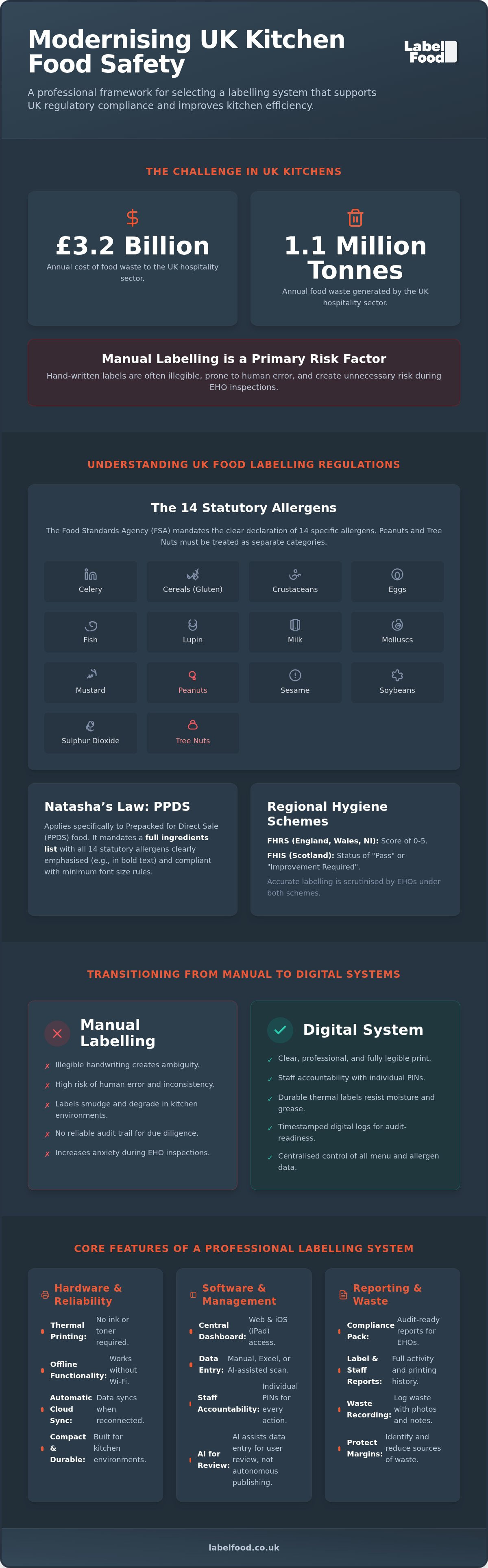
The UK hospitality sector generates 1.1 million tonnes of food waste annually, costing the industry an estimated £3.2 billion. Much of this loss stems from poor stock rotation and inefficient tracking. For a busy kitchen manager, the pressure to maintain accurate records whilst managing a high-speed service is constant. Hand-written labels are often illegible and prone to human error, creating unnecessary anxiety during EHO inspections. Investing in a dedicated commercial kitchen label printer is a pragmatic step toward operational control.
You likely recognise that manual systems are a weak link in your food safety management. This guide provides a professional framework for selecting a labelling system that supports UK regulatory compliance and improves kitchen efficiency. We will cover the specific requirements of Natasha’s Law for PPDS food and the necessity of distinguishing between all 14 statutory allergens, including the separation of peanuts and tree nuts. You will learn how to move from basic stickers to audit-ready digital records that reduce prep time and provide staff accountability. We will also explore how integrated waste recording can protect your margins and simplify your next food hygiene inspection.
Key Takeaways
- Master the 14 statutory allergens, including the separation of peanuts and nuts, to ensure accurate labelling for PPDS food under Natasha’s Law.
- Identify the core hardware requirements for a professional commercial kitchen label printer, focusing on ink-free thermal technology and offline syncing capabilities.
- Transition from manual day dots to a digital system that utilizes individual PINs to ensure staff accountability and reduce labelling errors.
- Protect your margins by recording food waste with photos and notes to generate audit-ready reports for EHO inspections.
- Simplify menu management using AI-assisted data entry for user review and manage operations centrally via the cloud dashboard on web or iOS.
Understanding UK Food Labelling Regulations
The legal framework for UK food labelling regulations is designed to protect consumers with allergies and ensure total transparency in the food chain. The Food Standards Agency (FSA) mandates the clear declaration of 14 statutory allergens whenever they are used as ingredients. These include celery, cereals containing gluten, crustaceans, eggs, fish, lupin, milk, molluscs, mustard, sesame, soybeans, and sulphur dioxide. Crucially, peanuts and tree nuts must be treated as separate categories. Failure to distinguish between these specific allergens is a common point of failure during safety audits.
Compliance monitoring varies by region. England, Wales, and Northern Ireland use the Food Hygiene Rating Scheme (FHRS), which provides a score from 0 to 5. Scotland operates the Food Hygiene Information Scheme (FHIS), issuing either a "Pass" or "Improvement Required" status. An Environmental Health Officer (EHO) will scrutinise your labelling accuracy regardless of the local scheme. Manual labelling is a primary risk factor here. Smudged ink, inconsistent handwriting, and forgotten dates create unnecessary anxiety and potential legal liability. A professional commercial kitchen label printer provides the clarity required to satisfy an inspector's review and proves that your kitchen operates with precision.
Natasha's Law and PPDS Requirements
Natasha’s Law applies specifically to Prepacked for Direct Sale (PPDS) food. These are items prepared and packed on the same premises before a customer orders them. The law mandates a full ingredients list with all 14 allergens emphasised, typically in bold. Professional labels must meet specific legibility standards, including a minimum font size for the x-height to ensure consumers can read the information easily. You can find detailed technical specifications in our guide to natasha’s law labelling requirements. It is vital to remember that while a labelling system facilitates this process, it remains a support tool for your record-keeping.
The Role of Digital Records in Food Safety Audits
Digital logs offer a level of reliability that paper systems cannot match. During an audit, an EHO looks for a robust "Compliance Pack" that demonstrates consistent staff behaviour. Digital systems track every label printed, creating a timestamped audit trail. This transparency reduces the likelihood of gaps in your safety records. By moving away from paper, you ensure that your records are organised and ready for immediate inspection. A commercial kitchen label printer integrated with a cloud dashboard allows managers to monitor activity across multiple sites. This ensures that safety standards remain uniform and that every kitchen in your group is audit-ready at all times.
Key Features of a Commercial Kitchen Label Printer
A professional commercial kitchen label printer must withstand the rigours of a high-pressure environment. Standard office hardware fails in the presence of steam, grease, and extreme temperatures. Thermal printing technology is the industry standard because it requires no ink or toner. This eliminates the risk of chemical contamination and ensures that labels remain legible even when exposed to moisture. By using heat-sensitive paper, the system produces sharp text that meets the requirements for mandatory food labelling information without the maintenance burden of traditional cartridges. Labels stay attached and readable from the freezer to the hot pass.
Hardware Reliability and Standalone Operation
The LabelFood Printer SV2 is designed as a standalone solution. It does not require a constant internet connection to function. This is essential for basement kitchens or areas with unstable Wi-Fi. Staff can continue labelling during a network outage without interruption. The device stores data locally and performs a cloud sync immediately once a connection is restored. This prevents data loss and maintains the integrity of your safety logs. Its compact footprint ensures it fits into crowded prep stations without obstructing workflow. Reliability is not just about the hardware; it is about ensuring your kitchen never stops moving.
Integrated Management Dashboards
Control is centralised through a cloud management dashboard available on web and iOS. There is no Android version, ensuring a focused and stable user experience on professional-grade tablets. You can update menu items, ingredients, and allergen data from any location. The system uses individual PINs for staff attribution. This creates a clear record of who prepared each item, fostering a culture of accountability. Transitioning to digital kitchen compliance records removes the ambiguity of paper logs. It ensures that your data is accurate, timestamped, and easily accessible during inspections. For kitchens prioritising precision, a complete food labelling system provides the necessary infrastructure for modern food safety management.
Integrated Systems vs. Manual Labelling
Manual labelling relies on handwriting, which is often illegible under pressure. A chef might spend several minutes per shift filling out day dots and checking allergen lists against a master folder. This time adds up across a brigade. A digital commercial kitchen label printer reduces this task to a three-click process. Centralised data management ensures that the information printed is always accurate and consistent with your master catalogue. This removes the need for staff to memorise complex UK food labelling regulations for every individual ingredient.
Manual errors carry a high financial cost. An incorrectly labelled item is often discarded to ensure safety, leading to direct food waste. Spoilage accounts for 21% of restaurant waste, often due to poor stock rotation caused by missing or unreadable labels. Automated systems eliminate the ambiguity of handwritten dates. They also reduce the training burden for new starters. Instead of teaching a hire specific handwriting shorthand or dating codes, they simply select the product from a pre-configured list on the iOS or web dashboard.
Efficiency Gains in High-Pressure Kitchens
Speed is critical during peak service hours. Digital prep labelling allows teams to process bulk ingredients in seconds rather than minutes. Our AI Menu Onboarding feature simplifies the initial setup by reading your existing product lists or PDFs. This AI acts as a tool for user review and editing; it never publishes data autonomously. This ensures you maintain total control over the accuracy of your allergens and ingredients whilst benefiting from a faster setup time. Centralised management allows a head chef to update a recipe across multiple sites simultaneously. This ensures every kitchen uses the most current safety data without manual intervention at the site level.
Staff Accountability and Error Reduction
Transparency is essential for professional kitchen management. The system generates detailed Staff Activity reports using individual PINs for every print action. This allows managers to identify specific training gaps if errors occur. You can also monitor total kitchen output through the Label Report feature. For a comprehensive look at the hardware that supports these digital logs, read our breakdown of the LabelFood Printer SV2. By shifting from stickers to a managed system, you create a verifiable record of safety and efficiency.
Managing Food Waste and Compliance Reporting
UK hospitality businesses lose an estimated £3.2 billion to food waste every year. This isn't just an environmental concern; it's a direct hit to your bottom line. With the standard rate for UK landfill tax set at £126.15 per tonne for the 2025-2026 period, the cost of disposal is a significant operational burden. Traditional paper logs are rarely accurate. They lack detail and are often filled out as an afterthought. A commercial kitchen label printer that integrates with a digital management system changes this dynamic. It turns waste recording into a precise, data-driven process that provides clear ROI.
Digital Waste Recording Best Practices
Effective waste management requires more than just a tally. It requires context. Our system allows you to document every discard with specific notes and visual evidence. This ensures that every lost ingredient is accounted for and understood.
- Step 1: Identify the waste item. Select the product from your catalogue and note the reason, such as spoilage, prep error, or customer return.
- Step 2: Document visually. Use the integrated camera on your iOS device to take a photo of the waste. This provides indisputable proof for internal audits and helps identify staff training needs.
- Step 3: Categorise and sync. Save the record to the cloud management dashboard. Records sync automatically once a connection is available, allowing for real-time inventory adjustments.
Reporting for Management and Audits
The Compliance Pack is a vital tool for demonstrating due diligence during EHO visits. It provides a timestamped history of your kitchen's safety and waste behaviours. By using food waste recording software, you move beyond guesswork. You can identify which ingredients are consistently over-prepped and adjust your par levels accordingly. Precise tracking helps prevent the 21% of waste typically attributed to spoilage in the sector.
Exporting data via Excel allows for deeper financial analysis. You can track waste trends over weeks or months, helping you to lower your environmental impact and protect your margins. These records show an EHO that you are in total control of your inventory and safety standards. If you're ready to professionalise your kitchen standards, explore our food labeling solutions today.
Implementing a Professional Labelling Solution
Transitioning to a digital commercial kitchen label printer is a strategic move that requires minimal downtime. Single-site operators benefit from immediate organisation, whilst multi-site managers gain centralised control over every kitchen in their group. The process begins with a thorough evaluation of your current menu and prep requirements. You need a system that scales without adding complexity to the chef's daily routine. Centralised management ensures that a recipe update in the head office is reflected instantly on every printer in the estate. This eliminates the risk of outdated allergen information reaching the consumer and maintains a consistent standard across the brand.
Onboarding and Product Setup
Setting up your product catalogue is the first step toward a unified system. You don't need to enter data manually. You can import existing product lists via Excel to populate the cloud management dashboard. For kitchens with complex or frequently changing menus, AI-assisted onboarding reads photos or PDFs of your menu to extract ingredient and allergen data. It's essential to understand that this AI is a tool for user review and editing. It never publishes data autonomously. A manager must verify the information before it becomes live on the system. Access the management panel via web or iPad to oversee this process. Note that there is no Android version available, as the system is optimised for professional iOS hardware and web browsers.
Maintaining High Standards
Long-term success depends on regular data reviews. As suppliers change or recipes evolve, your digital records must remain accurate. The system facilitates this through individual PINs for every staff member. This ensures that every label printed is attributed to a specific person, making it easier to manage behaviour and identify training needs. Accountability is the foundation of food safety. Managing your consumables is equally straightforward. You can manage your label roll supply via a subscription service, ensuring you never run out during a busy bank holiday. This proactive approach prevents a return to manual handwriting when rolls are low. For a deeper look at maintaining these professional standards across your business, read our guide on allergen management software UK.
Modernising Your Kitchen Standards
Adopting a commercial kitchen label printer is a pragmatic move toward operational stability. Digital records replace the ambiguity of manual day dots with timestamped, audit-ready data. This transition ensures your kitchen accurately identifies all 14 statutory allergens, including the essential distinction between peanuts and tree nuts. By utilising the LabelFood Printer SV2, you move from reactive safety measures to a proactive culture of accountability. The system provides a comprehensive Compliance Pack that simplifies the preparation for your next EHO visit, whether you operate under the FHRS or Scotland’s FHIS.
LabelFood is trusted by professional UK kitchens to provide dedicated hardware built for high-pressure environments. Precise records protect your margins by reducing food waste and streamlining staff training. You can manage your entire estate from a central dashboard, ensuring standards remain uniform across every site. Take the next step in professionalising your food safety management today.
Request a demo of the LabelFood SV2 system to see how integrated labelling can stabilise your workflow.
Frequently Asked Questions
Is the LabelFood Printer SV2 compliant with Natasha’s Law?
The LabelFood Printer SV2 is a support tool designed to help you meet the requirements of Natasha’s Law for prepacked for direct sale (PPDS) food. It allows you to print labels that include the food name and a full ingredients list with any of the 14 statutory allergens emphasised in bold. Whilst the system facilitates accurate record-keeping, the responsibility for verifying ingredient data remains with the kitchen manager. It ensures your labels meet legibility standards for font size and clarity.
Does the labelling system work if the kitchen internet goes down?
Yes, the commercial kitchen label printer operates as a standalone solution that does not require a constant internet connection. If your Wi-Fi fails or you operate in a basement kitchen with poor signal, the printer continues to function without interruption. All labelling data is stored locally on the device. Once the internet connection is restored, the system performs a cloud sync automatically to update your management dashboard and safety logs.
Can I manage multiple kitchen sites from one dashboard?
You can manage an unlimited number of kitchen sites through the centralised cloud management dashboard. This panel is accessible via web browsers or the iOS app. It allows head chefs or owners to update recipes, allergen information, and product catalogues across the entire estate simultaneously. This ensures that every site uses the most current data, maintaining a uniform standard of safety and efficiency without the need for manual updates at each individual location.
Which allergens are included in the UK statutory list?
UK food law specifies 14 statutory allergens that must be declared: celery, cereals containing gluten, crustaceans, eggs, fish, lupin, milk, molluscs, mustard, sesame, soybeans, and sulphur dioxide. Crucially, the regulations require you to treat peanuts and tree nuts as two separate categories. A professional commercial kitchen label printer ensures these are clearly highlighted on your packaging, helping you to avoid the errors common with handwritten day dots or generic stickers.
Is there an Android version of the management panel?
There is no Android version of the LabelFood management panel. The system is built exclusively for web browsers and iOS or iPad devices. This focus ensures a stable and reliable user experience on professional-grade hardware. Kitchen managers can access the cloud dashboard on an iPad or via a desktop computer to organise menus, review staff activity, and manage inventory. This streamlined approach maintains the high performance required in a busy commercial environment.
How does the AI-assisted onboarding work for my menu?
The AI-assisted onboarding feature simplifies the setup of your product catalogue by reading photos or PDFs of your existing menus. This technology extracts ingredient lists and identifies potential allergens for your consideration. It is important to note that the AI acts as a tool for user review and editing. It never publishes data autonomously. You maintain total control by reviewing and confirming all information before it is sent to the printer.
What reporting features are available for EHO inspections?
The system provides several reporting tools designed for internal audits and EHO inspections. These include the Compliance Pack, which offers a timestamped history of safety behaviours, and the Label Report for tracking total kitchen output. You can also access Staff Activity reports to monitor individual performance. These digital records provide a more reliable audit trail than paper logs, demonstrating due diligence and organised record-keeping during a food hygiene inspection.
How do individual staff PINs improve kitchen accountability?
Individual PINs ensure that every label printed is attributed to a specific member of staff. This creates a transparent record of activity and fosters a culture of accountability within the brigade. If an error is identified, managers can use the Staff Activity reports to pinpoint the source and address specific training gaps. This level of precision reduces the risk of human error and ensures that your kitchen maintains high professional standards at all times.