
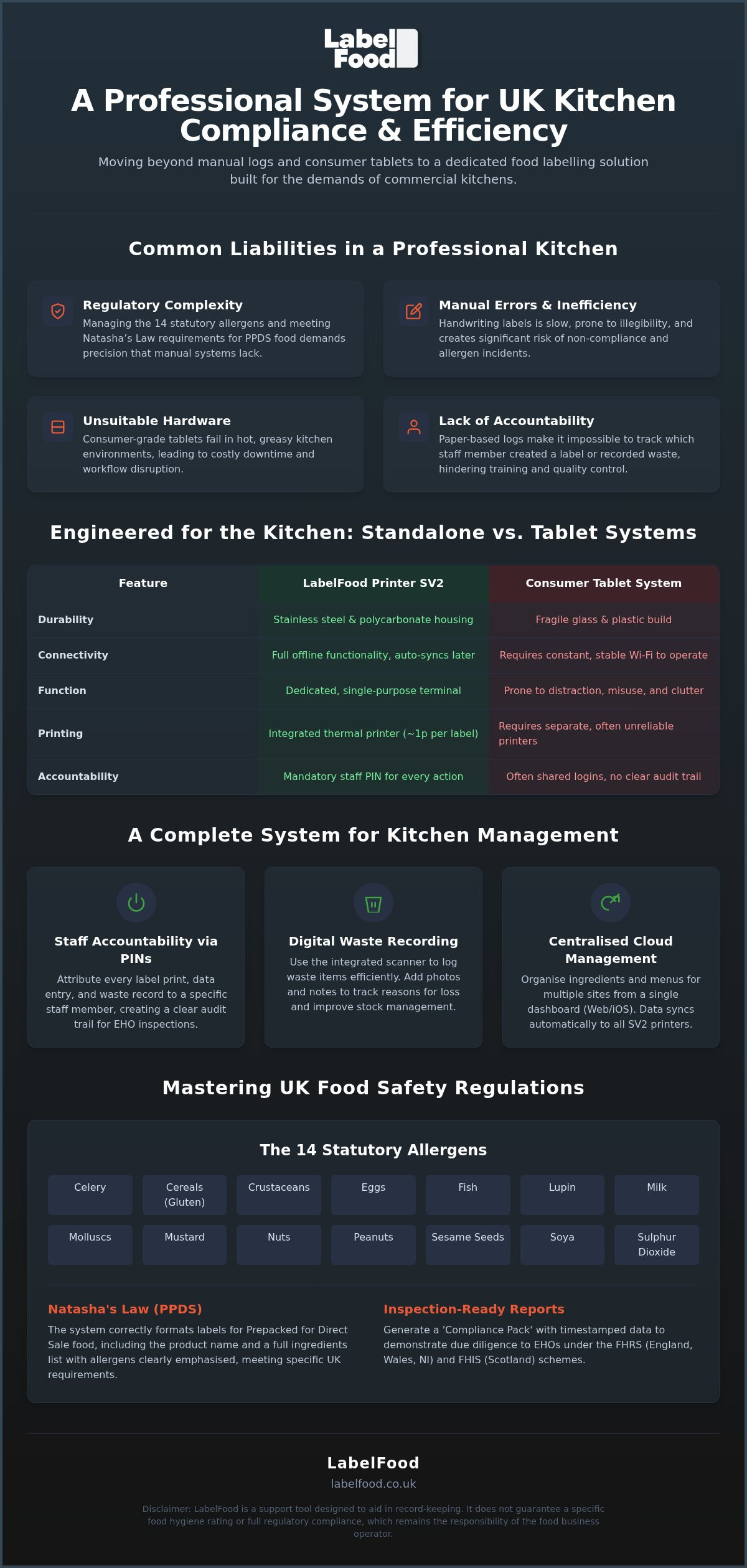
A consumer-grade tablet is not a professional kitchen tool; it is a liability that breaks under the pressure of a busy service. Handwriting ingredients for prepacked for direct sale (PPDS) items invites manual error and consumes valuable prep time. The LabelFood Printer SV2 replaces these fragile workarounds with a dedicated, standalone system built for the heat and grease of the pass. It provides a stabilising force in your kitchen, ensuring that every label printed is accurate and attributed to a specific staff member through individual PINs.
You understand the difficulty of managing the 14 statutory allergens whilst maintaining a high-speed workflow. This guide explains how to secure audit-ready records and total regulatory peace of mind through a unified digital platform. We will explore how the system functions offline, the methodology for digital food waste recording, and the role of the cloud management dashboard. Discover how to transition from chaotic manual logs to a streamlined, professional labelling system that prioritises precision and kitchen efficiency.
Key Takeaways
- Understand how to manage the 14 statutory allergens and meet Natasha’s Law requirements for PPDS food accurately.
- Discover why the standalone LabelFood Printer SV2 is more reliable than fragile, tablet-based systems in professional kitchens.
- Learn how to use digital waste recording and staff PINs to improve kitchen accountability and reduce food loss.
- Explore how to organise multi-site menus and generate Compliance Pack reports using the cloud management dashboard.
Navigating UK Food Labelling Regulations: Natasha’s Law and Beyond
UK food safety standards require precise, daily record-keeping. While international food labelling regulations provide a general framework, the UK's specific mandates demand granular detail. Operators must recognise and isolate 14 statutory allergens. It's vital to treat peanuts and nuts as separate categories to ensure staff and customer safety. In 2026, regulatory focus has sharpened on data transparency. This includes how businesses track ingredients, manage packaging waste, and present allergen information to the public.
The PPDS Requirement and Natasha’s Law
Natasha’s Law applies exclusively to food prepacked for direct sale (PPDS). This classification covers items packaged on-site before a customer orders them, such as grab-and-go sandwiches, boxed salads, or pots of sauce. These labels must display the product name and a full ingredients list with allergens emphasised. Relying on marker pens or manual handwriting creates unnecessary risk. Illegible handwriting or missed ingredients lead to compliance failures. The LabelFood Printer SV2 addresses this by printing clear, standardised labels from a managed database. It ensures every PPDS item meets the specific requirements of the Food Information Regulations without the inconsistency of manual input.
Preparing for EHO Inspections in 2026
Environmental Health Officers (EHOs) prioritise allergen management and accurate date coding during inspections. In England, Wales, and Northern Ireland, the Food Hygiene Rating Scheme (FHRS) provides a numerical scale of 0 to 5. Scotland utilises the Food Hygiene Information Scheme (FHIS), which issues "Pass" or "Improvement Required" ratings. Inspectors now expect to see organised, retrievable data rather than loose paper logs. Adopting a digital kitchen compliance record is the professional standard for modern operators. These records provide timestamped evidence of due diligence. The LabelFood Printer SV2 supports this by attributing every label to a specific staff member via individual PINs. This creates a clear trail of accountability that simplifies the inspection process and demonstrates a disciplined approach to kitchen management.
The LabelFood Printer SV2: Engineering for Commercial Kitchens
Commercial kitchens are hostile environments for standard electronics. Steam, high temperatures, and grease ingress quickly degrade consumer-grade tablets. The LabelFood Printer SV2 is engineered as a dedicated terminal with a robust stainless steel and polycarbonate housing. It eliminates the clutter of separate charging cables and the fragility of external screens. This is a single, unified unit designed for the pass. The hardware is built to withstand the physical realities of a professional workspace whilst maintaining a clean, professional appearance.
Core Specifications of the SV2 Terminal
Inside the terminal, an internal thermal printer handles all label production. This removes the logistical burden and cost of ink or toner. Labels are produced at a cost of approximately 1p each, representing a significant saving over the labour hours required for manual handwriting. The integrated scanner serves a dual purpose: rapid product selection and digital waste recording. When you update your menu via the cloud management dashboard, the SV2 pulls that data automatically. It's a closed-loop system. This ensures that Navigating UK Food Labelling Regulations for PPDS items remains consistent across every site in your estate.
Connectivity and Standalone Reliability
Kitchen Wi-Fi is notoriously unreliable. Most tablet-based systems cease to function the moment the connection drops, creating a bottleneck in your prep cycle. The LabelFood Printer SV2 maintains full operational capacity offline. You can continue to print labels and record waste without interruption. Once the connection is restored, the device automatically syncs all data to the cloud dashboard. This makes the LabelFood Printer SV2 the standalone solution for UK kitchens that cannot afford downtime. Security is handled natively, with data encrypted during the sync process. If you want to see how this hardware integrates into your workflow, you can explore the full system specifications.
Standalone Terminals vs. Tablet-Based Labelling Systems
Consumer tablets are designed for low-impact environments. In a professional kitchen, they represent a point of failure. High ambient temperatures and constant steam exposure degrade lithium-ion batteries and compromise touch-screen sensitivity. A tablet-based setup often relies on a fragile web of Bluetooth connections and third-party apps. During a peak Friday service, you cannot afford to troubleshoot a pairing error or wait for an operating system update to finish. The LabelFood Printer SV2 eliminates this operational friction by providing a hardwired, purpose-built terminal that does one job reliably.
Maintaining compliance with UK food allergen regulations requires consistency. If your tablet dies or the app crashes, your labelling stops. This creates a backlog and increases the risk of manual errors as staff revert to marker pens. The SV2 is a stabilising force because it is autonomous. It doesn't require a separate tablet or a charging dock that takes up valuable counter space. It's a single unit that stays where you put it, ready to print the moment it's needed.
The Fragility of Consumer Tech
Generic mobile devices aren't built for the grease and heat of the pass. Screen fragility is a major concern; a single drop can render a tablet useless and halt your labelling workflow. Furthermore, third-party app updates can frequently break compatibility with wireless printers. This creates downtime that kitchen managers have to resolve. Dedicated hardware like the LabelFood Printer SV2 provides a more stable professional environment. It uses a bespoke operating system tailored specifically for kitchen tasks. There are no background updates to manage and no consumer apps to clutter the interface. It's a professional tool for a professional environment.
Efficiency and Speed Comparison
Speed is critical during prep cycles. Generic wireless setups often suffer from significant boot times and "searching for printer" delays. The SV2 is ready instantly. Because the printer is integrated directly into the terminal, there's no latency. Staff don't have to wait for a connection to establish. The user interface is designed for quick scanning and immediate comprehension, outperforming generic mobile apps that often require multiple taps to reach a print command.
Staff distractions are another hidden cost of tablet use. A generic device allows access to browsers or social media, pulling focus away from food safety. The SV2 is a locked-down terminal. It only runs the LabelFood interface. This ensures staff remain focused on prep cycles and waste recording. By reducing the physical footprint and removing the need for external chargers, you create a cleaner, more efficient workspace.
Digital Food Waste Recording and Staff Accountability
Kitchen profit margins are often lost in the bin. Operational efficiency requires more than just accurate date coding; it demands a clear understanding of what is being discarded and why. The LabelFood Printer SV2 serves as a central terminal for capturing this data. It replaces vague paper tallies with timestamped, attributed records that identify recurring loss patterns. By moving away from manual logs, you gain a transparent view of your kitchen's performance.
Accountability is built into the system through individual staff PINs. Every label printed and every waste entry made is linked to a specific user. This prevents anonymous errors and ensures that staff take ownership of their prep cycles. When actions are tracked, precision improves across the entire team. It's a simple mechanism that fosters a culture of responsibility on the line.
Implementing a Food Waste Recording Software Strategy
Recording waste on the SV2 takes seconds. Staff use the integrated scanner to identify the product, select a reason for the waste, and add photos or notes. This level of detail is critical for identifying whether loss is caused by over-ordering, poor storage, or preparation errors. By analysing these digital logs on the dashboard, managers can adjust prep levels to match actual demand. This provides a direct financial ROI by reducing food costs and environmental impact. It's about making decisions based on data rather than guesswork.
Staff Management and Reporting
The management dashboard offers specific tools like the Label Report and Staff Activity logs. These reports allow you to track exactly what was printed and when. If a site shows a high volume of reprints, it might indicate a training need or a hardware issue. Identifying these trends early prevents small errors from becoming systemic compliance risks. You can monitor performance across multiple sites from a single login, ensuring standards remain consistent.
EHO inspections require quick access to historical data. The SV2 system generates a Compliance Pack PDF with a single click. This document collates all labelling and waste records into a professional format, demonstrating a high standard of record-keeping. It provides the transparency needed to satisfy inspectors that your kitchen is managed with discipline. To see how these reports can protect your business, explore our reporting dashboard today.
Implementation and Scaling: The Cloud Management Dashboard
Managing a kitchen's data requires a robust digital layer. The LabelFood Printer SV2 integrates with a cloud-based dashboard to centralise your operations. You can access this panel via any web browser or through the dedicated iOS and iPad application. It's important to note that there is no Android version of the management panel. This platform focus ensures a stable, high-performance environment for administrators managing complex menu data and multi-site staff records.
Onboarding Your Product Catalogue
Transitioning from paper logs to a digital system is a methodical process. For large-scale operations, bulk uploading data via Excel is the most efficient route. You can also utilise the AI-assisted data reading feature to scan existing menus or PDFs. The AI acts as a tool for user review and editing; it never publishes data autonomously. Every ingredient and allergen must be verified by a human operator to ensure accuracy. This centralises your allergen management software UK strategy. It ensures that every site in your group uses the same verified data, preventing dangerous inconsistencies across your estate.
Scaling and Long-Term Value
For London restaurant groups or multi-site bakeries, synchronisation is essential. When you update a recipe or allergen on the dashboard, the change pushes to every LabelFood Printer SV2 on your network instantly. This eliminates the risk of outdated information being used at different locations. The subscription model is straightforward. You can choose between a £325 annual investment or a £32 monthly option. This fee includes the terminal hardware, cloud access, and ongoing software updates.
Manual labelling is a significant labour expense that often goes uncalculated. When you consider that each printed label costs approximately 1p, the ROI becomes clear. You're replacing hours of handwriting with a system that prints in seconds. The hardware is designed to evolve alongside your business. Software updates are handled remotely. This means your system gains new functionality without the need for additional hardware purchases. It's a scalable solution built for the long-term stability and compliance of your professional kitchen.
Securing Future Kitchen Standards
Professional kitchen management in 2026 demands a shift from manual workarounds to dedicated digital systems. The LabelFood Printer SV2 provides the hardware reliability needed to handle the pressure of a commercial pass whilst ensuring every PPDS item meets Natasha's Law requirements. By integrating digital waste tracking and staff PIN accountability, you transform a basic labelling task into a source of actionable business data. This system isn't just about labels; it's about establishing a disciplined, audit-ready environment across your entire estate. You'll gain total control over your product catalogue through a centralised dashboard that syncs with every device on your network.
With the device included in your subscription and full support for the 14 statutory allergens, you can generate Compliance Pack PDFs with ease. Transitioning to a standalone terminal removes the fragility of consumer tablets. It's time to stabilise your workflow and protect your kitchen's reputation with a system built for professional chefs. Order your LabelFood Printer SV2 and start your 14-day free trial to experience a more efficient way to manage your kitchen compliance. We look forward to supporting your operation as you reach new standards of precision.
Frequently Asked Questions
Does the LabelFood Printer SV2 work without an active Wi-Fi connection?
The LabelFood Printer SV2 functions fully without an active Wi-Fi connection. You can continue to print labels and record food waste during a connection outage. All data is stored locally on the terminal and syncs automatically with the cloud dashboard once the internet is restored. This ensures that high-pressure London kitchens don't experience downtime due to unreliable signal or network failures on the pass.
How does the SV2 help with Natasha’s Law compliance for PPDS food?
The system automates the production of labels for prepacked for direct sale (PPDS) items. It prints the full product name and an ingredient list with the 14 statutory allergens emphasised in bold. This removes the risk of manual handwriting errors which lead to compliance failures. It provides a standardised way to meet the requirements of the Food Information Regulations across every site in your London restaurant group.
Can I manage my kitchen data from an Android device?
No, you cannot manage kitchen data from an Android device. The management panel is strictly limited to web browsers and iOS/iPad applications. This dedicated development focus ensures the system remains stable and secure for professional administrators. London kitchen managers typically access the cloud dashboard via a laptop or iPad to organise menus, review staff activity, and generate compliance reports for their various sites.
What are the 14 allergens tracked by the LabelFood system?
The system tracks the 14 statutory allergens defined by UK food safety laws. These are celery, cereals containing gluten, crustaceans, eggs, fish, lupin, milk, molluscs, mustard, peanuts, sesame, soya, sulphur dioxide, and nuts. It's vital to note that peanuts and nuts are isolated as distinct categories. This precision helps London operators manage risks effectively and provides clear information to customers with specific dietary requirements.
Is the SV2 printer included in the monthly and annual subscription plans?
Yes, the LabelFood Printer SV2 is included in both the monthly and annual subscription plans. You don't need to purchase the hardware separately. The subscription provides a complete food labelling system, including the standalone terminal, access to the cloud management dashboard, and ongoing software updates. This model allows London businesses to implement professional standards with a predictable investment of £325 annually or £32 per month.
How does the AI menu onboarding work and is it 100% autonomous?
AI menu onboarding uses data reading technology to extract information from your existing PDFs or Excel sheets. It is a support tool and is never 100% autonomous. A human operator must review and edit every ingredient and allergen entry before it is published. This ensures total accuracy in your product catalogue. London chefs use this feature to speed up the initial setup of complex menus.
Can the system generate reports specifically for EHO inspections?
Yes, the system generates a professional Compliance Pack PDF designed for inspections. This report provides a timestamped record of all labelling activity and food waste logs. It demonstrates a disciplined approach to record-keeping and due diligence. While it doesn't guarantee a specific rating, it provides London operators with the organised data that EHOs expect to see during a routine visit to the premises.
What is the difference between the SV2 and a generic label printer?
The SV2 is a dedicated, standalone kitchen terminal. Unlike a generic label printer, it doesn't require a separate tablet, Bluetooth pairing, or consumer-grade apps. It is built specifically for the heat and grease of a professional kitchen. It features an integrated scanner, a bespoke operating system, and robust housing. It eliminates the fragility and connectivity issues associated with third-party tablet setups in busy London kitchen environments.