
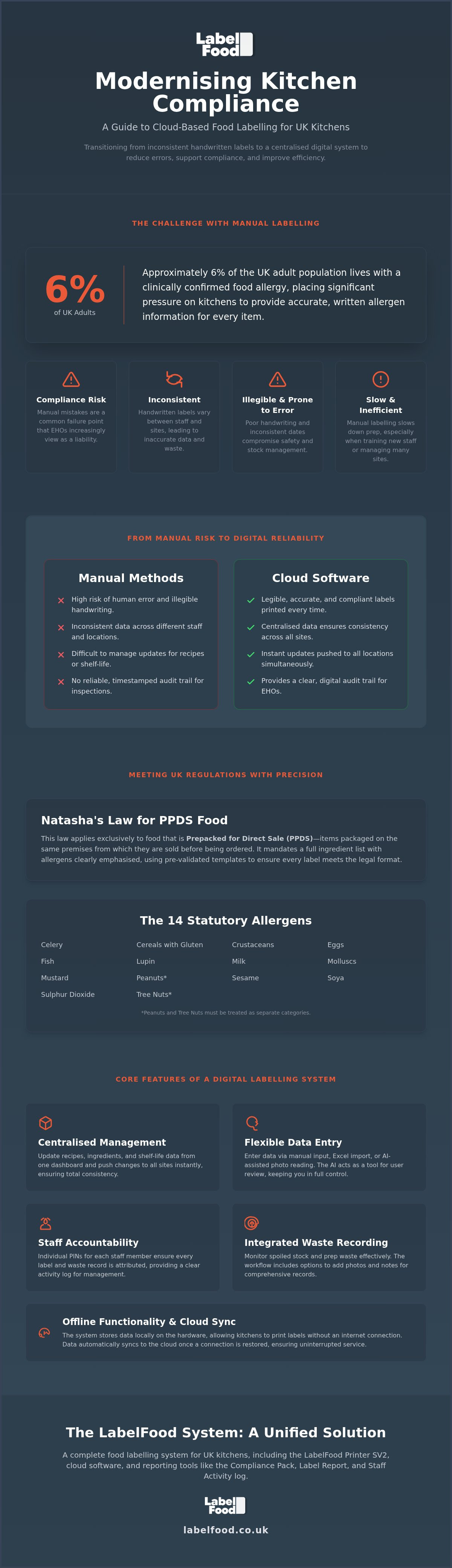
Approximately 6% of the UK adult population lives with a clinically confirmed food allergy. This puts significant pressure on your kitchen to provide accurate, written allergen information for every item produced. Natasha's Law requires full ingredient labelling for all Pre-Packed for Direct Sale (PPDS) foods, leaving no room for manual mistakes. You likely find that handwritten labels are slow and inconsistent, especially when managing multiple sites or training new staff. It's a common point of failure that Environmental Health Officers (EHOs) increasingly view as a liability.
Adopting kitchen label printing cloud software replaces guesswork with a centralised, digital audit trail. This guide explains how cloud-managed systems reduce manual errors, support compliance, and integrate food waste recording into your daily workflow. We'll look at the practical steps to transition your kitchen from pen and paper to a unified digital management layer that maintains functionality even whilst offline. Discover how to synchronise your product data and improve kitchen efficiency through a single, reliable system.
Key Takeaways
- Understand how Natasha’s Law affects PPDS items and why precise allergen labelling is essential for UK food safety standards.
- Learn how kitchen label printing cloud software removes the risk of human error and illegible handwriting found in manual systems.
- Discover how to integrate food waste recording directly into your kitchen workflow to monitor spoiled stock and prep waste effectively.
- Identify the advantages of a centralised management dashboard for ensuring consistent labelling across multiple locations and staff teams.
- See how standalone hardware with offline functionality ensures your labelling system remains operational during busy service periods.
The Role of Cloud Software in Modern Kitchen Labelling
Modern commercial kitchens require more than just a printer. They need a system. Kitchen label printing cloud software acts as a centralised data management tool. It moves the "brain" of your labelling from a chef's memory to a secure digital dashboard. Manual "day dots" and handwritten tape are no longer sufficient. They are a liability. Illegible writing and inconsistent dates lead to errors that compromise safety and increase waste. A digital system ensures that every label produced is legible, accurate, and compliant with your specific kitchen standards.
Centralisation is vital for multi-site operators. Managing consistency across three, five, or fifty sites is impossible with manual methods. A cloud-managed system allows you to push updates to all locations simultaneously. This eliminates the risk of one site using outdated shelf-life data whilst another has updated its recipes. Understanding the historical context of international food labelling standards shows how regulations have evolved from simple descriptions to complex allergen requirements. In the UK, this evolution means Environmental Health Officers (EHOs) now expect robust digital records. Using a cloud system supports your record-keeping for the Food Hygiene Rating Scheme by providing a clear, timestamped audit trail of what was prepared and when.
Centralising Product and Allergen Data
Accuracy is not optional. You must manage the 14 statutory allergens with precision. This includes treating peanuts and nuts as separate categories to ensure staff and customers have clear information. A cloud dashboard allows you to organise ingredient lists and shelf-life data from a central location. You can update a recipe once and see it reflected across every site instantly. Data entry is straightforward. You can use manual input, Excel imports, or AI-assisted photo reading. The AI acts as a tool for your review and editing. It simplifies the onboarding process but never publishes data without your final confirmation. This keeps you in total control of your product catalogue.
Offline Functionality and Cloud Synchronisation
Kitchen environments are notoriously difficult for Wi-Fi. Thick walls and stainless steel equipment often block signals. Your labelling system cannot stop just because the internet does. Reliable software stores data locally on the hardware. This allows chefs to continue printing labels during an outage. Service remains uninterrupted. Once the connection is restored, the system performs a background cloud sync. This ensures data integrity between the kitchen floor and the management office whilst maintaining frictionless operation during service. It provides peace of mind that your records are always up to date, regardless of your internet stability.
Meeting UK Regulations: Natasha’s Law and Allergen Compliance
Natasha's Law applies exclusively to food Prepacked for Direct Sale (PPDS). This includes any item packaged on the same premises from which it is sold before a customer orders it. It does not apply to food made to order or sold via distance selling. The regulation mandates a full ingredient list with the 14 statutory allergens clearly emphasised. Accuracy is critical. A single missing ingredient or an illegible label can lead to severe legal consequences and safety risks. Manual processes often fail here. Kitchen label printing cloud software solves this by using pre-validated templates that ensure every label meets the required legal format.
Managing these requirements across different regions requires precision. England, Wales, and Northern Ireland use the Food Hygiene Rating Scheme. Scotland operates under the Food Hygiene Information Scheme. Whilst the 14 allergens remain consistent across the UK, your record-keeping must align with local inspection expectations. Integrating your labelling with the UK food waste hierarchy allows you to manage surplus stock whilst maintaining strict safety boundaries. Cloud systems ensure that as regulations evolve, your templates are updated centrally and pushed to every site instantly.
Managing the 14 Statutory Allergens
The law identifies 14 major allergens including celery, cereals containing gluten, eggs, and mustard. Peanuts and tree nuts are treated as separate categories. You must be explicit. Software helps prevent cross-contamination by providing clear visual alerts for staff during the printing process. Tools like the "Compliance Pack" allow you to present organised, digital data to Environmental Health Officers (EHOs). It demonstrates a disciplined, professional approach to food safety that handwritten notes cannot provide.
Audit-Ready Documentation and Reporting
Digital systems provide total transparency. You can generate a "Label Report" to see exactly what was printed, when, and by which staff member. Staff Activity logs use individual PINs for attribution, creating accountability in the prep area. These records shouldn't exist in isolation. They should link directly to your existing HACCP plan. Adopting professional food labelling solutions ensures your documentation is always ready for review. It moves your kitchen from reactive guesswork to proactive, data-driven management. You maintain control over your compliance without the friction of manual data entry.
Cloud Software vs. Manual Labelling: A Comparison
Manual labelling is a drain on resources. Writing 100 prep labels by hand takes significant time. With the National Living Wage at £12.71 per hour as of July 2026, every minute spent on pen and paper costs your business. Kitchen label printing cloud software reduces this task to seconds. You tap a screen; the printer produces a legible, accurate label. This efficiency allows your team to focus on food preparation rather than administrative tasks. It replaces a slow, error-prone process with a stabilising digital workflow.
Legibility is a safety requirement. Handwritten dates are often misinterpreted. Smudged ink or poor penmanship leads to confusion amongst staff. This confusion results in stock being thrown away early or, worse, kept past its safe limit. Digital systems eliminate this ambiguity. They provide a clear, standardised format that every team member can read at a glance. During peak service hours, the speed of a digital system ensures that labelling remains a priority rather than a chore that gets skipped. It provides the peace of mind that your kitchen floor is operating with precision.
Subscription models offer a different value proposition compared to generic hardware. A standalone printer without cloud support requires manual data updates. This creates a risk of data silos where different sites use different information. A cloud-managed system ensures your data is backed up and accessible from any web browser or iOS device. It provides a management layer that scales with your business. You aren't just buying a printer; you're investing in a system that ensures information is never "illegible" or "missing" during an audit.
Efficiency in the Prep Workflow
Removing mental arithmetic prevents errors. Manual shelf-life calculations are prone to human error, especially in high-pressure environments. Digital systems automate these dates based on your specific kitchen rules. Using food prep date labels commercial improves prep speed significantly. It standardises formats across all stations. Whether a chef is at the sauce station or the pastry section, the labels look identical. This consistency is essential for a disciplined kitchen operation.
Accuracy and Regulatory Risk
A low Food Hygiene Rating is expensive. It damages your reputation and can lead to increased inspection frequency. Poor labelling is a common reason for points being deducted during an EHO visit. Generic printers often lack the durability required for kitchen heat and moisture. In contrast, a dedicated food safety label printer UK standard ensures the hardware withstands the environment. Manual systems fail when the kitchen gets busy. Digital records ensure that even during the busiest shifts, your documentation remains audit-ready and accurate.
Integrating Food Waste Management into the Labelling Workflow
Waste recording belongs on the kitchen floor. It shouldn't be an afterthought in the back office. Kitchen label printing cloud software provides the ideal point of entry for these records. When a chef identifies spoiled stock or prep waste, they record it immediately at the printer station. This captures data in real time. It removes the need for paper waste sheets that often end up stained or discarded. Digital logs allow you to distinguish between "prep waste," such as vegetable trimmings, and "spoiled stock" that has reached its expiry date.
Context is essential for management. Digital logs allow staff to include photos and specific notes regarding the disposal. A photo of a burnt batch of bread provides more insight than a simple tally mark. It allows kitchen managers to see exactly why waste is occurring. You can then adjust your ordering levels or prep schedules based on actual kitchen performance. This data-driven approach turns a cost centre into an opportunity for improved efficiency and better margin control. It provides a stabilising influence on your bottom line.
Digital Waste Logs and Staff Attribution
Accountability improves performance. Using individual staff PINs allows you to track waste patterns across your team. This isn't about monitoring for blame. It's about identifying training needs. If one station consistently records high levels of prep waste, it may indicate a need for better knife skills or revised prep instructions. Analysing these reports on a unified digital dashboard helps you identify high-cost items that frequently end up in the bin. You gain total visibility over your kitchen's output. It moves your operation away from guesswork toward disciplined management.
Sustainability and Profitability
Reducing waste is a financial necessity. Commercial kitchens in the UK face significant pressure from rising ingredient costs. Every gram of food wasted is profit lost. Implementing professional food waste recording software supports your business's green initiatives. It provides the hard data required to present sustainability progress to stakeholders or business owners. You can demonstrate exactly how much waste has been diverted through better management. For a complete solution that integrates waste tracking with your daily prep, explore our food labelling solutions. You'll find that precise recording leads to immediate, actionable insights for your business.
The LabelFood System: A Unified Solution for UK Kitchens
Efficiency in a commercial kitchen requires a single point of truth. The LabelFood system provides this through a unified combination of dedicated hardware and kitchen label printing cloud software. It removes the friction of managing disparate devices and multiple software subscriptions. This is a complete food labelling system. It includes the LabelFood Printer SV2 as part of the service, ensuring you have industrial-grade hardware ready for immediate use. The system functions as a vital support tool for your record-keeping, providing the digital evidence required for EHO inspections without the burden of manual data entry.
Control is managed through the Cloud Management Dashboard. This interface is available via web browser or a dedicated iOS/iPad app. There is no Android version. This platform focus ensures a stable, high-performance experience on professional hardware. You use the dashboard to organise your product catalogue, set shelf-life rules, and manage staff access. It's important to recognise that the system is a support tool. It facilitates accurate record-keeping but does not guarantee a specific food hygiene rating. Responsibility for food safety remains with the operator, supported by the precision of digital logs.
Hardware and Software Synergy
Generic office printers aren't built for kitchen heat. They often fail during busy shifts. A LabelFood Printer SV2 subscription provides a standalone, thermal solution that requires no ink. It is robust and designed for the physical realities of a workspace. Professional label design also helps maintain your brand identity. Clear, standardised labels look superior to handwritten tape. They signal a disciplined operation to both staff and inspectors. This synergy between hardware and the management layer creates a frictionless experience from the office to the kitchen floor.
Implementing the System in Your Kitchen
Transitioning to digital is straightforward. You can import your existing product data via Excel or use the AI Menu Onboarding tool. The AI reads your menus or PDFs and organises the data for your review. It is a tool for editing and verification, never an autonomous publisher of data. Once your catalogue is set, you assign individual staff PINs. This enables the Staff Activity reports and the Compliance Pack features. For London-based kitchens seeking audit-readiness, these digital trails are becoming the standard expectation. You move from a reactive stance to a position of total control over your kitchen's data and compliance documentation.
Modernise Your Kitchen Operations and Compliance
Manual labelling is an unnecessary risk in a high-pressure commercial kitchen. Transitioning to a digital system ensures your team produces accurate, legible labels that support Natasha's Law and general food safety standards. Centralising your data allows for total control over ingredient lists and shelf-life across every site. You move from fragmented record-keeping to a unified management layer that remains functional even whilst offline.
Adopting professional kitchen label printing cloud software provides the stability needed for long-term success. You gain access to the Compliance Pack for EHO inspections, detailed Label Reports, and integrated food waste recording with photo support. These tools turn daily preparation into a source of valuable data. With the dedicated LabelFood Printer SV2 included in your subscription, you have the hardware required to maintain a disciplined and efficient environment. Take control of your kitchen standards and reduce manual errors with a system designed for the physical realities of your workspace.
Explore the LabelFood Printer SV2 and Cloud System to begin standardising your kitchen's labelling and waste recording today.
Frequently Asked Questions
Does kitchen label printing software guarantee Natasha’s Law compliance?
No, the software does not guarantee regulatory compliance. It functions as a support tool for record-keeping and template management. The responsibility for ensuring that ingredient data is accurate and that allergens are correctly identified remains with the food business operator. It provides the digital infrastructure to assist you in maintaining high standards, but it is not a compliance guarantor.
What are the 14 statutory allergens I need to manage in my kitchen software?
You must manage 14 specific allergens defined by UK law: celery, cereals containing gluten, crustaceans, eggs, fish, lupin, milk, molluscs, mustard, tree nuts, peanuts, sesame, soya, and sulphur dioxide or sulphites. It is critical to treat peanuts and tree nuts as separate categories. Your software should allow you to emphasise these ingredients clearly on every label produced for PPDS items.
Will the labelling system work if my kitchen Wi-Fi goes down?
Yes, the system is designed to function whilst offline. The hardware stores your product data locally, allowing chefs to continue printing labels during internet outages. Service remains uninterrupted. Once the Wi-Fi connection is restored, the system performs a background cloud sync to ensure your management dashboard and kitchen records are perfectly aligned.
Can I manage multiple restaurant sites from one cloud dashboard?
Yes, the cloud dashboard enables centralised management for single or multi-site operations. You can update product data, shelf-life rules, and staff PINs from one central location and push those changes to all printers instantly. This ensures total consistency across your entire estate and prevents different sites from using outdated or incorrect information.
Is there an Android version of the LabelFood management panel?
No, the management panel is not available on Android. You can access the dashboard via any modern web browser or by using the dedicated app for iOS and iPad devices. This specific platform focus ensures a stable, high-performance environment for managing your kitchen data and compliance reports without the instability often found in cross-platform applications.
How does AI help with the menu onboarding process?
AI acts as a tool for rapid data entry and organisation during the setup phase. It can read your existing menus, PDFs, or photos of ingredient lists to populate your product catalogue. Crucially, the AI is a tool for user review and editing. It never functions as an autonomous publisher of data; you must verify and confirm all entries before they are used.
What is the difference between PPDS and standard food labelling?
PPDS (Prepacked for Direct Sale) refers to food that is packaged on the same premises from which it is sold before a customer orders it. These items require full ingredient lists with allergens emphasised under Natasha's Law. Standard labelling for loose food or items made to order has different requirements, often relying on verbal communication or separate allergen matrices.
Can the software help me record and reduce food waste?
Yes, kitchen label printing cloud software integrates waste recording directly into the kitchen workflow. Staff use individual PINs to record prep waste or spoiled stock at the point of disposal. The system supports photos and notes, providing kitchen managers with the data needed to identify waste patterns, adjust ordering, and protect business margins.