
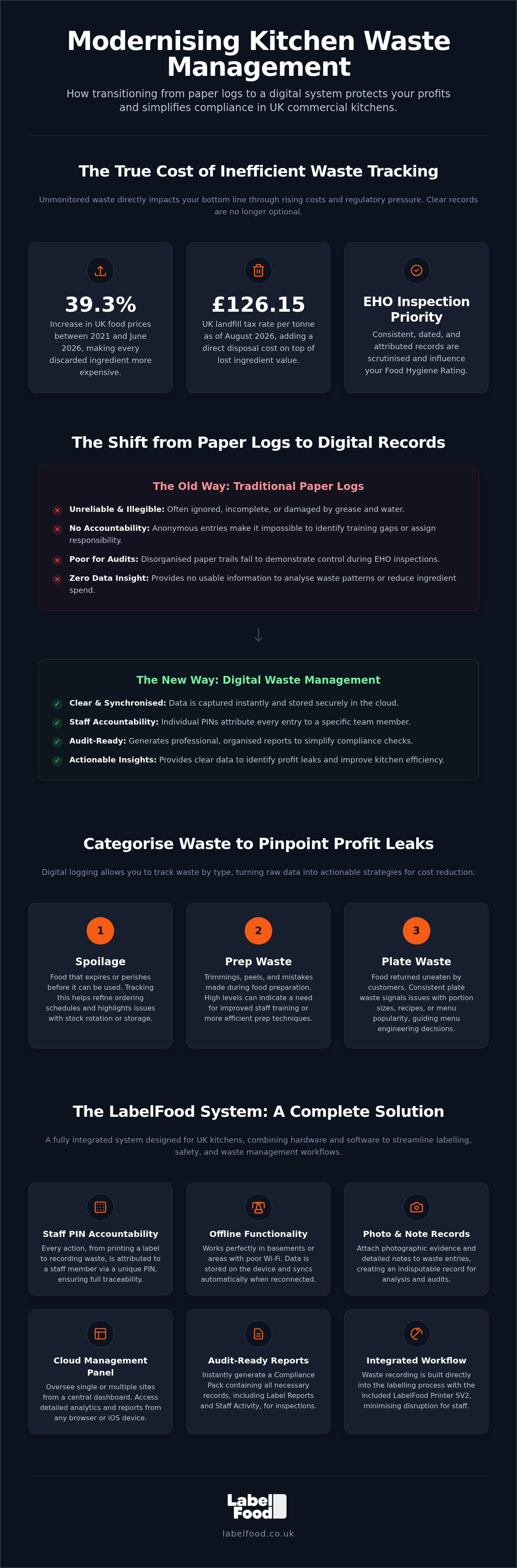
Food prices in the UK were 39.3% higher in June 2026 than in 2021. Every bin bag of kitchen waste now represents a direct hit to your bottom line. You likely find that manual paper logs are often ignored by staff or end up covered in grease. These unreliable records offer no protection during an EHO inspection and provide zero insight into your food spend. Transitioning to a digital system for food waste management for kitchens is a pragmatic way to protect your margins.
This guide explains how to implement a professional food waste management system that reduces costs and simplifies compliance through digital recording. You'll learn how to move away from messy paper trails and create audit-ready records that your team will actually use. We will cover the latest UK regulations and show you how to turn waste data into a practical tool for kitchen efficiency.
Key Takeaways
- Recognise why traditional paper logs often fail and how digital synchronisation provides a clearer view of kitchen operations.
- Identify specific profit leaks by categorising discards into spoilage, prep waste, and plate waste.
- Implement a professional system for food waste management for kitchens to reduce ingredient costs and simplify record-keeping.
- Learn how to integrate waste recording directly into your team's daily labelling workflow using the LabelFood Printer SV2.
- Use photo records and staff PINs to create detailed, audit-ready reports that help you prepare for inspections.
Understanding Food Waste Management in UK Commercial Kitchens
Food waste management for kitchens is the systematic process of monitoring, recording, and minimising every discarded ingredient to ensure legal safety and financial stability. It is no longer just an environmental choice. For UK operators, it is a core operational requirement. Effective management ensures that your kitchen remains profitable whilst staying compliant with strict UK food safety laws. Clear records prove to authorities that you maintain total control over your inventory.
The financial impact of waste is substantial. Every kilogram of discarded food represents lost procurement costs, the energy used for refrigerated storage, and the labour spent on preparation. In the context of global food waste, commercial kitchens contribute significantly to the 9.5 million tonnes generated annually in the UK. When you throw away a product, you aren't just losing the ingredient; you're paying for its disposal. As of August 2026, the UK landfill tax rate stands at £126.15 per tonne. Reducing waste is the fastest way to protect your margins.
The Legal and Regulatory Landscape
UK regulations are becoming increasingly rigorous. The Environmental Health Officer (EHO) prioritises consistent, dated, and attributed records during inspections. In England, Wales, and Northern Ireland, these records directly influence your score under the Food Hygiene Rating Scheme. In Scotland, they support your status under the Food Hygiene Information Scheme. Digital waste logs demonstrate professional diligence and a robust approach to stock rotation.
Specific laws like Natasha’s Law apply to prepacked for direct sale (PPDS) food. If a batch is discarded due to labelling errors or potential contamination, you must record this to maintain a clear audit trail. This process also safeguards against cross-contamination. You must track the 14 statutory allergens, treating peanuts and nuts as separate categories. Failure to record why an allergen-heavy ingredient was wasted can lead to dangerous gaps in your safety management system and hygiene records.
The True Cost of Kitchen Waste
Waste costs are often hidden. A discarded tray of prep isn't just the cost of the raw ingredients. It includes the 20 minutes of chef time and the electricity used by the walk-in chiller. London businesses face additional pressure to reduce landfill contributions due to local environmental targets and rising collection fees. Food waste management for kitchens provides the data needed to identify these profit leaks. By tracking waste by category, you can see if your losses stem from over-ordering, poor prep techniques, or plate waste. This clarity allows for informed decisions about menu engineering and portion control. Under UK food safety law, food waste management is the documented control of discarded material to prevent contamination and prove the integrity of the food chain.
Digital vs. Paper: Modernising Your Waste Management System
Traditional paper logs are a liability in a professional kitchen. They're frequently illegible, stained with grease, or missing entire shifts of data. This lack of precision makes effective food waste management for kitchens impossible. When an EHO inspector asks for your waste records, a disorganised folder of loose sheets does not inspire confidence. Modernising your system replaces these manual failures with instant digital synchronisation. Data is captured at the point of waste and stored securely in the cloud, providing a single source of truth for your operation.
Individual staff PINs are essential for maintaining professional standards. When every entry is attributed to a specific team member, accountability improves. You can identify training gaps if a particular station consistently records high prep waste. Digital systems also solve the issue of poor connectivity. Kitchens located in basements or behind thick walls often struggle with Wi-Fi. Professional systems offer offline functionality, allowing staff to record waste immediately whilst the data syncs automatically once a connection is restored. This ensures that no record is lost due to technical limitations.
According to research on Food waste in the UK, the hospitality sector faces unique pressures to improve efficiency. Moving away from manual logs is the first step toward meeting these demands. You can explore how digital recording integrates with your kitchen to replace unreliable paper trails with a professional, permanent record.
The Advantages of Cloud-Based Dashboards
A Cloud Management Dashboard provides total visibility over your inventory, whether you manage one site or ten. You can monitor waste patterns across multiple locations from a single interface. The system generates a Compliance Pack, which provides audit-ready reports for your food safety management system. These reports simplify the administrative burden of preparing for inspections. Note that the management panel is accessible via web browsers and iOS or iPad devices only; there is no Android version available.
Accuracy Through Visual Evidence
Digital records offer a level of detail that paper cannot match. By attaching photos to waste records, you can see exactly why ingredients were discarded. A photo of a bruised crate of tomatoes provides clear evidence of a supplier issue, whereas a photo of a burnt batch of sauce indicates a prep error. Adding specific notes helps managers distinguish between spoilage, over-ordering, and kitchen mistakes. This visual evidence prevents "pencil-whipping," where staff might fake records at the end of a shift to save time. It ensures that your data is accurate, honest, and useful for reducing your food spend.
Categorising Kitchen Waste to Identify Profit Leaks
Effective food waste management for kitchens depends on granular data. You cannot resolve profit leaks if you don't know where they originate. In a professional environment, waste is split into three primary categories: spoilage, prep waste, and plate waste. Categorising your discards this way allows you to identify whether the issue is a supplier problem, a kitchen error, or a menu design flaw. The Label Report in your dashboard provides a clear breakdown of which products are most frequently discarded, turning vague suspicions into actionable insights.
Tracking "prep date" labels is another vital layer of control. When staff use the system to print labels for prepared components, the shelf-life is automatically calculated. This removes the risk of "best guess" dating which often leads to premature disposal. By linking these waste categories to specific kitchen stations, you can identify which areas of your operation require more supervision or training. This methodical approach ensures that every gram of waste is accounted for and understood.
Spoilage and Inventory Management
Spoilage is often a symptom of over-ordering or poor stock rotation. If your digital logs show that unopened ingredients are consistently reaching their expiry, your par levels are likely too high. The LabelFood Printer SV2 ensures that every item in your walk-in has a clear, legible "use by" date. This clarity prevents the accidental disposal of perfectly good stock. To simplify your setup, you can use the AI menu onboarding tool to digitise your product catalogue via photo or PDF. The AI acts as a tool for your review and editing, ensuring your inventory data is accurate before you begin tracking. Once digitised, you can see exactly which high-value items are spoiling and adjust your procurement strategy to match actual demand.
Prep Waste and Plate Waste Analysis
Prep waste includes unavoidable items like vegetable peelings and bones, but it also captures avoidable mistakes like over-trimming or burnt batches. Use the Staff Activity report to monitor efficiency across different stations. If one section shows higher waste than others, it may indicate a need for a skills refresher. Plate waste provides insight into your customers' behaviour. If certain sides are consistently returned to the pot-wash, you should consider reducing portion sizes or removing the item. The UK hospitality sector loses approximately 1.1 million tonnes of food annually. Digital tracking allows you to distinguish between unavoidable prep and expensive errors, ensuring your food waste management for kitchens is driven by data rather than intuition.
Integrating Waste Recording into Daily Prep Workflows
Successful food waste management for kitchens relies on making data entry part of the physical workflow. If recording waste feels like an additional chore, staff will likely skip it during busy service. You should position your food waste recording software as a natural extension of your daily labelling routine. Since your team is already using the LabelFood Printer SV2 to date-mark prep, recording a discarded batch requires only a few extra taps on the same screen. It transforms a reactive task into a proactive habit.
Placement is critical. Hardware should be situated in a central, accessible location near the main prep station or the waste bins. This supports a "record as you go" philosophy. When a chef burns a batch or identifies spoilage, they can log it immediately rather than waiting until the end of the shift. This maintains data integrity. Memories fade during a high-pressure service; real-time recording ensures that every reason and quantity is captured accurately. Individual PINs streamline this process. Staff don't need to navigate complex login screens. They simply enter their four-digit code and start recording.
Step-by-Step Recording Process
The recording sequence is designed for speed and precision. First, the user identifies the item and selects it on the LabelFood Printer SV2 screen. They then enter the weight or quantity using the intuitive interface. Selecting the reason for waste (such as spoilage, prep error, or plate waste) provides the "why" behind the loss. Finally, the user captures a photo of the item for the record. This visual evidence is invaluable for management reviews. Once confirmed, the entry syncs to the cloud dashboard immediately, making the data available for site managers to analyse.
Staff Training and Culture
Building a culture of transparency is more effective than implementing punitive measures. Use the Staff Activity reports to reward efficiency and accuracy rather than using waste logs to punish honest errors. If a team member logs a mistake, it's an opportunity to identify a training need or a process flaw. Encouraging this transparency amongst the team ensures that all waste is logged, giving you a complete picture of your profit leaks. To get started quickly, you can set up your product catalogue using manual input or an Excel import. This allows for a fast transition from paper logs to a professional digital system. You can order your complete labelling and waste recording system to begin modernising your kitchen today.
The LabelFood System: A Complete Solution for UK Kitchens
The LabelFood Printer SV2 is the standard for professional kitchens. It is a dedicated, standalone device. You don't need to worry about third-party tablets that often fail in high-heat environments or lose connection during service. The system acts as a reliable support tool for your record-keeping and professional standards. It integrates your daily labelling and waste recording into a single, cohesive workflow. This eliminates the need for multiple devices and reduces clutter on your prep stations.
A subscription model ensures your kitchen remains operational without interruption. It includes the SV2 hardware, a continuous supply of label rolls, and regular software updates. Your data synchronises automatically with the Cloud Management Dashboard, providing a permanent record of your kitchen's activity. Whilst the printer handles the physical work, the management panel allows you to oversee operations via web browsers or iOS and iPad devices. Please note that there is no Android version of the management software available.
Beyond Waste: Total Kitchen Compliance
The SV2 system extends beyond food waste management for kitchens. It is designed to help you meet Natasha's Law labelling requirements for all prepacked for direct sale (PPDS) food. Accurate labelling is a legal necessity. The system also functions as allergen management software UK operators can rely on to track the 14 statutory allergens. You must treat peanuts and nuts as separate categories to maintain high safety standards. Digital records created by the system are dated and attributed to specific staff members. This provides the transparency that EHO inspectors require during a hygiene rating audit.
Getting Started with Digital Waste Tracking
Onboarding your kitchen is a linear and efficient process. You can use the AI-assisted menu onboarding tool to digitise your existing product catalogue. The AI reads your photos or PDFs and suggests entries for your review. It is a tool for you to edit and confirm, ensuring your data is accurate before service begins. Once your catalogue is live, you can generate a Compliance Pack at any time. This report summarises your waste and labelling history, proving your commitment to food safety. Effective food waste management for kitchens starts with the right hardware. You can organise a demonstration of the SV2 system to see how it fits your specific operational needs.
Modernising Your Kitchen Operations
Transitioning from unreliable paper logs to a digital system is a strategic move for your business. It replaces guesswork with precise data. You now understand how categorising waste into spoilage, prep, and plate categories reveals exactly where your profit is leaking. By integrating recording into your daily labelling routine, you ensure that every discard is captured without slowing down your team. Professional food waste management for kitchens is about maintaining total control and operational precision.
The LabelFood system provides standalone SV2 hardware with every subscription. It comes pre-programmed with the 14 statutory allergens to simplify your safety checks. You can generate a Compliance Pack report at any time to prove your standards to an EHO inspector. This level of detail is essential for protecting your margins and your reputation. The data you capture today becomes the foundation for a more efficient kitchen tomorrow.
Book a demonstration of the LabelFood Printer SV2 today to see how digital tracking can stabilise your food spend. Taking control of your waste data is the most effective way to ensure your kitchen remains audit-ready and profitable.
Frequently Asked Questions
How does food waste management improve my Food Hygiene Rating?
Digital recording provides the documented evidence of stock control that EHO inspectors require during an audit. In England, Wales, and Northern Ireland, these records support your score under the Food Hygiene Rating Scheme. In Scotland, they contribute to the Food Hygiene Information Scheme. Professional food waste management for kitchens proves you have total control over inventory and stock rotation. It demonstrates that your team follows established food safety management procedures.
Do I need a separate device for waste recording and food labelling?
You do not need a separate device. The LabelFood Printer SV2 is a complete system that handles both food labelling and waste recording on a single standalone unit. This eliminates the clutter of third-party tablets and ensures your hardware is built for the kitchen environment. You can switch between printing Natasha's Law compliance labels and recording discards with a few taps. It is a unified solution for high-pressure commercial spaces.
Can the system handle multi-site waste tracking for large catering businesses?
The system is designed for multi-site management through the Cloud Management Dashboard. You can monitor waste patterns and labelling activity across multiple locations from one central interface. This provides head chefs and owners with total visibility over their entire operation. Reporting tools allow you to compare performance between sites. You can identify which kitchens are managing their margins effectively and which require additional training or inventory adjustments.
Does the LabelFood system work if the kitchen Wi-Fi goes down?
The system continues to function if your kitchen Wi-Fi goes down. It features robust offline functionality that allows staff to record waste and print labels without an active internet connection. All data is stored locally on the device and syncs automatically with the cloud once the connection is restored. This ensures that your records remain accurate and permanent, even in basements or areas with unreliable connectivity.
How long does it take to train staff on the digital waste log?
Staff training is typically completed within minutes because the system uses individual PINs and an intuitive touch interface. Your team doesn't need to learn complex software; they simply enter their code and follow the on-screen prompts. The recording process is designed to be a natural extension of the labelling workflow. Because the system is fast and direct, it fits into a busy service without causing delays or administrative frustration.
What reporting tools are available for food waste analysis?
You have access to three specific reporting tools: the Compliance Pack, Label Report, and Staff Activity report. These provide deep insights into your food waste management for kitchens. The Label Report identifies which products are frequently discarded, whilst Staff Activity monitors prep efficiency. The Compliance Pack generates audit-ready records that simplify the process of preparing for EHO inspections. These tools turn raw data into actionable business intelligence.
Is the waste management software compatible with Android tablets?
The management panel is not compatible with Android tablets. It is accessible exclusively via web browsers and iOS or iPad devices. This ensures a stable and secure environment for managing your kitchen data and reporting. Whilst the management panel is restricted to these platforms, the LabelFood Printer SV2 itself is a standalone device. It does not require any external tablet or phone to record waste or print labels during daily service.
Can I import my existing product list into the waste recording system?
You can import your existing product list using manual input, Excel import, or AI-assisted photo and PDF reading. The AI tool allows you to digitise paper menus or supplier lists quickly. It acts as a support tool for you to review and edit the data before it is published to your system. This flexibility ensures that you can move from a paper-based system to digital tracking with minimal administrative effort.