
A single manual labelling error during a peak lunch service is often all it takes to compromise a kitchen's Food Hygiene Rating. In high-pressure environments where staff turnover is constant, maintaining consistent food safety compliance labels London kitchens can rely on becomes a significant operational burden. The risk isn't just a lower score. It's the legal complexity of Natasha’s Law and the fundamental safety of your customers.
You already know that handwritten prep stickers are slow, prone to mistakes, and difficult to audit during a surprise EHO inspection. This guide provides a pragmatic checklist to move beyond manual guesswork. It focuses on meeting UK food safety standards and Natasha’s Law requirements for PPDS items using professional, digital labelling systems. We'll outline how to achieve total allergen transparency, reduce prep time, and ensure your records are always audit-ready. From managing the 14 statutory allergens to implementing staff-specific PIN tracking, this is your roadmap to a more efficient, compliant workspace. You'll learn to transform labelling from a daily chore into a reliable, automated asset.
Key Takeaways
- Understand the specific criteria London EHOs use to assess labelling accuracy during inspections under the Food Hygiene Rating Scheme.
- Identify the essential requirements for food safety compliance labels London kitchens must implement to satisfy Natasha’s Law for PPDS items.
- Evaluate the labour savings and error reduction achieved by transitioning from manual handwriting to automated thermal labelling systems.
- Learn how to use AI-assisted tools to rapidly digitise your menu and establish a robust, audit-ready compliance workflow.
- Discover the benefits of standalone labelling terminals that provide offline functionality and individual staff accountability through unique PINs.
The Regulatory Standard for London Food Businesses
In London, food businesses operate under the Food Hygiene Rating Scheme. This specific system applies to England, Wales, and Northern Ireland. It is distinct from Scotland’s Food Hygiene Information Scheme, which uses different categories and criteria. Local Environmental Health Officers (EHOs) from London councils conduct unannounced inspections to ensure adherence to food safety principles and regulations. Implementing food safety compliance labels London kitchens can rely on is a critical part of maintaining high standards during these visits.
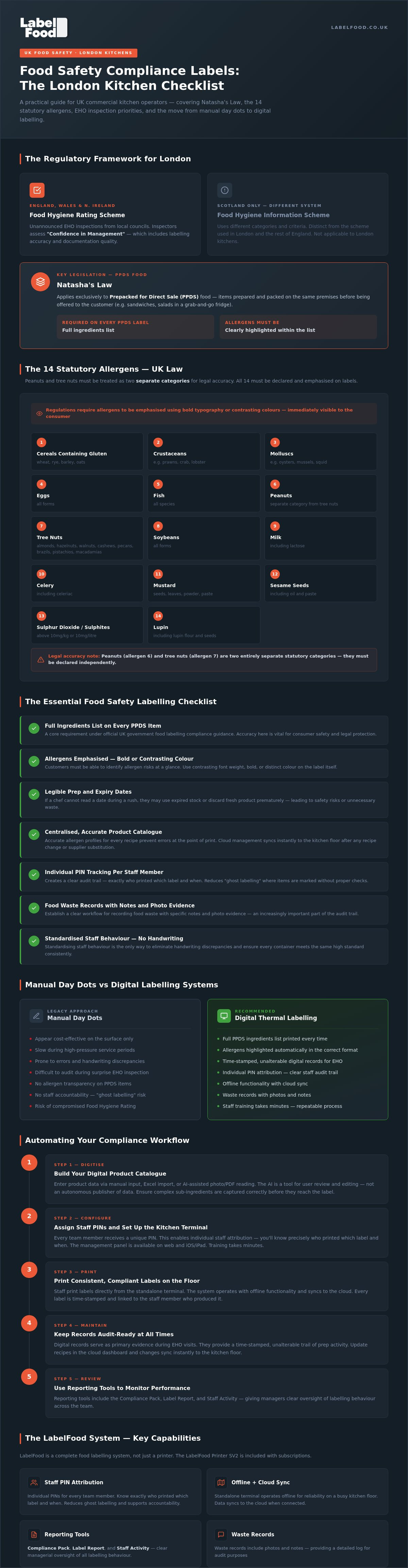
A major focus for current inspections is compliance with Natasha’s Law. This legislation applies only to Prepacked for Direct Sale (PPDS) food. These are items prepared and packed on the same premises before being offered to the customer, such as sandwiches or salads in a grab-and-go fridge. Every PPDS product must carry a label with a full ingredients list. Allergens must be clearly highlighted within that list to prevent consumer confusion.
The 14 Statutory Allergens in the UK
UK regulations identify 14 statutory allergens that require declaration. For legal accuracy, you must treat peanuts and tree nuts as two separate categories. The full list includes:
- Cereals containing gluten (wheat, rye, barley, oats)
- Crustaceans and Molluscs
- Eggs and Fish
- Peanuts and Soybeans
- Milk and Tree Nuts (almonds, hazelnuts, walnuts, cashews, pecans, brazils, pistachios, macadamias)
- Celery and Mustard
- Sesame seeds and Sulphur dioxide/sulphites
- Lupin
Regulations mandate that these allergens are emphasised on the label. This is typically achieved using bold typography or contrasting colours to ensure they are immediately visible to the consumer.
London EHO Inspection Focus Areas
When an EHO visits a London kitchen, they assess "Confidence in Management." This score reflects how well a business documents its safety procedures. Inspectors look for consistent date labelling on high-risk ingredients and prepared batches. Digital records are increasingly used as primary evidence during these visits. They provide a time-stamped, unalterable trail of prep activity. Using a digital terminal to generate labels ensures that your documentation is accurate and ready for review at any time.
The Essential Food Safety Labelling Checklist
Maintaining food safety compliance labels London kitchens can rely on requires a systematic approach to daily prep. It isn't just about sticking a label on a tub. It's about the data behind the sticker. Every Prepacked for Direct Sale (PPDS) item must feature a comprehensive ingredients list. This is a core requirement within the official UK government food labelling compliance guidance. Accuracy here is vital for consumer safety and legal protection.
Ensure allergens are emphasised using a contrasting font, bold weight, or distinct colour. This allows customers to identify risks at a glance. Legibility is equally important for prep and expiry dates. If a chef cannot read a date during a rush, they might use expired stock or discard fresh product prematurely. This leads to unnecessary waste or safety risks. Standardising staff behaviour is the only way to eliminate handwriting discrepancies and ensure every container meets the same high standard.
Product Data Management
Centralise your product catalogue. Maintaining accurate allergen profiles for every recipe prevents errors at the point of print. You can use AI-assisted tools to review and edit ingredient data. This helps ensure complex sub-ingredients are captured correctly before they reach the label. Updates made in the cloud management dashboard sync instantly to the kitchen floor. This ensures the team always uses the most current data, regardless of recipe changes or supplier substitutions.
Staff Accountability and Training
Assigning individual PINs to every team member creates a clear audit trail. You'll know exactly who printed which label and when. This accountability reduces "ghost labelling" where items are marked without proper checks. Establish a clear workflow for recording food waste with specific notes and photo evidence. Training kitchen porters and chefs on the labelling terminal takes minutes. The long-term efficiency gains are substantial. A complete food labelling system simplifies these steps into a single, repeatable process that staff can master quickly.
Manual Day Dots vs Digital Labelling Systems
Manual day dots are a legacy solution. They appear cost-effective at the point of purchase. However, the hidden costs of manual errors are substantial. Handwriting labels is slow. A chef might spend 20 minutes per shift marking prep tubs. Over a month, this labour cost exceeds the price of a digital subscription. Thermal printing reduces this task to seconds. It provides the consistent food safety compliance labels London kitchens need to maintain operational speed.
Legibility is a major risk factor. Unreadable handwriting leads to confusion during service. If a date is misinterpreted, high-risk ingredients might be kept too long. Paper stickers also present a hygiene risk. They are often absorbent, soaking up grease and moisture. This can harbour bacteria. Digital labels use non-absorbent materials designed for the rigours of a professional kitchen. They remain legible and intact even in humid environments. They don't peel or smudge when handled with wet hands.
Efficiency and Labour Savings
Time is a finite resource in any kitchen. Manual date marking drains labour hours that are better spent on production. Consider the cumulative time lost across a whole team. Automated systems remove the need for staff to cross-reference allergen charts manually. This is especially valuable for new starters who aren't yet familiar with the menu. The system handles the complex calculations. It automatically determines the correct expiry dates based on your specific shelf-life rules. This prevents stock rotation mistakes that lead to food waste or safety breaches.
Reliability and Hardware Standards
Professional environments require hardware that performs under pressure. The LabelFood Printer SV2 is engineered for high-heat, high-humidity spaces. It isn't a generic consumer device. It's a purpose-built terminal. Reliability is critical during peak times. If your kitchen Wi-Fi drops, the SV2 continues to work offline. It syncs with the cloud once the connection is restored. This ensures no interruption to your labelling workflow. The hardware integrates seamlessly with our allergen management software UK. This connection provides a unified platform for managing data across multiple sites. It's a robust solution for operators who prioritise precision and uptime.
Step-by-Step: Automating Your Compliance Workflow
Transitioning to a digital system requires a structured implementation. The process begins with data consolidation. You don't need to type every ingredient manually. Existing product lists can be uploaded via Excel to the cloud dashboard. This ensures the food safety compliance labels London kitchens produce are based on verified, centralised data from day one. Synchronisation is seamless. Changes made on the web dashboard or iOS app update the physical SV2 terminal instantly. Note that the management panel is accessible via web browsers or iOS devices, as there is no Android version of the software. This unified system eliminates the risk of staff using outdated recipe information.
Menu Onboarding and AI Assistance
Onboarding a complex menu is often the biggest hurdle for busy managers. Our AI-assisted tool simplifies this by reading product PDFs or photos of supplier labels. It identifies ingredients and suggests allergen highlights based on the 14 statutory categories. It's important to remember that the AI acts as a support tool. Every entry requires user review and editing before it is published to the printer. This keeps you in total control of the data accuracy. Once verified, these profiles are stored in the cloud, ready for instant access across your site.
Daily Kitchen Operations
Configuring the LabelFood Printer SV2 terminal is the next step. The device is designed for immediate utility. It works offline, so kitchen layout or Wi-Fi dead zones don't hinder production. You can set up individual staff profiles with unique PINs. This ensures every label is attributed to a specific team member, creating a robust audit trail for EHO visits. This level of accountability is essential for maintaining high professional standards.
Daily use is straightforward. Chefs select the item from the touchscreen to print prep labels at the start of a shift. The system automatically calculates shelf life based on your preset rules. If stock is discarded, staff use the terminal to record food waste. They can add notes and take photos directly through the system. This creates a digital waste log that is far more accurate than paper-based tallies. These records are stored in the cloud, providing a permanent history of kitchen efficiency. At the end of the week, you can generate a Compliance Pack or a Label Report from the web dashboard. These reporting tools provide a high-level overview of staff activity and labelling consistency for management review.
To start building your digital catalogue, explore our complete food labelling system.
Professional Standards: The LabelFood Solution for London
Deploying food safety compliance labels London kitchens can rely on requires hardware built for the environment. Generic tablet setups often fail in high-heat zones. They lack the durability needed for constant commercial use. The LabelFood Printer SV2 is a standalone solution. It operates independently. It doesn't rely on third-party apps that might crash or require consumer-grade updates. This reliability is why professional operators choose dedicated systems over consumer-grade hardware. It ensures the labelling process never stops, even during the busiest service periods.
The system creates digital kitchen compliance records automatically. Every label printed is a data point. When an EHO visits, you don't need to hunt for paper logs. You provide the Compliance Pack. This report summarises your safety protocols and staff activity. It shows the inspector that your management has total control over the prep area. For multi-site London businesses, this control is centralised. You can update a recipe in a Soho kitchen and have it ready for print in Shoreditch seconds later. It removes the risk of communication breakdowns across different locations.
Advanced Reporting and Waste Tracking
Efficiency is measured through data. The Label Report allows you to monitor exactly how many labels are used per shift. This helps in tracking stock usage and identifying inconsistencies in prep behaviour. Food waste recording is integrated directly into the workflow. Staff take photos and add notes to every discarded item. This identifies specific cost-saving opportunities by highlighting recurring waste patterns. You can review these logs via the management panel on web browsers or iOS devices. Having this level of transparency across your organisation ensures that high standards are maintained without constant on-site supervision.
Future-Proofing Your Kitchen
Regulations are not static. UK food safety standards will continue to evolve through 2026 and beyond. A digital system allows you to adapt instantly. You can update your allergen declarations or shelf-life rules without reprinting manual guides. This is vital for meeting Natasha’s Law labelling requirements as your menu grows and changes. The system scales with your business. Whether you run a single bakery or a growing restaurant group, the infrastructure remains robust. It ensures that every item leaving your kitchen carries a clear, compliant, and professional label, protecting both your customers and your reputation.
Achieving Audit Readiness in London Kitchens
Transitioning to a digital system is an operational necessity for high-volume environments. Manual day dots and handwritten prep stickers introduce unacceptable risks to your Food Hygiene Rating. By implementing food safety compliance labels London kitchens can trust, you eliminate handwriting discrepancies and ensure every PPDS item carries accurate allergen data. This approach doesn't just meet Natasha's Law requirements; it builds a culture of precision and accountability across your entire team. You move from reactive guesswork to proactive management.
The right tools transform compliance from a daily burden into a background process. LabelFood offers a complete system with the SV2 hardware included, providing the audit-ready reporting tools required for modern standards. It's a solution already trusted by professional UK kitchens to manage complex allergen profiles and staff activity through individual PINs. You can take control of your kitchen's documentation and reduce labour time spent on prep marking. Request a demo of the LabelFood Printer SV2 for your London kitchen today. Maintaining a five-star standard is achievable with a disciplined, automated workflow that supports your team's success.
Frequently Asked Questions
What are the 14 allergens that must be labelled in the UK?
The 14 statutory allergens are celery, cereals containing gluten, crustaceans, eggs, fish, lupin, milk, molluscs, mustard, peanuts, sesame seeds, soybeans, sulphur dioxide, and tree nuts. It's a legal requirement to treat peanuts and tree nuts as separate categories. Tree nuts include almonds, hazelnuts, walnuts, cashews, pecans, brazils, pistachios, and macadamias. Every ingredient list on a PPDS label must highlight these specific items clearly, usually in bold or a contrasting colour.
Does Natasha’s Law apply to food made to order in London restaurants?
Natasha’s Law doesn't apply to food made to order. It applies exclusively to Prepacked for Direct Sale (PPDS) food. This includes items prepared and packed on the same premises before a customer orders them, such as sandwiches in a grab-and-go fridge. For non-prepacked food made to order, you must still provide allergen information upon request, but it doesn't require the full ingredient labelling mandated for PPDS items.
Can I use a standard office printer for food safety labels?
Standard office printers aren't suitable for the food safety compliance labels London kitchens require. Office paper is absorbent and often fails to adhere to damp or cold surfaces. It also poses a hygiene risk as it can harbour bacteria. Professional thermal printers, like the SV2, use non-absorbent, moisture-resistant labels designed for high-heat and refrigerated environments. These labels remain legible and stay attached to containers throughout the entire storage and prep cycle.
How does the LabelFood Printer SV2 handle Wi-Fi outages?
The LabelFood Printer SV2 is designed for high-pressure environments where connectivity might be unreliable. It features full offline functionality, allowing your team to print labels even if the kitchen Wi-Fi fails. All data remains accessible on the terminal. Once the connection is restored, the device automatically syncs with the cloud management dashboard. This ensures your digital records and staff activity logs are updated without any manual intervention or data loss.
What is the difference between PPDS and non-prepacked food?
PPDS food is prepared and packed on-site before the consumer chooses or orders it. This includes items like boxed salads or pre-wrapped baguettes. Non-prepacked food refers to items served loose, such as a meal in a restaurant or a pastry placed in a bag at the point of sale. Whilst both require allergen transparency, only PPDS items must carry a physical label with a full ingredients list and emphasised allergens.
How long do food safety compliance records need to be kept?
There is no single fixed duration for all records, but many UK local authorities recommend keeping food safety records for at least six months beyond the shelf life of the product. For items with a long shelf life, this can extend to two years. Maintaining digital records via the Compliance Pack simplifies this process. It removes the need for physical storage space and ensures you can retrieve historical data instantly during an unannounced EHO visit.
Do I need a separate label for peanuts and tree nuts?
You don't need separate labels, but you must identify them as separate categories within the ingredients list. Peanuts and tree nuts are distinct allergens under UK law. If a product contains both, both must be highlighted. For example, a label might list "Peanuts" and "Cashew Nuts" in bold. Using a digital system ensures these distinctions are consistently applied across your entire product catalogue without manual entry errors.
Is there an Android version of the LabelFood management dashboard?
There is no Android version of the LabelFood management dashboard. The system is designed to run on web browsers for desktop management and as a dedicated app for iOS and iPad devices. This focus ensures a stable and secure environment for managing the food safety compliance labels London kitchens use. Kitchen managers can access the cloud dashboard from any computer to update recipes, review staff PIN activity, or generate waste reports.