
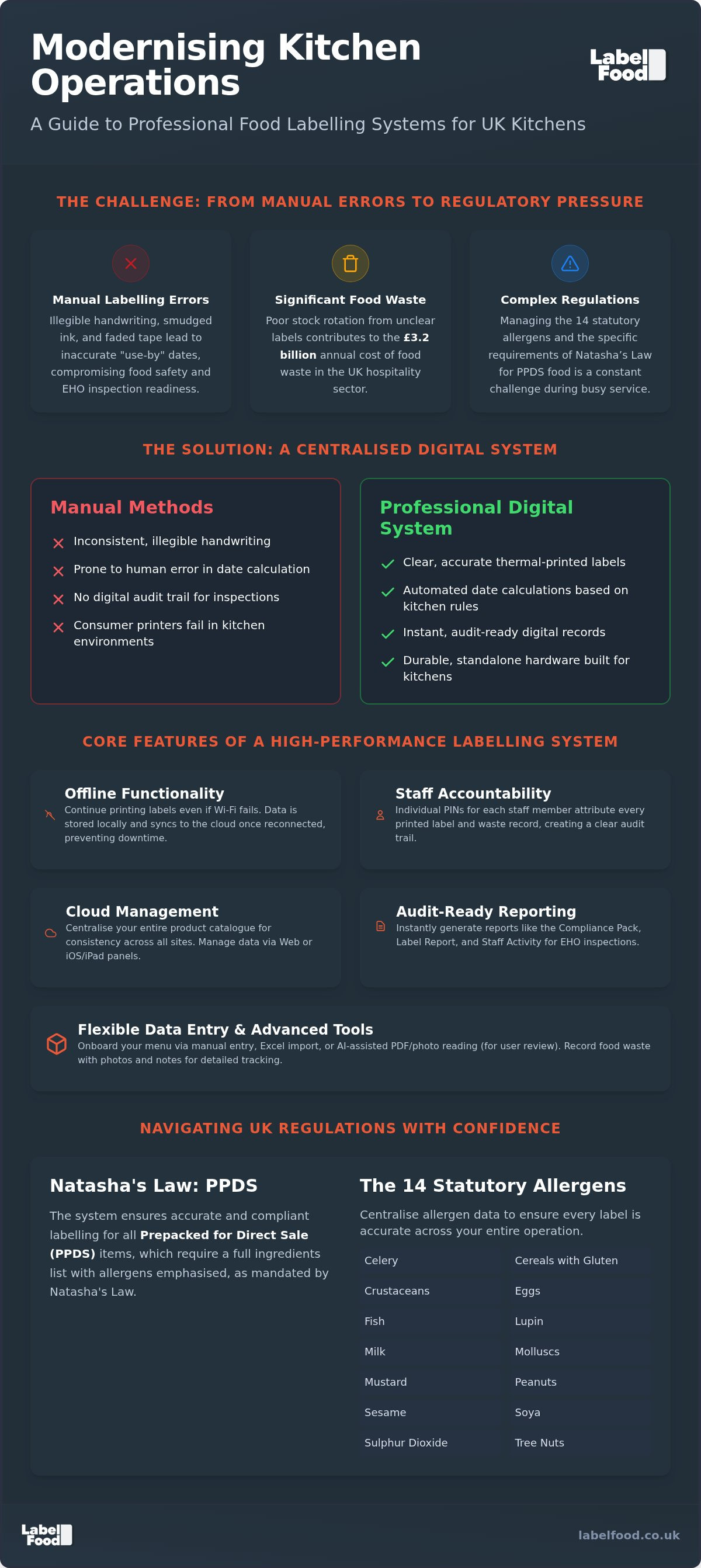
An EHO inspection shouldn't feel like a gamble. It's the ultimate test of your kitchen's discipline and operational control. Relying on manual handwriting and faded tape often leads to errors that compromise safety and shrink your margins. Integrating a professional kitchen labelling machine removes these points of failure. You likely find the complexity of managing 14 statutory allergens and the requirements of Natasha’s Law a constant source of stress during a busy shift.
It's a valid concern for any operator. Food waste costs the UK hospitality sector an estimated £3.2 billion annually, much of it due to poor stock rotation and illegible use-by dates. This guide explains how the right labelling system streamlines your prep, supports accuracy for prepacked for direct sale items, and reduces avoidable waste. We'll explore how digital tools provide the transparency your customers demand and the audit-ready records your inspectors expect. Discover how cloud management, AI-assisted onboarding, and individual staff PINs create a culture of accountability whilst keeping you in total control of your kitchen data.
Key Takeaways
- A professional kitchen labelling machine replaces manual handwriting errors with thermal-printed accuracy to speed up prep workflows.
- Correctly apply Natasha’s Law to prepacked for direct sale (PPDS) food and manage all 14 statutory allergens with centralised data control.
- Reduce the high costs of food waste by integrating digital recording, including photos and notes, into the standard labelling process.
- Maintain audit-ready records for EHO inspections using the Compliance Pack and Staff Activity reports via a secure cloud dashboard.
- Utilise standalone hardware that functions offline whilst syncing data to web or iOS management panels for multi-site oversight.
Understanding the Professional Kitchen Labelling Machine
A professional kitchen labelling machine is more than a simple peripheral. It is a unified system designed to replace the unreliability of manual handwriting with thermal-printed precision. In a high-pressure environment, illegible "day dots" or smudged marker pen on masking tape create unnecessary risk. A professional system integrates three core pillars: a standalone thermal printer, a cloud management dashboard, and secure software. Unlike basic office equipment, this hardware is built for the physical realities of the line. It survives high heat, humidity, and constant use.
Transitioning from traditional manual methods to a digital prep labelling workflow ensures every item in your walk-in has a clear, standardised record. This shift is part of a broader movement within global food labelling regulations to improve transparency and safety. By centralising your product catalogue in the cloud, you ensure that every label printed across multiple sites is identical. This eliminates the "chef's choice" approach to shelf-life dating. Consistency becomes the default setting for your kitchen team.
The Role of Digital Labels in UK Food Safety
Legibility is the foundation of a successful Environmental Health Officer (EHO) inspection. Handwritten labels are prone to human error, especially when calculating "use by" or "best before" dates during a busy prep session. A professional system automates these calculations based on your pre-set kitchen rules. Once printed, the system maintains digital logs that serve as evidence of due diligence. If an inspector asks for production records from a previous week, you don't hunt through paper folders. You access the cloud dashboard for instant reporting. This digital trail proves you are in control of your stock rotation.
Why Consumer Printers Fail in Commercial Kitchens
Consumer-grade printers or standard Bluetooth label makers aren't built for commercial environments. Grease, steam, and extreme temperature fluctuations quickly degrade non-specialised hardware. Standard Bluetooth devices often struggle with connectivity in kitchens filled with stainless steel and heavy machinery. Reliability is compromised when you need it most.
The labels themselves are a critical point of failure for generic systems. Professional thermal label rolls are engineered to stay attached in deep-chill refrigeration yet peel away cleanly during the wash cycle. Consumer labels often leave adhesive residue or disintegrate when wet. A dedicated professional kitchen labelling machine ensures the hardware remains operational whilst the labels remain legible, regardless of the environment.
Key Features of a High-Performance Labelling System
A high-performance professional kitchen labeling machine is defined by its ability to maintain operations under pressure. Reliability starts with standalone functionality. If your kitchen's internet connection drops, your labelling cannot stop. A robust system stores data locally, allowing for continuous printing whilst queuing updates to sync with the cloud once connectivity is restored. This autonomy prevents bottlenecks during peak service hours.
Efficiency is further driven by thermal printing technology. By using heat-sensitive paper, these systems eliminate the need for ink cartridges or ribbons. This reduces long-term costs and removes the risk of ink smudging on food-contact surfaces. Control is maintained through staff accountability. Individual PINs ensure every label is attributed to a specific user. This creates a clear audit trail and encourages better behaviour amongst the team. You can view exactly who is processing prep or recording waste via the digital management panel.
Hardware Reliability and Design
Space is a premium in commercial kitchens. A system must offer a compact footprint to fit onto crowded prep stations without obstructing workflows. Integrated touchscreens are essential; they remove the need for external tablets or fragile handheld devices that are easily dropped or misplaced. For a deeper look at hardware specifications, read about the LabelFood Printer SV2: The Standalone Solution for UK Kitchen Compliance. This unit operates as a self-contained hub, keeping your workspace organised and wire-free.
Software and Data Management
Speed of setup is a priority for busy operators. Modern systems allow for rapid menu onboarding through Excel imports or AI-assisted reading of existing PDFs. AI serves as a tool for user review and editing; it does not autonomously publish data. This ensures your allergen records remain accurate and under your total control. The cloud dashboard centralises this information, which is particularly effective for multi-site management. Changes made at the head-office level are pushed to every printer instantly.
Reporting tools provide the final layer of protection. You can generate a Compliance Pack or Staff Activity log at any time, providing immediate proof of operational standards. These reports are accessible via web browsers or iOS and iPad devices. The management panel is not available on Android. To see how these tools integrate into your daily routine, you can explore our food labelling solutions online.
Navigating UK Regulations: Natasha’s Law and Allergens
Compliance in a UK kitchen requires a precise understanding of which laws apply to your specific operation. Natasha’s Law, effective since October 2021, mandates that all food Prepacked for Direct Sale (PPDS) must carry a label with a full ingredients list and emphasised allergens. Confusing PPDS with standard prep labelling is a common error. PPDS refers specifically to food packaged on-site before a customer selects or orders it. A professional kitchen labeling machine ensures these labels are accurate, legible, and compliant with current standards.
For a comprehensive breakdown of these mandates, consult our Natasha’s Law Labelling Requirements: The Definitive 2026 Guide for UK Kitchens. Centralising your ingredient data within a digital system removes the guesswork. It prevents cross-contamination of information by providing automated warnings when high-risk ingredients are added to a recipe. This level of control is essential for protecting both your customers and your business reputation.
The 14 Statutory Allergens in the UK
UK law recognises 14 statutory allergens that must be declared. These include celery, cereals containing gluten, crustaceans, eggs, fish, lupin, milk, molluscs, mustard, sesame, soybeans, and sulphur dioxide. Crucially, peanuts and tree nuts are treated as separate categories. Relying on manual handwriting to highlight these in an ingredient list is high-risk. Human error during a busy shift often leads to missed declarations or illegible warnings.
A digital labelling system automates the bolding of these specific allergens within your product catalogue. When your team prints a label for a PPDS item, the system recognises the allergens and emphasises them according to regulatory requirements. This consistency is vital for customer safety. It ensures that even if your menu changes, your allergen communication remains accurate and under your total control.
Audit Readiness and EHO Inspections
Environmental Health Officers (EHOs) look for evidence of a robust food safety management system. In England, Wales, and Northern Ireland, this is reflected in the Food Hygiene Rating Scheme. In Scotland, the Food Hygiene Information Scheme applies. Whilst a professional kitchen labeling machine does not guarantee a specific rating, it serves as a critical support tool for record-keeping and due diligence.
Digital records create an undeniable paper trail. During an unannounced inspection, you can produce Staff Activity logs and Compliance Packs that demonstrate your commitment to operational standards. This level of transparency shows that your kitchen operates with discipline. It transforms allergen management from a point of stress into a controlled, repeatable process that stands up to scrutiny.
Reducing Costs Through Food Waste Recording
Food waste is an invisible drain on kitchen profitability. In the UK hospitality sector, this waste costs an estimated £3.2 billion in direct business costs annually. Integrating waste recording into your daily workflow transforms how you manage stock. A professional kitchen labeling machine shouldn't just print dates; it should act as a data entry point for everything that doesn't make it to the plate. The LabelFood system allows staff to log items as waste at the moment of disposal. This captures critical data before the evidence is gone.
Capturing details is essential for meaningful change. The SV2 system enables staff to add photos and notes to every waste entry. This provides context. Was the item spoiled, over-prepped, or dropped? By analysing these digital records via the cloud dashboard, kitchen managers can identify specific patterns. You might find that certain prep levels are consistently too high on Tuesday mornings. Adjusting your ordering based on these reports directly improves your bottom line. It's about making decisions based on facts rather than guesswork.
Digital Waste Logs vs Paper Records
Traditional paper waste sheets are often lost, illegible, or ignored. They provide zero real-time visibility. Digital entry ensures every item is accounted for and attributed to a staff member via their unique PIN. This creates a culture of accountability amongst the team. Managers can monitor waste patterns across multiple sites from a single web or iOS management panel. For a detailed look at implementing these processes, read our Food Waste Recording Software: The Professional Guide for UK Kitchens.
The ROI of a Professional Labelling System
The return on investment for a professional kitchen labeling machine is immediate. You save significant time by eliminating manual handwriting during morning prep. Staff can focus on production rather than calculating "use by" dates. Accurate expiry tracking reduces stock loss by ensuring older items are used first. These efficiencies often offset the cost of a professional subscription. You aren't just buying a printer; you're investing in a system that protects your margins. You can view our complete food labelling system to see how it integrates waste and prep management into one platform.
Choosing the Right Professional Labelling Machine
Selecting a professional kitchen labeling machine requires a shift in perspective. You aren't just purchasing a piece of hardware; you're choosing a partner for your kitchen's operational stability. Evaluate the total cost of ownership carefully. One-off hardware purchases often seem attractive initially but frequently lack the necessary software updates and UK-based support required for long-term compliance. A subscription model ensures your system evolves with changing regulations. The LabelFood Printer SV2 is included with your subscription, providing a complete system that integrates hardware, software, and cloud management.
Your choice must align with your existing digital infrastructure. The LabelFood management panel is accessible via web browsers and iOS or iPad devices. There is no Android version. This focus on specific platforms ensures a more stable and secure user experience for kitchen managers. Reliability in high-pressure environments is non-negotiable. UK-based support is a critical component of this reliability. When questions arise during a busy shift, you need a partner who understands the specific nuances of the UK Food Hygiene Rating Scheme and Natasha's Law.
A unified system removes the friction of multi-site management. If you operate several bakeries or restaurants, you can push menu updates to every professional kitchen labeling machine in your estate instantly. This level of control is impossible with generic, non-connected devices. It ensures that every site follows the same safety protocols and uses the same accurate ingredient data.
Implementation and Staff Training
System setup is rapid. Use AI-assisted menu onboarding to read your existing PDFs or Excel files. Remember that the AI is a tool for your review and editing; it does not publish data autonomously. This keeps you in total control of your allergen information. Train your team on individual PIN-based entry. This ensures every prep label and waste record is attributed to a specific person, encouraging better behaviour and accountability. Organise your kitchen centre to include a dedicated labelling station. This reduces clutter and ensures the system is always ready for use during prep cycles.
Next Steps for Your Kitchen
Start with a kitchen audit. Identify where manual errors occur or where traditional "day dots" are failing. Look for gaps in your PPDS labelling for Natasha's Law. Once you understand your requirements, seeing the system in action is the next logical step. You can enquire about the LabelFood Printer SV2 today to request a demonstration. Transitioning to a unified system is a straightforward process that delivers immediate operational clarity and peace of mind.
Modernising Your Kitchen Operations
Adopting a professional kitchen labelling machine moves your business beyond the risks of manual record-keeping. You've seen how digital precision streamlines prep workflows and ensures Natasha's Law requirements for PPDS items are met with accuracy. By centralising your allergen data and automating waste recording, you protect your margins and your customers simultaneously. Reliability is a core requirement; robust offline functionality ensures your kitchen never stops printing, even during internet outages.
Implementation is immediate with AI-assisted menu onboarding. This tool allows you to review and edit your product catalogue quickly, moving your team from setup to operation without delay. When an inspector arrives, the Compliance Pack reporting provides the evidence of due diligence they expect. It's a systematic approach to kitchen discipline. You can take total control of your compliance and food waste today. Request a demo of the LabelFood Printer SV2 to see how this unified system integrates into your physical workspace. Start building a more efficient, audit-ready kitchen centre now.
Frequently Asked Questions
What is Natasha’s Law and how does it affect my kitchen labelling?
Natasha's Law requires all food Prepacked for Direct Sale (PPDS) to carry a label with a full ingredients list and emphasised allergens. For London operators, this means any item packaged on-site before a customer selects it must be clearly labelled. Using a professional kitchen labeling machine automates the bolding of allergens, reducing the risk of manual errors during a busy service and ensuring your communication is consistent with current UK safety standards.
Is the LabelFood Printer SV2 a standalone device or does it need a tablet?
The LabelFood Printer SV2 is a standalone device. It doesn't require a secondary tablet or smartphone to operate at the prep station. The unit features an integrated screen for direct data entry, keeping your workspace organised and free from unnecessary wires. This design is built specifically for the physical demands of a high-pressure kitchen environment, providing a reliable hub for all your prep and compliance labelling needs.
How does the system handle the 14 statutory allergens in the UK?
The system manages all 14 statutory allergens recognised in the UK, including the specific separation of peanuts and tree nuts. When you enter ingredients into the cloud dashboard, the software automatically identifies and highlights these allergens for your review. This feature is essential for maintaining accurate records and protecting customers with allergies. It ensures your team follows a standardised process for every label printed across your London site.
Can I record food waste directly on the labelling machine?
You can record food waste directly on the SV2 hardware. The system allows staff to capture photos and notes of wasted items, providing context for stock loss. These records are attributed to individual staff members via unique PINs. This data syncs to your management panel, allowing you to analyse waste patterns and adjust prep levels. It transforms the labelling station into a tool for protecting your kitchen's profit margins.
Does the labelling software work on Android devices?
The LabelFood management panel is not compatible with Android devices. It is available exclusively via web browsers and on iOS or iPad platforms. This specific focus ensures high stability and security for your kitchen data. Managers can access reports, update menus, and monitor staff activity from any London location using a compatible Apple device or a standard desktop browser. This maintains a reliable connection between the physical printer and the digital dashboard.
What happens to my labelling if the kitchen Wi-Fi goes down?
Your labelling workflow won't stop if the Wi-Fi fails. The SV2 features robust offline functionality, allowing it to print labels using data stored locally on the device. Once your internet connection is restored, the printer automatically syncs all activity and waste records back to the cloud dashboard. This ensures your digital logs remain complete and your kitchen stays operational during connectivity issues, providing total peace of mind for busy managers.
How do I import my existing menu into the LabelFood system?
Importing your catalogue is a streamlined process. You can upload existing menus via Excel import or utilise AI-assisted onboarding to read your current PDFs. The AI acts as a tool for your review and editing; it never publishes data autonomously. This ensures you maintain total control over the accuracy of your ingredient and allergen records whilst significantly reducing the time required to set up your professional kitchen labeling machine.
Is digital labelling accepted by EHO inspectors in England and Wales?
Digital record-keeping is widely accepted by EHO inspectors in England and Wales. The system generates specific Compliance Packs and Staff Activity logs that provide a clear paper trail of your food safety procedures. Whilst the software acts as a support tool rather than a compliance guarantor, it provides the transparency needed to demonstrate due diligence. London kitchens use these digital records to show inspectors that their stock rotation and allergen management are under control.