
A single handwritten mistake on a prep label can compromise your entire food safety record. In a high-pressure UK kitchen, maintaining consistency is difficult when facing high staff turnover and complex regulations. You likely spend hours each week managing manual waste logs and checking prep date rotations. It is a fragmented process that leaves room for error, particularly regarding Natasha's Law requirements for prepacked for direct sale (PPDS) food.
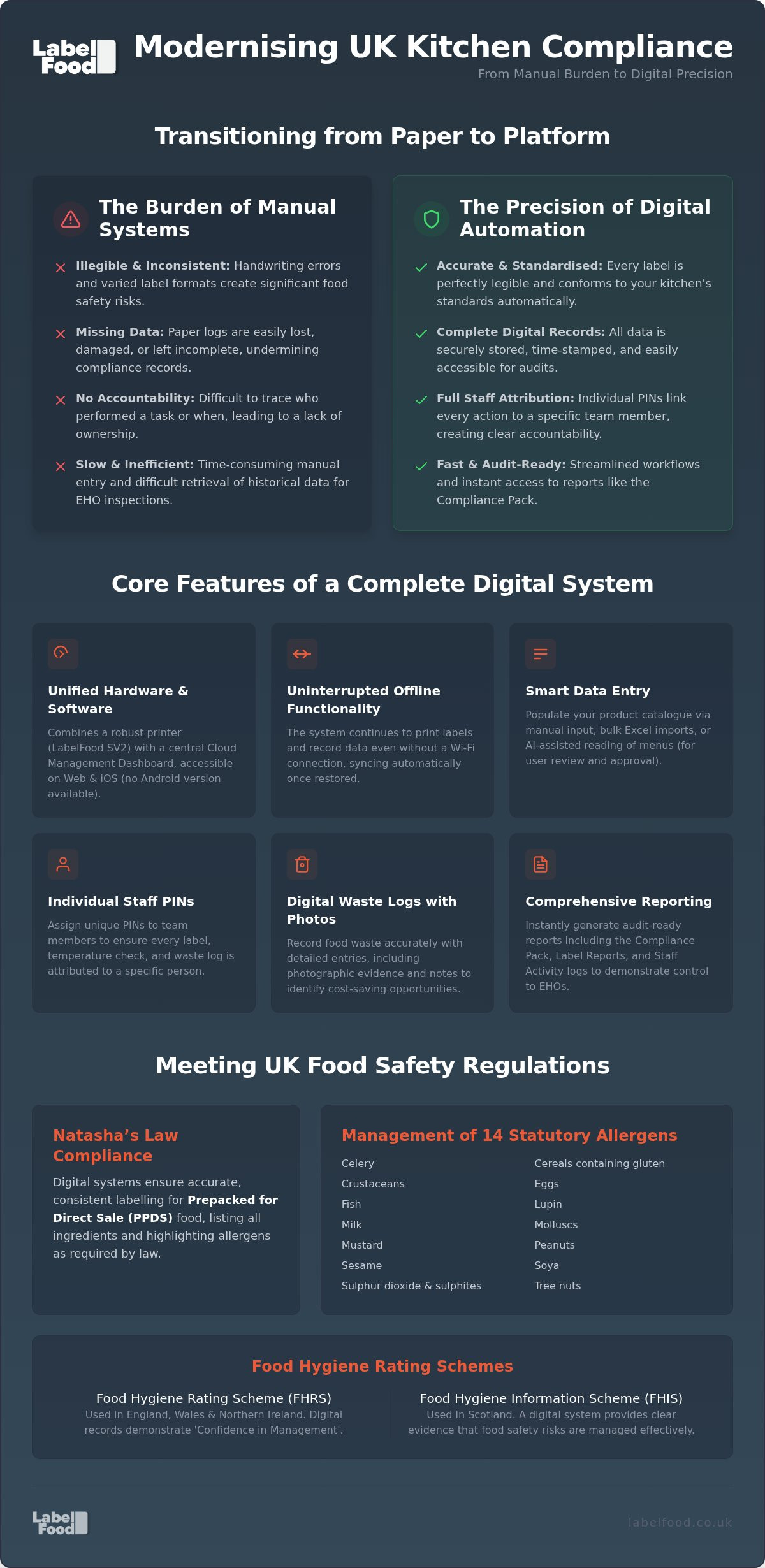
Relying on manual systems is no longer the most efficient way to manage risk. Implementing kitchen compliance automation replaces these unreliable methods with digital precision. It ensures that every allergen label and waste entry is accurate, legible, and attributed to a specific team member. This transition moves your operation away from guesswork and towards a stable, data-driven environment.
This guide explains how to integrate digital systems to ensure your kitchen remains audit-ready. You'll learn how to reduce food waste through better tracking and accelerate prep workflows with professional labelling. We focus on practical steps to achieve a consistent compliance record without the administrative burden of traditional paperwork.
Key Takeaways
- Manual record-keeping is prone to illegible handwriting and missing data. Digital systems provide the precision required to meet UK food safety standards.
- Transitioning to kitchen compliance automation ensures that Natasha’s Law requirements for PPDS food are met with accurate allergen labels.
- Digital waste logs with photo evidence allow for better tracking and reduced food waste compared to traditional paper records.
- Individual staff PINs create clear activity attribution, making your kitchen more organised and accountable during busy shifts.
- Integrated reporting tools like the Compliance Pack provide an audit-ready history to support your record-keeping for EHO inspections.
The Burden of Manual Compliance in UK Kitchens
Kitchen compliance automation is the digitisation of safety records and labelling. It is a transition from fragmented paper logs to a unified digital management layer. Manual record-keeping is inherently prone to error. In a professional British kitchen, the environment is fast-paced. Handwriting becomes illegible. Data goes missing. These gaps are more than just administrative oversights; they are significant risks to the business. Manual systems are slow and unreliable.
UK food safety regulations require extreme precision. Managing the 14 statutory allergens, including peanuts and nuts as separate categories, is a daily necessity. High staff turnover compounds the problem. New team members often lack familiarity with specific kitchen standards. This leads to inconsistent labelling. When labelling standards fluctuate, the risk of a safety incident increases. Manual systems cannot enforce consistency. They rely entirely on human memory and diligence. Digital kitchen compliance automation removes this reliance on individual memory.
The Risk of Paper-Based Systems
Physical logs are impractical for modern operations. They are easily damaged by kitchen spills or lost entirely. Paper lacks durability. It also lacks accountability. Without digital timestamps and individual staff PINs, it's difficult to track who completed a task. You can't verify if a fridge temperature was taken at 09:00 or 11:30. Retrieving historical data during an unannounced inspection is often a slow, stressful process. It suggests a lack of organisation. Digital systems remove this friction. They provide immediate access to a clean, audit-ready history. Records are stored securely and remain accessible when needed.
Regulatory Pressures: EHO and Food Hygiene Ratings
Compliance is built on fundamental food safety principles. The Food Hygiene Rating Scheme (FHRS) used in England, Wales, and Northern Ireland places heavy emphasis on confidence in management. Digital records demonstrate this control. They provide evidence of a proactive approach. In Scotland, the Food Hygiene Information Scheme (FHIS) similarly requires proof that risks are being managed effectively.
Manual systems often fail during a rigorous food safety audit. An Environmental Health Officer (EHO) looks for a consistent pattern of care. If records are incomplete or illegible, it undermines the trust in your operation. Automation provides the infrastructure to support these standards. It ensures that every record is captured accurately. This level of precision is difficult to maintain with a pen and a clipboard. It's about creating a reliable, verifiable trail of activity.
How Kitchen Compliance Automation Systems Work
Modern kitchen compliance automation operates through a dual-layer approach. It combines physical hardware at the prep station with a digital management layer in the cloud. This structure ensures that food safety protocols are not just followed but recorded in real-time. It replaces the fragmented nature of paper logs with a unified stream of data. The result is a more stable environment for both staff and management.
Hardware vs Software: A Unified System
A professional kitchen requires equipment that can withstand heat, steam, and constant use. General-purpose tablets or consumer printers often fail under these conditions. A dedicated device like the LabelFood Printer SV2 is essential. It serves as the physical touchpoint for the entire system. This hardware integrates directly with a Cloud Management Dashboard. The dashboard acts as the central hub for your operation. You can access it via web browsers or iOS/iPad devices. Note that there is no Android version available.
Reliability is a priority during service. The system features offline functionality to prevent interruptions. If your kitchen loses Wi-Fi connectivity, the printer continues to function. Your team can still print labels and record data. Once the connection is restored, the device syncs with the cloud automatically. This ensures zero downtime. It also guarantees that your digital record remains complete and accurate. If you want to improve your kitchen's reliability, consider investing in a complete food labelling system that handles these transitions seamlessly.
Data Management and AI Tools
Setting up a product catalogue is often the most time-consuming part of digitisation. You have three primary methods for data entry. Manual input is available for small updates. Excel imports allow for bulk uploads of existing data. For faster onboarding, the system uses AI-assisted reading to process photos or PDFs of your menus.
The AI is a tool for efficiency, not an autonomous publisher. Every piece of data the AI extracts must be reviewed and edited by a human user before it is saved. This human-in-the-loop requirement is vital for maintaining legal accuracy. It is particularly important when following official government guidance for Prepacked for Direct Sale (PPDS) items. The 14 statutory allergens must be identified with total precision. This includes treating peanuts and tree nuts as separate categories to ensure clear communication to the consumer.
Centralised management is a major benefit for multi-site operators. You can organise your product data from a single location. Updates to recipes or allergen information are pushed to all sites instantly. This eliminates the risk of different branches using outdated information. It ensures a professional standard is maintained across your entire estate. It provides total control over what is printed on every label in every kitchen.
Digital vs Manual: Managing Natasha’s Law and Allergens
Handwritten labels are a liability in a commercial kitchen. "Day dots" often lack necessary detail. They are prone to smudging and illegible handwriting. Implementing kitchen compliance automation replaces these manual methods with standardised, printed labels. This transition ensures that every item in your kitchen is correctly identified. It provides a level of precision that manual systems cannot match. Clear, printed information is the foundation of a safe kitchen environment.
Understanding Natasha’s Law Requirements
Specific rules apply to prepacked for direct sale (PPDS) food. Under Natasha's Law, these items must display a full ingredients list with allergens emphasised. Failing to include a single ingredient is a significant legal risk. Automation ensures that your labels align with the Food Standards Agency guidance on Natasha's Law. The system manages font sizes and visual emphasis automatically. It ensures the text remains legible and meets the minimum font size requirements. This removes the risk of a staff member forgetting to highlight a specific allergen or using a layout that does not meet legal standards during a busy shift.
Managing the 14 Statutory Allergens
The 14 statutory allergens require precise management. You must distinguish between peanuts and tree nuts. They are separate categories. Digital systems automate this distinction across your entire product catalogue. When an ingredient list is printed, the software identifies and emphasises the allergens. This typically involves bolding the specific ingredient. It is a consistent process that does not depend on staff memory or training levels. Reliance on human memory is a common point of failure in manual kitchens.
Standardising allergen data ensures that every site in your operation follows the same safety protocols. Professional labels also reduce the risk of cross-contamination. They provide definitive information for staff handling ingredients in a shared space. These labels are durable and remain legible in cold or humid environments. They are far more reliable than handwritten alternatives which often fade or peel. Printed labels project a professional standard to both your team and visiting inspectors. This level of detail is essential for maintaining an audit-ready kitchen and protecting your customers from avoidable harm.
Implementing Automation in Your Food Prep Workflow
Integrating kitchen compliance automation into your daily workflow changes the morning setup. Instead of manually calculating shelf-life and writing labels, staff select products from a pre-configured list. The printer generates accurate prep date labels instantly. This reduces setup time and eliminates calculation errors. It establishes a professional standard from the start of the shift. Digital systems ensure that date rotations are consistent across every station. You don't have to rely on staff memory for complex rotation rules.
Staff Accountability and Activity Logs
Accountability is built into the system through individual staff PINs. Every label printed and every waste entry made is attributed to a specific team member. This creates a transparent activity log. Managers can use Staff Activity reports to monitor performance and identify where additional training is required. It's about building a culture of precision. Digital records replace the anonymity of manual logs. You know exactly who handled the prep and when it occurred. This level of oversight is difficult to achieve with paper records. It provides clear evidence of staff diligence during a safety review.
Digital Food Waste Recording
Manual waste logs are often incomplete or ignored. Using food waste recording software makes the process pragmatic. Staff record waste using the same interface used for labelling. The system allows for digital notes and photo evidence. Seeing why food is being discarded is as important as knowing the quantity. You can analyse waste patterns to adjust your ordering and prep levels. This data-driven approach reduces loss and improves your bottom line. It provides a level of detail that a simple tally on a sheet can't match. You gain total visibility over your inventory loss.
The system generates comprehensive reports for management review. The Compliance Pack provides an overview of your safety records. Label Reports show the volume and type of items being processed. These documents are essential for internal audits and EHO inspections. They prove that your kitchen operates with total control. The data is stored securely in the cloud and remains accessible for historical review. This removes the stress of searching through physical folders. If you are ready to professionalise your workflow, you can view our complete food labelling system to see how these tools work in practice.
The LabelFood System: A Professional Standard for 2026
Modern kitchen compliance automation requires hardware that matches the intensity of a professional environment. A system is only as reliable as its weakest component. Generic hardware often fails in the heat and humidity of a commercial kitchen. The LabelFood system is designed to provide a stabilizing force. It offers a unified approach to record-keeping and labelling. This is a support tool for professional standards; it is not a compliance guarantor. The responsibility for safety remains with the operator, but the system provides the infrastructure to manage it effectively.
SV2 Printer Specifications and Reliability
The LabelFood Printer SV2 is the core of the physical setup. It is built for the rigours of a commercial kitchen. It functions as a standalone solution. You don't need a constant PC connection to print labels or record data. This autonomy is vital during a busy service. The printer utilizes thermal technology. This means no ink or toner is required. It reduces long-term maintenance costs and prevents downtime caused by empty cartridges. The device is durable and easy to clean. It ensures that every label for prepacked for direct sale (PPDS) food remains legible and professional.
Audit Readiness and Professional Reporting
A subscription-based model provides more than just software access. It ensures a consistent supply of label rolls and ongoing technical support. This removes the administrative burden of managing consumables. The system focuses on providing digital kitchen compliance records that are clear and accessible. The Compliance Pack is a specific reporting tool. It compiles your safety data into a format that supports the requirements of an EHO inspection. This is applicable whether you are under the Food Hygiene Rating Scheme in England or the Food Hygiene Information Scheme in Scotland.
Management data is accessible through the Cloud Management Dashboard. You can view reports on staff activity and food waste from any location. The dashboard is available on web browsers and iOS or iPad devices. It's important to note that there is no Android version of the management panel. The system uses AI-assisted photo and PDF reading to speed up menu onboarding. This AI is a tool for user review and editing; it never publishes data autonomously. This ensures that the 14 statutory allergens, including the separate categories for peanuts and tree nuts, are always verified by a human professional. This combination of hardware durability and digital precision establishes a high standard for any UK food business.
Future-Proofing Your Kitchen Operations
Manual record-keeping is an operational risk that modern kitchens don't need to carry. Transitioning to kitchen compliance automation provides a stabilizing force in a high-pressure environment. It replaces illegible handwriting and fragmented logs with a unified, digital management layer. This shift ensures your records remain audit-ready and consistent across every site.
The system streamlines your workflow with the LabelFood Printer SV2 and simplifies reporting through the dedicated Compliance Pack. AI-assisted menu onboarding also reduces the administrative burden of setting up your product catalogue. These tools are designed to support your professional standards without the friction of traditional paperwork. You gain total visibility over your labelling and waste records from a single dashboard.
View the LabelFood Printer SV2 and start your subscription to professionalise your kitchen's record-keeping today. Taking these steps now creates a more organised, efficient, and reliable operation for the future.
Frequently Asked Questions
Does kitchen compliance automation guarantee a 5-star hygiene rating?
Kitchen compliance automation does not guarantee a specific food hygiene rating. It acts as a support tool for record-keeping and procedural consistency. Achieving a 5-star rating under the Food Hygiene Rating Scheme in England or a "Pass" in Scotland depends on your overall management and physical standards. The system provides the audit-ready evidence EHOs look for, but the responsibility for maintaining safety protocols remains with the kitchen operator.
What food items fall under Natasha’s Law labelling requirements?
Natasha's Law applies exclusively to food that is prepacked for direct sale (PPDS). This includes items prepared and packed on the same premises before the customer selects them. Examples common in London bakeries and cafes include pre-wrapped sandwiches and boxed salads. These items must display a full ingredients list with the 14 statutory allergens clearly emphasised. Items prepared to order or packed after the customer chooses them are not classified as PPDS.
Can the system track the 14 statutory allergens automatically?
The system identifies the 14 statutory allergens by cross-referencing your ingredients list with legal requirements. It treats peanuts and tree nuts as separate categories for total precision. Whilst the AI-assisted onboarding extracts this data from menus or PDFs, it never publishes data autonomously. You must review and edit the extracted information before saving. This ensures that every label printed in your kitchen meets the specific legal standards for allergen emphasis.
Does the LabelFood Printer SV2 work if the kitchen internet goes down?
The LabelFood Printer SV2 features full offline functionality to ensure zero downtime during service. Your team can continue to print labels and record prep dates even if your Wi-Fi connection fails. The device stores all activity locally and syncs with the Cloud Management Dashboard automatically once the internet is restored. This prevents the loss of safety records and maintains the professional standard of your labelling during connectivity issues.
How does digital waste recording help reduce kitchen costs?
Digital waste recording provides the data needed to identify the root causes of inventory loss. By capturing photos and notes for every entry, you can distinguish between spoilage, prep errors, or over-ordering. Analysing these patterns allows you to adjust your ordering levels and prep schedules with precision. Reducing avoidable waste directly improves your bottom line and helps maintain a more sustainable, cost-effective operation across your London sites.
Is the management dashboard available on Android devices?
The Cloud Management Dashboard is currently available on web browsers and iOS or iPad devices only. There is no Android version of the management panel. This focus ensures a high-performance experience for managers who need to access Compliance Packs or Staff Activity reports on professional hardware. You can manage your product catalogues and site settings from any compatible Apple device or desktop computer with a stable internet connection.
How are staff held accountable within an automated labelling system?
Accountability is maintained through the use of individual staff PINs for every action taken on the system. Whether a team member prints a prep label or records a waste entry, the activity is attributed to their specific profile. This creates a transparent record that managers can review via Staff Activity reports. It helps identify specific training needs and encourages a culture of precision and responsibility within the kitchen environment.
Can I import my existing product list into the LabelFood system?
You can import your existing product lists directly into the system using Excel files for bulk uploads. For faster setup, the AI-assisted menu onboarding tool can read photos or PDF versions of your current menus to extract ingredient data. This significantly reduces the time required to build your digital product catalogue. Every imported item remains editable, allowing you to refine allergen information and shelf-life settings before the system goes live.