
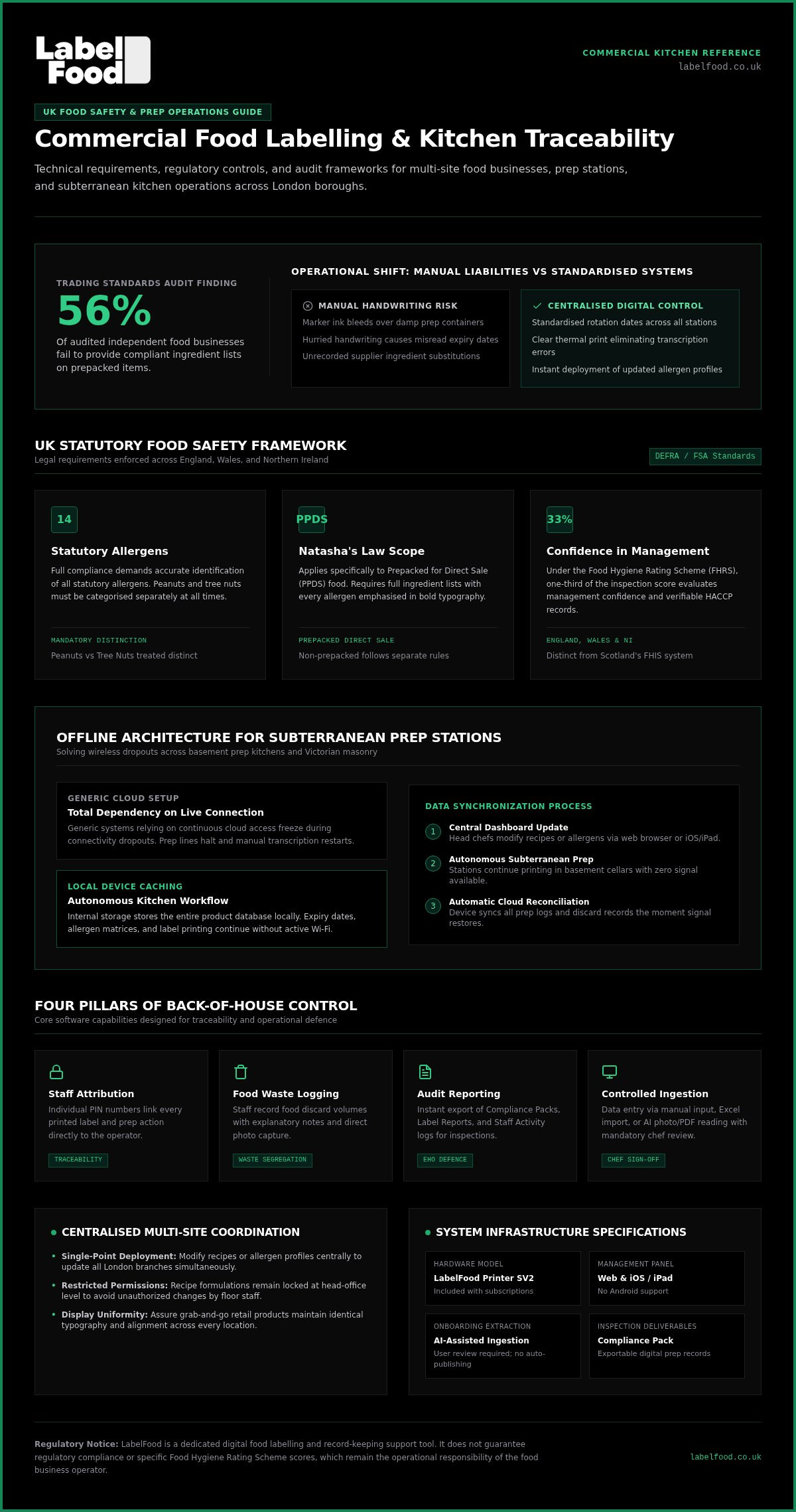
Trading Standards audits revealed that 56% of audited independent food businesses fail to provide compliant ingredient lists on prepacked items, usually caused by smeared day dots or untracked prep changes. Running a commercial kitchen in the capital is relentless. Between high staff turnover, subterranean prep stations with zero Wi-Fi, and rigorous Environmental Health Officer (EHO) inspections across the 32 London boroughs, manual labelling is an operational liability. Choosing dependable cloud-based food labelling software London teams can rely on has become vital to keeping service moving smoothly.
You already know that illegible handwriting and paper rotation sheets drain precious prep time and invite unforced mistakes. This guide explains how to evaluate commercial cloud labelling systems that combine centralised menu management with robust, offline-capable hardware. We examine essential criteria for defensible audit records, mandatory food waste logging, and how to maintain uninterrupted prep workflows across your London sites.
Key Takeaways
- Learn how evaluating cloud-based food labelling software London operations rely on establishes centralised recipe consistency and eliminates illegible handwriting errors across prep lines.
- Understand why purpose-built thermal terminals protect daily workflows better than fragile consumer tablets by operating autonomously through subterranean Wi-Fi dropouts.
- Discover how structured audit trails, label logs, and individual staff PIN tracking build clear, defensible digital evidence for local authority EHO inspections.
- Explore straightforward menu onboarding workflows that combine assisted catalogue extraction with mandatory chef sign-off to protect recipe accuracy.
- See how integrated food waste logging with notes and photo capture supports statutory commercial waste segregation requirements across your London sites.
Why London Commercial Kitchens Require Dedicated Cloud-Based Labelling
Handwritten day dots create friction during busy prep shifts. Marker ink bleeds over damp containers; hurried handwriting causes misread dates; unrecorded recipe changes leave teams vulnerable. In high-turnover metropolitan kitchens, relying on manual transcription invites errors. Implementing dedicated cloud-based food labelling software London operators trust centralises recipes, standardises rotation dates, and establishes immediate operational control across every prep station.
When suppliers substitute products without advance notice, paper binders fail. Cloud databases solve this by pushing ingredient updates directly to your print terminals. Kitchen teams tap a screen to generate clear, uniform labels. Prep times drop, stock rotation becomes consistent, and ambiguous handwriting is eliminated from your walk-ins.
Meeting Strict UK Food Safety Standards
UK food law demands rigorous diligence. The Food Standards Agency sets the statutory framework enforced by local councils, requiring accurate identification of all 14 statutory allergens. Peanuts and tree nuts must always be treated as distinct categories.
Under Natasha's Law, Prepacked for Direct Sale (PPDS) foods require full ingredient lists with allergens emphasised in bold typography. Loose, made-to-order dishes fall under separate non-prepacked rules, but inspectors expect verifiable records for both. In England, the Food Hygiene Rating Scheme (FHRS) dedicates one-third of its assessment to confidence in management. Clear digital prep records demonstrate organised HACCP procedures during unannounced inspections.
Managing Multi-Site Kitchens Across London
Coordinating multiple venues across the capital introduces compounding complexity. Managing sites in Soho, Shoreditch, or Canary Wharf requires unified standards that manual systems cannot sustain.
- Centralised deployment: Update a recipe or allergen profile on your central dashboard; every site receives the adjustment simultaneously.
- Restricted permissions: Lock recipe formulations at head-office level to prevent unauthorized alterations by local prep staff.
- Brand consistency: Ensure grab-and-go retail items maintain identical typography, alignment, and formatting across every branch display.
Adopting unified cloud-based food labelling software London teams can access from any browser ensures that brand standards and food safety protocols remain aligned across all locations.
Essential Features of Commercial Food Labelling Software
Back-of-house technology must prioritise kitchen durability and central administrative control. Effective cloud-based food labelling software London operators implement relies on a cloud dashboard accessible via modern web browsers and iOS or iPad devices. This structure allows head chefs to manage recipes centrally, whilst floor teams operate dedicated, simplified terminals at prep stations.
High-standard commercial software combines several core functions to secure daily operations:
- Staff attribution: Individual PIN identification links every printed label and prep action to a specific team member, reinforcing traceability.
- Integrated waste recording: Teams log food discard volumes with explanatory notes and direct photo capture, assisting with statutory commercial waste segregation.
- Automated reporting: Instant generation of Label Reports and Staff Activity logs provides visibility across daily prep volume.
Offline Reliability in Commercial Environments
London's commercial layout creates unique technical challenges. Many hospitality kitchens operate in vaulted basements, sub-ground prep cellars, or behind dense Victorian masonry where wireless signals regularly fail. Generic systems that depend on permanent cloud connectivity freeze when the signal drops, bringing prep lines to an abrupt halt.
Industrial terminals solve this by caching product databases locally within internal device storage. Staff continue calculating expiry dates, selecting allergen matrices, and printing labels without interruption. As soon as the wireless signal restores, the device automatically syncs all operational records to the cloud. Deploying a complete food labelling system from LabelFood ensures prep workflows remain active through routine connectivity blackouts.
Comprehensive Digital Audit Trails
Paper logbooks and manual sign-off sheets deteriorate rapidly on damp prep counters. Digital systems replace perishable paper folders with timestamped audit records. When assessing kitchen alignment with official FSA allergen guidance for food businesses, local Environmental Health Officers scrutinise prep procedures and stock rotation controls.
The software compiles exact print timestamps, shelf-life parameters, and user attributions into structured, exportable Compliance Packs. These records provide kitchen managers with defensible due diligence logs to support routine inspections without falsely guaranteeing specific food hygiene ratings.
Hardware Architecture: Dedicated Terminals vs Generic Tablet Setups
Kitchen software relies entirely on the resilience of physical hardware. Many hospitality operators attempt to save upfront costs by pairing generic consumer tablets with desktop thermal printers via Bluetooth. In hot, humid kitchen environments, these cobbled-together setups quickly fail. Commercial-grade food prep demands hardware engineered specifically for tough physical conditions.
A unified system pairs purpose-built hardware with cloud software. Dedicated terminals feature sealed, wipe-clean housings designed to repel grease, moisture, and fine flour dust. Integrating the print mechanism directly into the terminal body eliminates external power bricks, exposed cables, and unreliable wireless pairings.
The Hidden Operational Costs of Consumer Tablets
Domestic tablets struggle on commercial prep stations. Proximity to fryers, steam tables, and pot-wash stations damages internal components. Screens shatter easily when dropped on tiled kitchen floors.
Operating friction causes constant service delays:
- Connection dropouts: Bluetooth print queues disconnect unpredictably during prep rushes, causing staff to abandon labelling altogether.
- Battery degradation: Continuous charging inside warm kitchens degrades consumer lithium batteries, creating safety hazards and swollen cases.
- System interruptions: Consumer operating system updates trigger sudden driver mismatches, preventing communication between software and external print mechanisms.
Generic hardware also opens doors to employee distraction. Staff can close work applications, browse media, or misplace detached hardware around the venue.
Streamlined Workflows with Integrated Terminals
Compact central London venues cannot spare wide counter footprints for sprawling desktop computers. A single-purpose, direct thermal terminal occupies minimal space on stainless prep tables. Operators avoid messy ink ribbons, messy toner cartridges, and smudged prints; direct thermal technology applies heat directly to treated label rolls.
Reviewing the purpose-built LabelFood Printer SV2 hardware specifications reveals why dedicated terminals simplify daily prep. The plug-and-play unit features an internal power supply, robust touch interface, and integrated thermal printing inside a single sealed chassis. Combining dedicated hardware with cloud-based food labelling software London operators gain an unyielding workstation that accurately outputs labels compliant with statutory UK food labelling requirements.
Step-by-Step Implementation: Onboarding Your Kitchen Menu
Transitioning from paper prep lists to digital automation requires a methodical onboarding approach. Begin by gathering existing recipe cards, supplier specification sheets, and current allergen matrices. Auditing these materials before data entry prevents outdated ingredient profiles from entering the cloud database. Once collected, operators upload recipes into their cloud dashboard using web browsers or iOS and iPad devices.
A structured onboarding process follows five clear steps:
- Recipe audit: Cross-check supplier documentation to identify sub-ingredients and processing aids.
- Method selection: Choose between manual text input, structured spreadsheet import, or assisted extraction.
- Catalogue verification: Review ingredient hierarchies, allergens, and shelf-life parameters.
- Credential setup: Assign individual four-digit PINs to kitchen staff for prep attribution.
- Test prints: Execute mock prep runs on the terminal to check label alignment and print contrast.
Rapid Catalogue Setup and Verification
Entering hundreds of recipes by hand drains administrative hours. Operators can import large catalogues swiftly by uploading bulk Excel files directly into the cloud management dashboard. Alternatively, assisted extraction tools parse photos or PDF specification sheets directly from suppliers.
Automated tools serve purely as data extraction assistants. They extract text into editable fields, but they never publish recipes autonomously. Chefs and managers must review, verify, and approve every extracted ingredient list before saving. This human sign-off ensures unexpected supplier reformulations or sub-ingredients are caught before labels print at prep tables.
Configuring UK Regulatory Label Templates
Prepacked for Direct Sale items require precise layout formatting. Labels must display the exact food name, an exhaustive ingredient list organised by incoming weight, and mandatory 14-allergen bolding. Before going live, teams should review the statutory framework outlined in the guide to Natasha's Law labelling requirements.
The dashboard automates use-by and best-before date calculations based on your internal HACCP procedures. After setting these parameters centrally, prep chefs simply tap an item on the terminal screen. The correct expiry timestamp and storage instructions print automatically. Implementing reliable cloud-based food labelling software London teams can quickly learn removes manual math from morning prep routines. Explore how you can streamline your kitchen catalogue setup with LabelFood today.
Selecting the Right Solution for Your London Hospitality Business
Selecting back-of-house technology requires assessing your kitchen's daily prep volume and service format. Kitchens produce different label outputs: internal prep stickers with secondary shelf-life dates, customer-facing retail labels, or a balance of both. Operators must evaluate the total investment across recurring software licensing, dedicated hardware provision, and consistent roll restocking rather than comparing standalone software fees.
When shortlisting systems, prioritise platforms with UK-based operational support. Waiting on overseas support desks during an early morning bakery prep shift creates unacceptable downtime. Look for built-in food waste recording that captures notes and photographic evidence. Under English commercial recycling regulations, monitoring organic discard directly at prep stations protects operating margins while simplifying duty-of-care recording.
Tailoring Solutions by Venue Type
Different kitchen formats encounter distinct regulatory and operational demands across the capital:
- Bakeries and grab-and-go delis: These sites rely on Natasha's Law compliance. Systems must accurately format full ingredient declarations and emphasise the 14 statutory UK allergens on adhesive packaging.
- High-volume prep kitchens: Dark kitchens and event caterers require rapid-fire expiry date printing. Kitchen teams need single-touch printing to mark bulk gastronorm pans quickly during prep rushes.
- Multi-site hospitality groups: Central management panels allow operations directors to push seasonal changes simultaneously across every branch, maintaining strict menu consistency.
The LabelFood Complete System Advantage
Instead of forcing operators to source separate printers, cables, and software licenses from different vendors, LabelFood delivers a complete food labelling system. The dedicated LabelFood Printer SV2 is included directly with subscriptions. The cloud management panel operates smoothly on web browsers and iOS or iPad devices, providing real-time oversight over menus and stock control.
The integrated terminal handles food waste logging directly on the line. Staff snap photos of spoiled ingredients, add context notes, and log weights under their personal PINs. This creates timestamped digital accountability without extra paperwork. Adopting the complete commercial kitchen labelling system pairs robust physical engineering with cloud-based food labelling software London businesses need to run clean, efficient, and audit-ready operations.
Build a Resilient Prep Line Across Your London Venues
Operating a commercial kitchen in the capital leaves zero margin for labelling ambiguity or hardware downtime. Smeared day dots and fragile consumer tablets slow teams down and create unnecessary friction during local authority inspections. Transitioning to automated workflows establishes clear operational standards that support your kitchen team through every service.
A unified system resolves these back-of-house bottlenecks directly. Subscriptions include the dedicated LabelFood Printer SV2 terminal, which operates seamlessly offline during internet outages and syncs automatically once reconnected. From individual staff PIN tracking to structured Compliance Pack exports, your managers gain defensible records without administrative drag.
Implementing reliable cloud-based food labelling software London operations rely on safeguards your daily prep, reduces manual labour, and simplifies commercial food waste recording across every site. Take control of your kitchen workflows. Book a demo to explore the complete LabelFood system and discover how straightforward station management can be.
Frequently Asked Questions
Does cloud-based food labelling software guarantee compliance with Natasha's Law?
No software system can legally guarantee compliance. Legal accountability always remains with the food business operator. Choosing dependable cloud-based food labelling software London kitchens rely on provides structured record-keeping and layout tools. The system assists by formatting Prepacked for Direct Sale labels with complete ingredient lists and emphasised statutory allergens, helping your team maintain consistent standards across daily prep.
What happens if our London kitchen loses internet access during morning prep?
The system continues printing without interruption. The LabelFood Printer SV2 terminal caches your entire product catalogue locally within onboard memory. Basement kitchens across London frequently battle poor wireless signals, but staff can select recipes, calculate expiry dates, and print labels offline. Once the connection recovers, the terminal automatically syncs all label logs and waste entries with the cloud dashboard.
Can we manage labelling across multiple London restaurant branches from one account?
Yes, centralised multi-site management is built into the cloud dashboard. Operational managers can update recipe formulations, change shelf-life values, and introduce seasonal specials from a single web browser or iPad. Adjustments push instantly to dedicated terminals in Soho, Shoreditch, or Canary Wharf. Tiered permissions prevent unauthorized menu adjustments at station level, preserving brand consistency across all venues.
How are the 14 statutory allergens highlighted on printed food labels?
Statutory allergens are highlighted automatically using bold typography within the ingredient declaration. UK regulations require clear visual emphasis for all 14 statutory allergens, keeping peanuts and tree nuts as distinct legal categories. During catalogue setup, the system identifies these ingredients from your validated master list and formats them clearly, ensuring labels meet standard visibility rules for consumer safety.
Can the software interface run on Android tablets or smartphones?
No, the administrative dashboard is engineered exclusively for modern web browsers and iOS or iPad devices. Floor operations do not rely on domestic smartphones or tablets. Instead, printing takes place on the dedicated LabelFood Printer SV2 terminal. This purposeful design avoids driver mismatches, consumer battery degradation, and accidental app closures on greasy prep lines.
How does digital food waste recording operate within the labelling terminal?
Kitchen teams log discarded ingredients directly on the terminal interface using their unique staff PINs. Operators enter weights, select specific discard categories, add explanatory notes, and capture photographic evidence directly at the station. These entries sync directly with the management dashboard, building audit-ready records to track prep margins and assist with statutory English commercial food waste segregation rules.
How quickly can a commercial kitchen import existing menus into the system?
Menu onboarding can be completed quickly using several flexible ingestion methods. Kitchens can import large recipes in bulk using structured spreadsheets or use assisted extraction tools to parse supplier PDF sheets and spec photos into editable text fields. Human review remains mandatory to verify every allergen before saving. Implementing cloud-based food labelling software London teams understand keeps menu setup straightforward and precise.