
A single manual error in your prep kitchen isn't just a mistake. It's a significant regulatory risk that could lead to an unlimited fine. Managing 14 statutory allergens across a busy menu requires absolute precision. Manual processes are often too slow and prone to human error. Implementing automated allergen labelling replaces this friction with a reliable, digital system. It removes the guesswork from your daily prep and ensures every ingredient is accounted for accurately.
You likely feel the constant pressure of upcoming EHO inspections and the strict requirements of Natasha’s Law for your prepacked for direct sale (PPDS) items. It's a complex landscape to navigate whilst maintaining a fast-paced service. This guide explains how to implement a streamlined labelling workflow to ensure your kitchen remains audit-ready at all times. You'll learn how to transition from handwritten stickers to digital records that provide total confidence during food hygiene inspections. The following sections cover the essential steps to achieve operational efficiency, whether you operate under the FHRS in England or the FHIS in Scotland.
Key Takeaways
- Identify the 14 statutory allergens and correctly apply Natasha’s Law requirements to your prepacked for direct sale (PPDS) items.
- Transition from slow manual processes to automated allergen labeling to eliminate handwriting errors and streamline your prep workflow.
- Maintain consistent operation with a system that offers offline functionality and individual staff PINs for clear record-keeping attribution.
- Use AI-assisted tools to digitise your product catalogue for manual review, ensuring your digital records are accurate and professional.
- Build confidence for EHO inspections by switching to smudge-proof, clear labels and maintaining digital logs across all your kitchen sites.
Understanding UK Allergen Regulations and Manual Risks
The UK Food Information Regulations dictate how your kitchen must communicate ingredient data. Compliance isn't a choice. It's a mandatory safeguard for the millions of UK residents with food allergies. Relying on staff memory or hand-drawn charts during a peak service is a liability. A single oversight can result in a hospital admission or a criminal prosecution.
The 14 Statutory Allergens in the UK
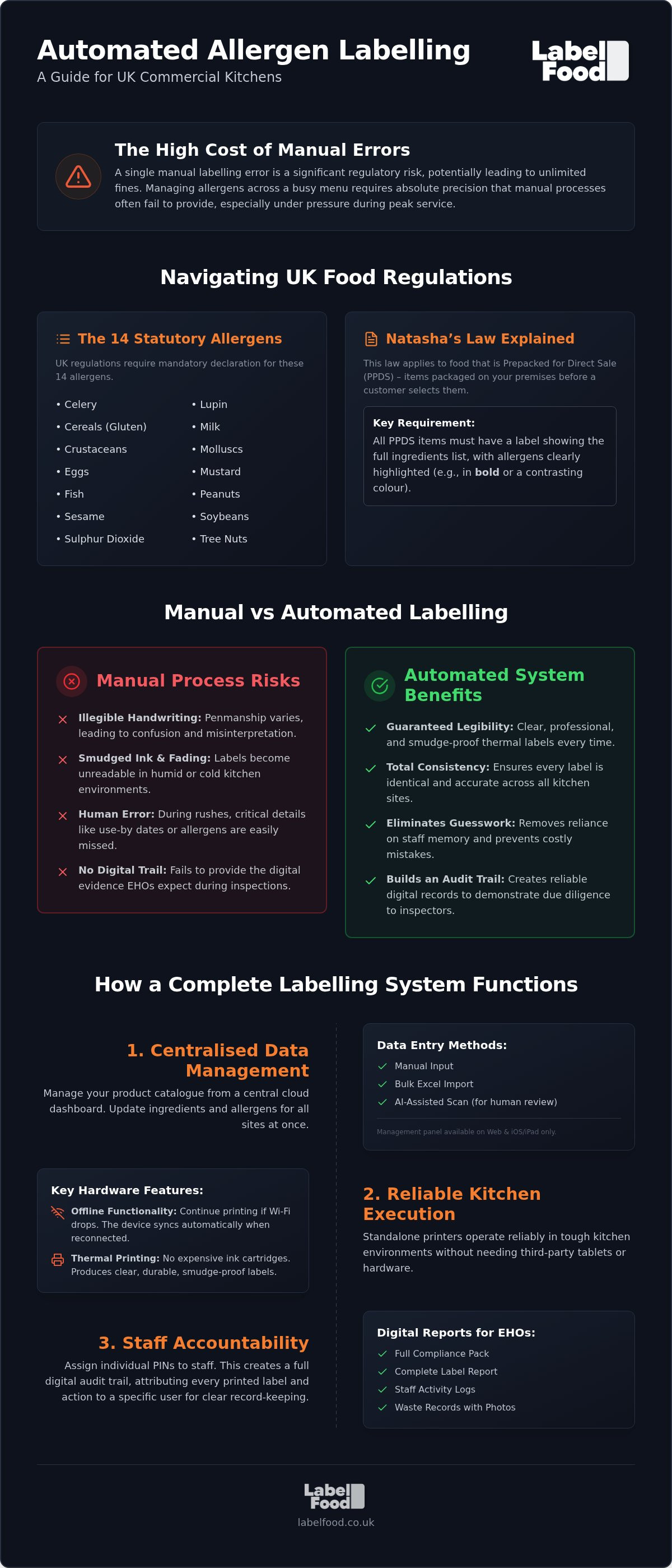
UK standards recognise 14 allergens that require mandatory declaration. These include celery, cereals containing gluten, crustaceans, eggs, fish, lupin, milk, molluscs, mustard, peanuts, sesame, soybeans, sulphur dioxide, and tree nuts. It's vital to distinguish peanuts from tree nuts. Tree nuts encompass specific varieties like almonds, cashews, and walnuts. Accurate declaration is the core of kitchen safety. Professional labelling must clearly state what a product "contains". If cross-contamination is a risk, a "may contain" statement should be used after a thorough assessment.
Natasha's Law: PPDS Requirements for 2026
Natasha’s Law targets food Prepacked for Direct Sale (PPDS). This includes any item packaged on your premises before a customer selects it. These products must feature a label showing the full ingredients list, with allergens highlighted in bold or a contrasting colour. The shift from basic stickers to detailed, professional labels is now the industry standard. For a deeper look at these rules, review our guide on Natasha’s Law labelling requirements.
Handwriting labels introduces avoidable friction. Ink smudges. Penmanship varies. Critical details like "use-by" dates or specific allergens are easily missed during a rush. Handwritten records also fail to provide the digital evidence EHOs look for during inspections. Adopting automated allergen labeling eliminates these vulnerabilities. It ensures every label is legible and identical. It creates a reliable record-keeping system that supports your broader food safety goals without the inconsistencies of manual input.
How Automated Allergen Labeling Systems Function
Modern automated allergen labeling systems bridge the gap between administrative oversight and kitchen execution, particularly for fast-paced sites across London. The process begins at a central digital hub and ends with a physical, smudge-proof label on a prep container or PPDS item. This integration ensures that the data your management team approves is exactly what appears on the kitchen floor. It replaces the fragmented nature of manual charts with a unified, digital workflow.
Cloud Management and Data Entry
The Cloud Management Dashboard serves as the brain of the system. Managers can populate their product catalogue using manual input, Excel imports, or AI-assisted menu onboarding. This AI tool reads photos or PDFs to extract ingredient data quickly. Remember that the AI is a support tool for speed; it requires a person to review and edit all data before publishing. This ensures total accuracy before any labels are printed. You can manage this data via web browsers or the iOS/iPad app. No Android version is available for the management panel.
Hardware Reliability in the Kitchen
Kitchens are high-heat, high-pressure environments. Generic office equipment or consumer-grade printers often fail due to grease and humidity. Dedicated thermal printers, such as the LabelFood Printer SV2, are designed for these conditions. These units are standalone devices. They don't require third-party tablets or external hardware to function, which reduces the number of failure points in your prep area. Thermal printing also eliminates the need for expensive ink cartridges, producing clear labels that remain legible even in cold storage.
Reliability depends on more than just physical durability. If your kitchen Wi-Fi drops, your prep shouldn't stop. Effective systems for automated allergen labeling offer offline functionality, allowing staff to continue printing labels without an active internet connection. Once the connection is restored, the device automatically syncs with the cloud. This ensures that multi-site operators have consistent data across all locations simultaneously. Identifying which staff member handled specific prep is also simplified through individual PINs. This creates a digital audit trail, which is a key component when following the Food Standards Agency allergen guidance. Implementing a complete food labelling system turns complex regulatory requirements into a series of simple, repeatable actions for your team.
Manual vs. Digital: Managing Labelling Accuracy
Manual day-dotting is a significant drain on kitchen resources. It's slow. It's inconsistent. A chef spending 30 minutes a shift handwriting labels is 30 minutes away from the pass. Beyond the time cost, manual entry is the primary source of labelling errors. Smudged ink or illegible handwriting can lead to critical misunderstandings. Automated allergen labeling eliminates these variables. You select the item, and the system prints a clear, accurate label instantly. The allergens are pre-programmed into the database. This ensures that ingredients like lupin or molluscs are never omitted during a busy service because a staff member forgot the recipe details.
Reliable data is the backbone of consumer trust. Following Allergy UK guidance on food labelling helps protect your customers and your reputation. Digital systems ensure that the information on the label matches the master recipe every time. It removes the risk of "hidden" allergens being missed when staff are under pressure.
Staff Attribution and Accountability
Accountability is often lost in manual systems. When a mistake is found, it's difficult to trace the source. Digital systems solve this using individual staff PINs. Every label printed is attributed to a specific team member. You can access a Staff Activity report to monitor kitchen behaviour and ensure standards are met. This transparency helps identify specific training gaps. If a staff member struggles with allergen management or waste logging, the digital logs provide the evidence needed for targeted coaching. It turns a potential mistake into a learning opportunity.
Audit Readiness for EHO Inspections
EHO inspections require immediate access to historical data. If you operate in England, Wales, or Northern Ireland, your Food Hygiene Rating Scheme (FHRS) score depends on your ability to prove diligence. In Scotland, the Food Hygiene Information Scheme (FHIS) requires a similar level of transparency. Digital tools like the Compliance Pack and Label Report provide instant proof of your safety protocols. Transitioning to digital kitchen compliance records replaces stacks of paper with an organised, searchable database. It demonstrates to inspectors that your kitchen is managed with precision. You aren't just claiming to be safe; you are showing the evidence.
Implementing Automated Systems in High-Pressure Kitchens
Kitchens in high-volume areas like London operate on tight margins and even tighter schedules. Introducing new technology often meets resistance if it complicates the workflow. Successful implementation of automated allergen labeling depends on its ability to integrate into existing prep routines without adding friction. Place your printer at the heart of the prep station. It should be as accessible as a chef’s knife. This ensures that labelling happens as ingredients are portioned, not as an afterthought at the end of a shift. Professional kitchens don't have time for tech that gets in the way of service.
Skepticism from senior chefs is common. They've seen third-party solutions that add more work than they save. Address this by focusing on the immediate time savings during prep. A digital system prints a label in seconds. It removes the need for staff to search for allergen charts or double-check recipe folders. It provides a stabilising force when the kitchen is at its busiest. The system handles the complex task of ingredient declaration so the team can focus on the pass.
AI-Assisted Menu Onboarding
Setting up a digital catalogue used to require days of manual data entry. AI-assisted onboarding has changed this process. You can upload PDFs or photos of your existing menus and product lists. The AI reads the data and suggests the correct allergen tags. This reduces the initial setup time from days to just a few hours. However, the software is a tool for speed, not a replacement for professional oversight. A chef must lead the final verification of all data. You review and edit the entries before they're published to the kitchen printers. This ensures the records are accurate and legally sound.
Waste Recording with Visual Evidence
Waste management is often neglected during a rush. Integrating food waste recording software into your labelling system provides a complete view of your inventory. When an item reaches its use-by date, staff log the loss directly through the management panel. They can add photos and notes to explain why the food was discarded. This visual evidence helps managers identify patterns in spoilage or over-ordering. Accurate labelling naturally leads to better stock rotation. It ensures that ingredients are used in the correct order, which directly reduces stock spoilage. To see how this fits your workflow, explore our complete food labelling solutions.
The LabelFood Printer SV2: Streamlining Compliance
The LabelFood Printer SV2 serves as the central hardware component of the complete system. It's designed to withstand the physical demands of a professional kitchen. Unlike generic office equipment, it produces professional, smudge-proof labels. This is essential for prepacked for direct sale (PPDS) items where legibility is a legal requirement under Natasha’s Law. It turns your digital records into physical safeguards. Adopting automated allergen labeling through a dedicated device ensures that your safety standards are never compromised by low-quality printing or smudged ink. It's the physical endpoint of a reliable, digital workflow.
Key Features of the SV2 System
The SV2 utilises thermal printing technology. This means you don't need to stock ink or toner cartridges. It's a cleaner, more efficient solution for food prep environments. The device features a compact design, making it suitable for restricted kitchen spaces often found in London and busy city centres. It fits easily into existing prep lines without requiring a massive footprint. The printer maintains a direct sync with the cloud dashboard. When you update a menu or ingredient list on the web panel or iPad, the changes are available at the printer instantly. This ensures your staff always have access to the most current data.
Subscription and Support
Choosing a complete system is more reliable than assembling piecemeal hardware and software. This integrated approach to automated allergen labeling removes the friction of managing separate vendors. The LabelFood subscription model includes the SV2 printer hardware, access to the cloud management dashboard, and a regular supply of label rolls. This removes the administrative burden of sourcing generic supplies that might not be compatible with your device. You have a single point of contact for the entire system. It provides a level of stability that third-party alternatives cannot match.
The system acts as a silent partner in your compliance strategy. It handles the technical details of record-keeping so you can focus on kitchen operations. Having a dedicated tool for allergen management gives you peace of mind during EHO inspections. You aren't scrambling for paperwork or deciphering handwritten notes. Instead, you have a professional, audit-ready system in place. Every label is consistent, clear, and accurate. To get started, you can view the LabelFood Printer SV2 and see how it fits your specific kitchen requirements.
Securing Your Kitchen Standards
Manual labelling is a point of failure in any high-pressure kitchen. Transitioning to automated allergen labeling replaces this vulnerability with a stabilising, digital record-keeping system. This approach ensures your prep is consistent and your PPDS items meet Natasha’s Law requirements for full ingredient lists. You gain clear visibility through the Compliance Pack and Staff Activity reporting. This data provides the evidence needed during EHO inspections, whether you operate under the FHRS or FHIS schemes.
The system recognises all 14 UK statutory allergens, treating peanuts and tree nuts as separate categories. It acts as a professional support tool that simplifies complex regulatory tasks. By digitising your workflow, you reduce human error and free your team to focus on service. Achieving this level of operational efficiency is a logical step for any professional food business. Take control of your kitchen’s record-keeping and build total confidence in your safety protocols.
Request a demo of the LabelFood Printer SV2 to see how a complete labelling system supports your business.
Frequently Asked Questions
What are the 14 allergens that must be labelled in the UK?
UK regulations recognise 14 statutory allergens that require mandatory declaration. These are celery, cereals containing gluten, crustaceans, eggs, fish, lupin, milk, molluscs, mustard, peanuts, sesame, soybeans, sulphur dioxide, and tree nuts. Peanuts and tree nuts must be treated as separate categories. Accurately declaring these ingredients is the foundation of your safety records and is a primary focus during EHO inspections in London and across the UK.
Does Natasha’s Law apply to all food made on-site?
Natasha’s Law applies specifically to prepacked for direct sale (PPDS) food. This includes any items packaged on your premises before a customer selects or orders them. It doesn't apply to non-prepacked food, such as meals plated in a restaurant, or food packed after a customer orders it. For PPDS items, you must provide a full ingredients list with all 14 statutory allergens highlighted clearly on the label.
Can I use an automated allergen labeling system if the kitchen Wi-Fi fails?
You can continue to use the system even if your kitchen Wi-Fi fails. The LabelFood Printer SV2 features offline functionality, allowing staff to print labels without an active internet connection. Once the connection is restored, the device automatically syncs with the cloud management dashboard. This ensures uninterrupted service in busy London kitchens and maintains consistent records across all your sites once the network is stable again.
What is the difference between FHRS and FHIS for allergen compliance?
The Food Hygiene Rating Scheme (FHRS) is used in England, Wales, and Northern Ireland, providing a numerical score from 0 to 5. Scotland uses the Food Hygiene Information Scheme (FHIS), which provides a binary "Pass" or "Improvement Required" result. Both schemes evaluate how well you manage allergen information. An automated allergen labeling system supports your record-keeping for either scheme by providing clear, digital logs of your safety protocols.
How does AI menu onboarding work for allergen management?
AI menu onboarding allows you to digitise your product catalogue by uploading photos or PDFs of your menus. The AI extracts ingredient data and suggests allergen tags to speed up the setup process. It's a support tool designed for user review and editing. You must verify all extracted data before publishing it to your printers. This ensures your automated allergen labeling remains accurate and under your professional control at all times.
Can I track food waste using the same labelling system?
You can track food waste directly through the same system used for labelling. Staff can log discarded items using the management panel, adding specific notes and photos as visual evidence. This integrated approach links your labelling data with stock loss records. It helps managers in London identify patterns in spoilage and over-ordering. Digital waste recording provides a clear audit trail of how stock is managed within your kitchen operations.
Is the LabelFood management panel available on Android?
The LabelFood management panel is not available on Android. You can access the cloud management dashboard via a web browser or through the dedicated app on iOS and iPad devices. This allows kitchen managers to organise product data and review staff activity from a tablet or computer. The system is designed to provide a stable management layer for your labelling hardware, ensuring all data remains synchronised across your Apple devices.
How do individual staff PINs help with food safety audits?
Individual staff PINs create a digital audit trail by attributing every printed label to a specific team member. This accountability is essential during food safety audits as it proves who performed specific tasks and when. You can review the Staff Activity report to monitor kitchen behaviour and identify training gaps. It demonstrates to EHO inspectors that your allergen management is organised and that every staff member is accountable for their labelling accuracy.