
A handwritten food label is no longer a professional standard; it's a liability. In a high-pressure commercial kitchen, relying on illegible scribbles or staff memory for allergen data risks more than just a poor inspection result. You already know that manual dating is slow and often leads to unnecessary food waste through poor stock rotation. Implementing a dedicated custom food label printer isn't about buying a gadget. It's about establishing a reliable system that keeps your prep station moving and your records audit-ready.
UK food safety standards are increasingly rigorous. Between the specific requirements of Natasha’s Law for prepacked for direct sale (PPDS) food and the 14 statutory allergens, the margin for error is slim. This guide explains how to select a professional labelling system that integrates with your workflow. We'll examine the regulatory landscape, including the differences between the Food Hygiene Rating Scheme and Scotland’s Food Hygiene Information Scheme. You'll learn how digital management tools can replace manual guesswork with precise, cloud-synced data to support your kitchen's efficiency and record-keeping.
Key Takeaways
- Understand the specific labelling requirements for Prepacked for Direct Sale (PPDS) food and the 14 statutory allergens, including the distinction between peanuts and nuts.
- Evaluate how a professional custom food label printer system reduces manual errors and improves the speed of daily prep cycles.
- Discover how digital waste recording and individual staff PINs create a clear trail of activity for internal audits and EHO inspections.
- Learn to use cloud-based reporting tools and AI-assisted onboarding to organise product catalogues across multiple sites efficiently.
Navigating UK Food Labelling Regulations and Compliance Standards
Compliance in a UK commercial kitchen isn't optional. It's a foundational requirement for safety and business continuity. While international food labelling regulations provide a broad framework, UK operators must adhere to specific, rigorous standards. These rules govern how you identify ingredients, manage allergens, and track shelf life. Using a custom food label printer helps standardise these outputs, but the responsibility for data accuracy remains with the operator. A digital system acts as a support tool for record-keeping; it's not a legal guarantor of compliance.
Natasha's Law and PPDS Requirements
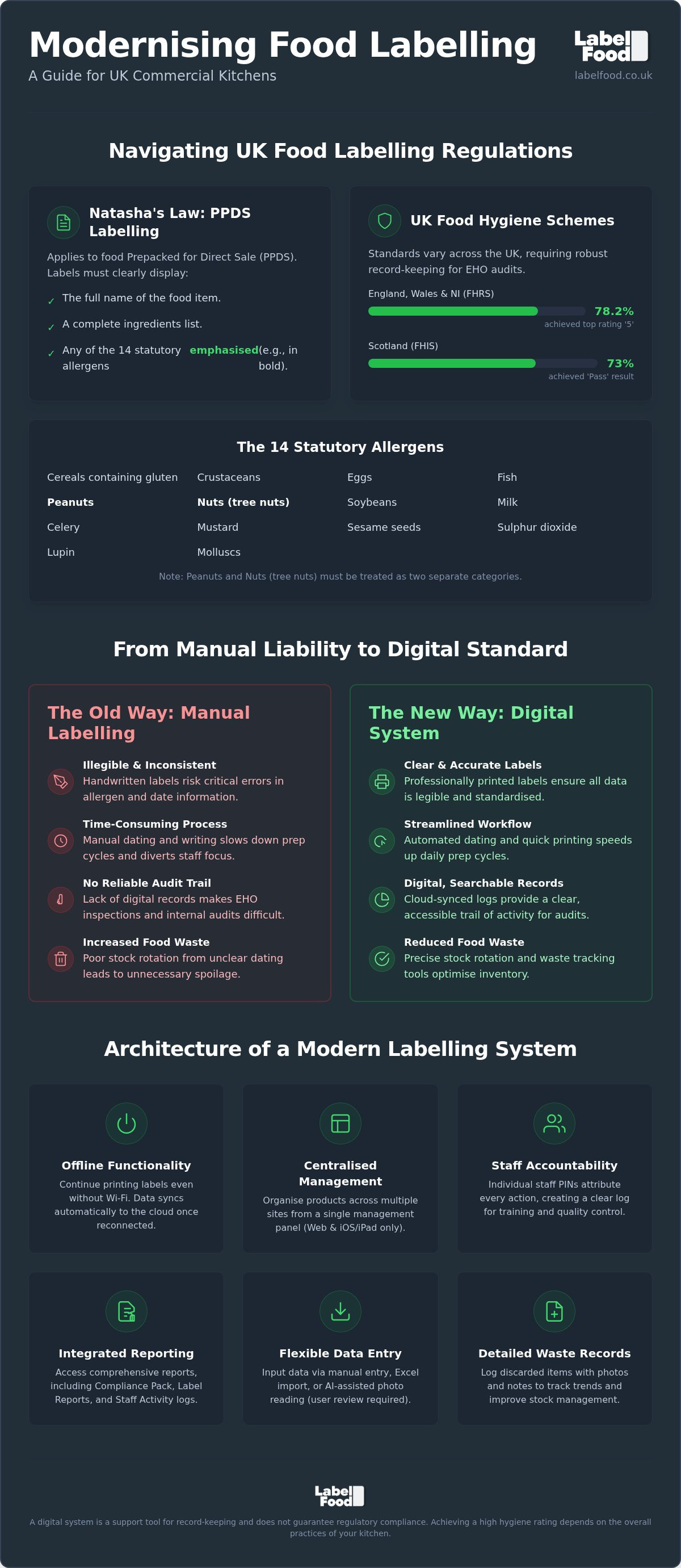
Natasha's Law applies specifically to food prepacked for direct sale (PPDS). This includes any item packed on-site before a customer orders it, such as sandwiches or salads prepared in the morning for the lunch rush. These products must carry a label showing the full name of the food and a complete ingredients list. Crucially, any of the 14 statutory allergens present must be emphasised within that list. This usually involves using bold, italics, or underlining to ensure they stand out. Clear, printed labels eliminate the risks associated with illegible handwriting on these critical safety markers.
The 14 allergens you must track include cereals containing gluten, crustaceans, eggs, fish, soybeans, milk, celery, mustard, sesame, sulphur dioxide, lupin, and molluscs. You must treat peanuts and nuts (tree nuts) as two distinct categories. Accurate identification is the only way to prevent incidents. A custom food label printer ensures these distinctions are clear and consistent across every batch of prep.
Regional Food Hygiene Standards in the UK
Food hygiene ratings are handled differently depending on your location. In England, Wales, and Northern Ireland, the Food Hygiene Rating Scheme (FHRS) uses a scale from 0 to 5. As of July 2026, 78.2% of businesses in these regions hold the top rating of 5. In contrast, Scotland uses the Food Hygiene Information Scheme (FHIS). This system provides a simple "Pass" or "Improvement Required" result. As of August 2026, 73% of Scottish food businesses have achieved a "Pass" result.
Professional labelling supports these ratings by providing clear evidence of food safety management. Environmental Health Officers (EHOs) look for legible date marking and robust stock rotation records during audits. Digital records provide a reliable trail of activity that manual logs cannot match. While the system facilitates better organisation, achieving a high rating depends on the overall hygiene practices of your kitchen team.
The Architecture of a Modern Custom Food Label Printer System
A custom food label printer is no longer just a peripheral device. In a professional kitchen, it's the physical endpoint of a digital management system. The transition from standalone gadgets to integrated cloud-based systems has changed how operators handle data. Instead of manually updating individual units, managers can now push updates to every site simultaneously. This ensures that every label produced reflects the current UK food labelling rules without local intervention.
Kitchen environments present unique technical challenges. Unreliable Wi-Fi is common due to structural interference and heavy equipment. A robust system must feature offline functionality. This allows staff to continue printing labels during a network outage, with data syncing back to the cloud once the connection is restored. Accountability is also built into the architecture. By requiring individual staff PINs, the system generates activity logs that attribute every label to a specific team member. This transparency is essential for internal quality control and staff training.
Hardware Reliability in Commercial Environments
The LabelFood Printer SV2 is built for the rigours of a busy prep station. It uses direct thermal technology, which eliminates the need for ink or toner. This reduces ongoing costs and prevents downtime caused by empty cartridges. Because it operates as a standalone hardware solution, it doesn't require a permanent PC connection in the kitchen. This minimalist footprint is ideal for workspaces where space is at a premium and hygiene is the priority.
Cloud Syncing and Data Management
Centralised control is the core of modern labelling. Using a web-based dashboard or iOS management panel, you can organise thousands of SKUs across multiple locations. Note that the management panel is available for web and iOS/iPad only, as there is no Android version. For kitchens with extensive menus, Excel imports allow for rapid data entry. You can also use AI-assisted tools to read existing menus or PDF documents. These tools are designed for user review and editing; they never publish data autonomously. This ensures you maintain total control over the information printed in your kitchen. Implementing a complete food labelling system provides the stability needed to scale your operations with confidence.
Evaluating Professional Hardware vs. Generic Labelling Methods
Manual methods like "day dots" or handwritten masking tape are common but inefficient. In a high-volume kitchen, these small vulnerabilities lead to significant risks. Hand-marked labels often lack the specific details required by UK food labelling regulations. Professional systems replace these gaps with digital precision. Transitioning to a dedicated custom food label printer eliminates the inconsistency of individual staff handwriting. It ensures every label is legible, accurate, and professional.
Manual Handwriting vs. Digital Precision
Kitchens are humid. Steam and heat make ink smudge and adhesive fail. Handwritten dates are frequently miscalculated, which directly increases food waste. Automation removes this "human error" factor. The system calculates use-by dates automatically based on your pre-set shelf life data. Speed is the primary operational advantage. Printing a batch of labels for morning prep takes seconds. Manual writing takes minutes. This efficiency allows chefs to focus on production rather than paperwork.
Manual allergen marking also carries high risk. Misidentifying any of the 14 statutory allergens, such as failing to distinguish between peanuts and nuts, can have severe consequences. A digital system ensures the correct allergen data is printed every time. It pulls directly from your verified product catalogue, removing the need for staff to recall complex ingredient lists under pressure.
Consumer-Grade vs. Commercial-Grade Systems
Generic, third-party Bluetooth printers are often marketed as low-cost alternatives. They rarely survive the physical demands of a commercial environment. These devices lack the software needed for multi-site management and staff accountability. A professional custom food label printer is part of a wider system. It provides integrated reporting tools, such as the Label Report and the Compliance Pack. These tools offer a clear audit trail for EHO inspections.
Staff accountability is another differentiator. Professional systems use individual PINs to track who printed which label and when. Generic stickers offer no such traceability. This data is essential for internal quality control and identifying training needs. It provides a level of oversight that consumer-grade gadgets cannot match.
Professionalism also impacts customer trust. A clear, printed label looks superior to a scrawled sticker. It signals to both customers and inspectors that your kitchen prioritises safety. While generic stickers might seem cheaper upfront, the cost of mislabelled stock and the risk of a lower hygiene rating make them a poor investment. Reliability is the standard. Precision is the result.
Streamlining Kitchen Workflows with Automated Labelling and Waste Tracking
Efficiency in a commercial kitchen depends on speed and precision. Manual logs and handwritten stickers are a persistent bottleneck. Integrating a custom food label printer directly into your daily prep cycle eliminates this downtime. By standardising how every item is marked, you create a frictionless transition from prep to service. This isn't just about stickers; it's about establishing a disciplined, repeatable workflow that every team member can follow without hesitation.
Accountability is central to this automated approach. The system requires individual staff PINs for every action. This ensures that every label printed and every waste entry made is attributed to a specific team member. You don't have to guess who prepared a batch or who recorded a waste event. This transparency generates clear Staff Activity reports, which are essential for managing large teams across multiple stations and identifying specific training needs.
Integrated Food Waste Management
Paper waste logs are often incomplete, illegible, or lost. Transitioning to digital food waste recording ensures total data integrity. Staff can record waste items instantly using the system, capturing specific photos and notes to explain the loss. This visual evidence is invaluable. It helps you identify if waste is occurring due to over-preparation, poor storage, or incorrect portioning during service.
Managers can analyse these records through the cloud dashboard to identify patterns. If certain ingredients are consistently appearing in the waste log, you can adjust your ordering and production levels immediately. This data-driven approach turns a standard compliance task into a powerful strategy for reducing overheads. It provides the definitive answer to where your margins are being lost.
Optimising the Prep Cycle
The cloud management dashboard allows you to organise your product catalogue by station or category. This means a pastry chef only sees relevant dessert items, while the larder section has their own specific list. One-touch printing for common prep items further accelerates the process. It removes the need for staff to search through long menus, allowing them to focus on production.
Cloud syncing ensures that any updates to allergen information or shelf-life data are pushed to the printer instantly. This removes the risk of staff using outdated information from a previous week's manual prep list. Consistency is maintained across the entire kitchen without the need for constant verbal briefings. You can optimise your kitchen workflow by implementing this unified labelling and waste management system.
The LabelFood Printer SV2: Integrated System for Commercial Operations
The LabelFood Printer SV2 is more than a custom food label printer. It's the core component of a complete food labelling system designed for the specific demands of UK commercial kitchens. Subscriptions include the SV2 hardware as standard, providing a standalone solution that doesn't require a permanent PC connection. This integrated approach replaces fragmented, manual processes with a unified digital workflow. It ensures that every label produced is legible, professional, and backed by a robust data management layer.
Reliability is built into the hardware. The SV2 uses direct thermal printing technology. This removes the ongoing cost and maintenance associated with ink or toner cartridges. Because the system features offline functionality with cloud syncing, your kitchen prep continues without interruption during network outages. Data entry is flexible. You can upload product catalogues via Excel imports or use AI-assisted tools to read existing menus and PDFs. This AI is a tool for user review and editing; it never publishes data autonomously. This ensures you maintain total control over your ingredient and allergen records.
Reporting and Audit Readiness
Professional oversight requires more than just printing a date. The LabelFood system includes specific reporting tools to maintain high operational standards. The Compliance Pack generates a digital trail of your labelling activity, which is essential for providing evidence during EHO inspections. The Label Report provides a detailed overview of every label produced, while the Staff Activity report monitors kitchen performance. By using individual PINs for staff attribution, the system creates a transparent record of who performed specific tasks.
Management oversight is accessible through a centralised dashboard. This allows you to organise product data across multiple sites from a single location. The management panel is available via web browsers and iOS or iPad devices. Note that there is no Android version of this software. This streamlined access ensures that kitchen managers can review records and update protocols instantly, regardless of where they are located. It provides the definitive answer to complex multi-site management challenges.
Getting Started with LabelFood
Implementing a professional system is a straightforward transition. The subscription model provides the SV2 hardware and access to the cloud management dashboard, creating a scalable solution for businesses of any size. Integrating the LabelFood Printer SV2 into your daily routine automates the most time-consuming aspects of kitchen record-keeping. It removes the guesswork from shelf-life calculations and allergen marking.
Adopting this technology is a critical step toward comprehensive allergen management software UK. Whether you operate a single bakery or a large-scale restaurant group, the system provides the stability needed for professional operations. From AI-assisted onboarding to detailed waste records with photo evidence, every feature is designed to solve everyday kitchen problems. This is the professional standard for UK food labelling, providing the utility and peace of mind required in high-pressure environments.
Implementing Professional Labelling for Long-Term Efficiency
Transitioning from manual logs to a digital system is a strategic shift for any commercial operation. Relying on handwritten notes risks compliance gaps under Natasha's Law and regional hygiene schemes. A professional custom food label printer replaces ambiguity with standardised, legible data. This ensures your kitchen stays organised while providing a clear audit trail for EHO inspections.
The LabelFood system provides the stability needed in high-pressure environments. With standalone SV2 hardware included and cloud-based compliance reporting, you gain total oversight of your prep cycles and food waste. It's a support tool designed specifically for UK food safety standards, helping you manage the 14 statutory allergens and PPDS requirements with confidence.
Request a demo of the LabelFood Printer SV2 system to see how integrated labelling can streamline your workflow.
Take control of your kitchen records and establish a more efficient, professional workspace today.
Frequently Asked Questions
Does a custom food label printer guarantee I will pass my EHO inspection?
No, the system acts as a support tool for record-keeping rather than a compliance guarantor. While it provides the digital evidence and legible records that Environmental Health Officers (EHOs) look for during audits, passing an inspection depends on your overall kitchen hygiene and safety practices. Using a custom food label printer helps standardise your documentation, which is a significant part of the Food Hygiene Rating Scheme assessment in London and across the UK.
What are the specific labelling requirements for PPDS food under Natasha's Law?
Natasha’s Law requires all prepacked for direct sale (PPDS) food to carry a label showing the full name of the product and a complete ingredients list. Any of the 14 statutory allergens present must be emphasised, usually through bold or italicised text. This rule applies specifically to food prepared and packed on-site before a customer orders it. Providing clear, printed information helps reduce the risks associated with verbal allergen communication or illegible handwriting.
Can I use the LabelFood system on an Android tablet or phone?
No, the LabelFood management panel is available exclusively on web browsers and iOS or iPad devices. There is currently no Android version of the software. This focus ensures a stable and secure environment for managing your product data and reporting tools. Kitchen managers in London can access their dashboard from a desktop computer or an Apple tablet to monitor staff activity and update product catalogues across multiple sites without compatibility issues.
How does the AI menu onboarding tool work for my existing product list?
The AI tool reads your existing menus or PDF documents to accelerate the initial setup of your product catalogue. It identifies ingredients and potential allergens for your team to check. Crucially, the AI is a tool for user review and editing; it never publishes data autonomously. You maintain total control over the final records. This process makes transitioning to a custom food label printer system significantly faster for busy commercial operations.
Do I need a constant internet connection to print labels in my kitchen?
No, you do not need a permanent internet connection to print labels in your kitchen. The LabelFood Printer SV2 features offline functionality that allows staff to continue their prep cycles even if the Wi-Fi is unreliable. Any labels printed or waste recorded whilst offline will automatically sync with the cloud management dashboard once the connection is restored. This ensures your kitchen remains operational and your records stay up to date without technical interruptions.
How are peanuts and tree nuts handled in the allergen labelling system?
Peanuts and nuts (tree nuts) are treated as two distinct categories within the system to ensure high legal accuracy regarding UK food safety. This distinction is critical for the 14 statutory allergens you must recognise in a commercial kitchen. By separating these categories on your printed labels, you provide clearer information for customers with specific sensitivities. This precision helps maintain a professional standard and reduces the margin for error during busy service periods.
What information is included in the food waste recording reports?
Food waste recording reports include specific photos and notes captured by staff at the point of disposal. Every entry is attributed to a specific team member via their individual PIN, providing a clear trail of staff activity. These reports help managers identify patterns in food loss, such as over-preparation or storage issues. By reviewing these digital logs, you can adjust your ordering and production levels to reduce overheads and improve your kitchen's overall efficiency.
Can I manage multiple kitchen sites from a single management dashboard?
Yes, the cloud management dashboard is designed to centralise product data across multiple kitchen sites. You can update menus, change allergen information, and review compliance reports for every location from a single management panel. This is particularly useful for London-based restaurant groups or bakeries with several branches. It ensures that every site uses the most current data, maintaining consistency and professional standards across your entire business without the need for on-site visits.