
What happens when a label is clear on one shift but the supporting records are difficult to find on the next? For London hotels, consistent information across preparation areas matters as much as the label itself. Choosing a hotel kitchen food labelling system London teams can use means looking beyond the printer to the workflow, record access and staff accountability.
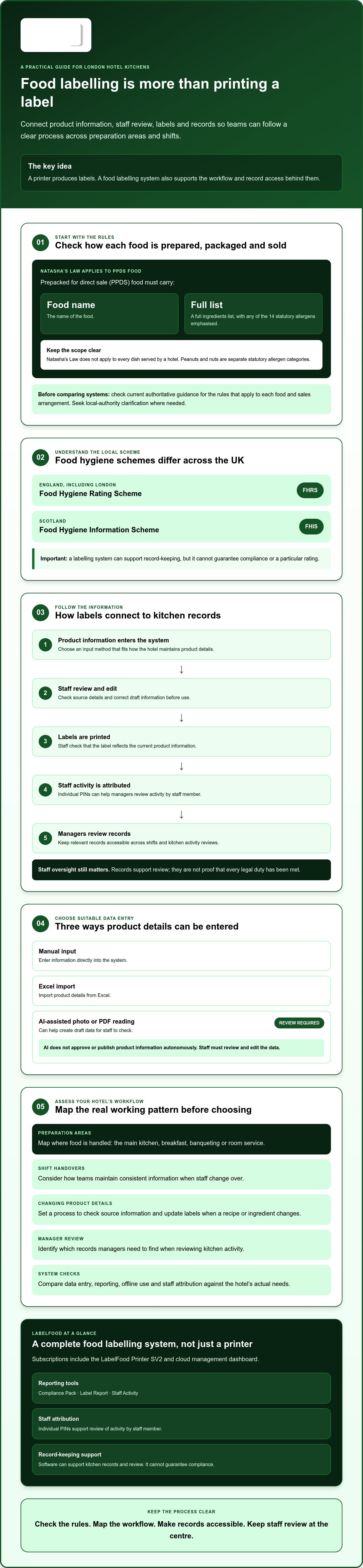
The rules depend on how food is prepared, packaged and sold. Natasha’s Law applies to prepacked for direct sale (PPDS) food, which must carry the food name and a full ingredients list, with any of the 14 statutory allergens emphasised. Other service arrangements have different requirements, so check which rules apply before comparing systems.
This guide explains the relevant labelling duties and what to assess in a system: how staff create and update labels, how managers review kitchen activity, and whether records remain accessible across shifts. It also covers features such as staff attribution and offline use. Software can support record-keeping, but it cannot guarantee compliance.
Key Takeaways
- Map how product information becomes a kitchen label and which records managers need to review across shifts.
- Compare systems by data entry, reporting, offline use and staff attribution, then check each feature against your hotel’s workflow.
- Assess a hotel kitchen food labelling system London hotels can use by mapping preparation areas, label needs and record access before introducing it.
- Check current authoritative guidance for the rules that apply to your food and sales arrangements, and seek local-authority clarification where needed.
- LabelFood is a complete system, not just a printer. Subscriptions include the LabelFood Printer SV2 and cloud management dashboard.
What London hotel kitchens need from a food labelling system
A food labelling system combines the process, equipment and records a kitchen uses to create, apply and review labels. It is more than a printer: it includes the product information staff rely on, how they turn it into a label and where managers can find the records later.
Hotels may prepare food in several areas, from the main kitchen to breakfast, banqueting or room service. Different teams can handle the same product across shifts. A repeatable process helps staff use consistent information and gives managers a clearer way to identify records or labels that need review. The right workflow depends on the hotel’s menu and service arrangements.
For hotels in London, the relevant food hygiene scheme is the Food Hygiene Rating Scheme (FHRS), used in England. Scotland operates a separate Food Hygiene Information Scheme (FHIS). A labelling system can support record-keeping, but it cannot guarantee compliance or a particular rating. Food safety procedures sit within the business’s wider management approach, including its Hazard Analysis and Critical Control Points (HACCP) plan where applicable.
Which food labelling rules should a London hotel check first?
Start by checking how each food is prepared, packaged and offered for sale. Natasha’s Law applies to prepacked for direct sale (PPDS) food, not every dish served by a hotel. PPDS food must carry the food name and a full ingredients list, with any of the 14 statutory allergens emphasised. Peanuts and nuts are separate allergen categories. Check current authoritative UK guidance to confirm which duties apply to each product and sales arrangement.
Why do hotels need a repeatable labelling workflow?
A label is only one part of the process. Teams also need a reliable way to maintain product information and keep records accessible when staff change over or managers review kitchen activity. If a recipe or ingredient changes, for example, the hotel needs a process for checking the underlying information and updating labels where required. A printer alone does not manage that wider task.
Set clear steps for entering or reviewing product details, producing labels and retaining related records. Make sure staff in each preparation area know which process to follow. For more on PPDS rules, see this guide to Natasha’s Law labelling requirements. A hotel kitchen food labelling system London teams assess should fit established routines, rather than assume every kitchen area works in the same way.
How a hotel kitchen food labelling system connects labels and records
A useful workflow connects the information behind a label to the printed label and records managers can review later. This helps a hotel trace how product details were entered, checked and used in kitchen routines. Staff still need to verify the information and the label before use. A system can support record-keeping, but it does not replace staff oversight or guarantee compliance. For allergen information, refer to FSA guidance on allergen labelling and check which requirements apply to your food.
Workflow: Product information input → staff review and edit → label printing → staff attribution using an individual PIN → records and reports available for review.
How should product information enter the system?
Choose an input method that suits how the hotel maintains recipes and product details. Information can be entered manually or imported from Excel. AI-assisted photo or PDF reading can help create draft data, but staff must review and edit it. AI does not approve or publish product information autonomously.
Before printing, authorised staff should check that the source details are current and the resulting label reflects them correctly. This is especially important when information changes or records are prepared for a different menu or service. The digital kitchen compliance records guide explores how digital records can support review.
What records can managers review?
Look for reporting that helps managers access and assess kitchen activity. LabelFood includes the Compliance Pack, Label Report and Staff Activity as reporting tools. Individual staff PINs support attribution, giving managers a way to review activity by staff member. These records support oversight; they are not proof that every legal duty has been met.
Food waste records can include photos and notes, adding context for later review. Consider who needs access to records and how they will retrieve them during routine management checks. LabelFood supports offline use with cloud syncing, which can help staff continue working offline and make records available through syncing when connectivity returns. This is not a promise of uninterrupted service. The management panel is available on web and iOS/iPad, not Android.
When assessing a hotel kitchen food labelling system London hotels can use across different areas, check each step against actual staff routines. You can review how LabelFood’s complete food labelling system brings the printer, product information and records together.
How to compare hotel kitchen food labelling systems in London
Compare systems against the work your teams actually do. A standalone printer produces labels, but does not manage product information or retain reviewable records by itself. Spreadsheets may hold data, but staff still need a process for turning it into consistent labels. General consultancy is a different type of support, not a like-for-like labelling system. Compare the whole workflow, not just the hardware.
Use these questions as a starting point. Ask suppliers to demonstrate each step, then test it against your kitchens and shift handovers.
| Area | What to check |
|---|---|
| Label workflow | How does product information become a label, and where can staff check the details before printing? |
| Data entry | Can the system accept the input methods your team uses, such as manual entry or Excel import? |
| Reporting | Which reports are available, and can managers find the records they need to review? |
| Offline use | What can staff do without an internet connection, and how does cloud syncing work when connectivity returns? |
| Staff attribution | Can activity be associated with individual staff, and does that match your review process? |
Which functions matter across hotel shifts and sites?
Decide whether teams need consistent product data across preparation areas and a central management view. If you want activity attributed to staff, check whether individual PINs fit your hotel’s access and handover routines. For multi-site operations, ask how multi-site kitchen labelling management works for your locations and responsibilities. Do not assume a feature suits your setup just because it appears on a supplier’s list.
What should managers ask during a product review?
Ask for a practical demonstration using a representative product and a routine your team recognises. Check what remains available when the internet is down, what syncs later and which devices support the management panel. LabelFood’s panel is available on web and iOS/iPad, not Android. For legal context, consult food labelling guidance for caterers, then confirm specific duties against current authoritative guidance.
A hotel kitchen food labelling system London teams choose should fit their staffing, kitchen layout and record-review needs. LabelFood’s commercial kitchen food labelling solutions guide provides another starting point for comparing the workflow and system elements available.
How to assess a labelling system before introducing it in a London hotel
Test the process against your hotel’s real kitchen routines before relying on it. A structured assessment can expose gaps in product information, staff responsibilities and record access before a new workflow becomes part of daily service. Use these steps to guide your review.
- Map the kitchens. List preparation areas, the activities carried out in each and the points where staff hand over work. Include current label and food waste record processes.
- Identify label needs. Note which products need labels and what information staff use to prepare them. Check requirements against the food and how it is packaged and sold.
- Review product data. Decide who can enter or change product information, who reviews those changes and who checks labels before use. Make responsibilities clear across shifts.
- Test representative workflows. Ask kitchen staff to carry out sample tasks, from entering or importing product data through to reviewing and printing a label. Include a staff handover where relevant.
- Check records and offline use. Confirm that managers can retrieve the records they need. Test what staff can do without an internet connection and how offline activity syncs when connectivity returns.
Validate the process before rollout
Use current authoritative guidance to check which legal duties apply to your products and sales arrangements. If an interpretation remains unclear, contact the relevant local authority. A system setup or staff introduction can support consistent record-keeping, but it does not establish compliance or guarantee a food hygiene rating.
Include the people who will enter product details, review labels and retrieve records in testing. Ask them to identify unclear steps and practical obstacles. Adjust the process before introducing it more widely, then make sure staff know who is responsible for each check.
Review waste recording separately if it forms part of your assessment. Records that include photos and notes may give managers useful context for later review. The food waste recording software guide covers that workflow in more detail.
A hotel kitchen food labelling system London teams select should match the hotel’s mapped kitchens, responsibilities and record-review needs. To assess how LabelFood’s complete food labelling system may fit, review the LabelFood system.
When LabelFood fits a London hotel’s food labelling workflow
LabelFood may suit a hotel looking to connect label production with product information and records in one system. It is a complete food labelling system, not simply a printer. Subscriptions include the LabelFood Printer SV2 and cloud management dashboard. Assess it against your hotel’s mapped workflows, staff responsibilities and device requirements before deciding whether it fits.
What does the LabelFood system include?
The system combines the printer with a management panel for product data and records. Teams can enter information manually, import it from Excel, or use AI-assisted reading from a photo or PDF to create draft data. Staff must review and edit those readings before using them. AI does not approve or publish product information autonomously.
For activity review, the system includes the Compliance Pack, Label Report and Staff Activity reporting tools. Individual staff PINs support attribution. These tools help managers review records and activity; they do not establish that every food safety duty has been met. Food waste records can include photos and notes, giving the team material to review without promising a reduction in waste.
LabelFood supports offline use with cloud syncing. Consider how that fits your kitchen’s connection and record-access needs. Offline use can support work when a connection is unavailable, while syncing supports later access to records. It is not a guarantee of uninterrupted service.
What should a hotel confirm before choosing LabelFood?
Check the management panel against the devices your team uses. It is available on web and iOS/iPad only, with no Android version. Confirm that this suits the people who need to manage product information and review records. Also consider whether manual input, Excel import or staff-reviewed AI-assisted reading fits how the hotel maintains its product data.
Compare the system with the steps you tested: who reviews product details, who checks labels, how staff activity is attributed, and how managers retrieve reports and waste records. LabelFood supports record-keeping. It does not guarantee regulatory compliance or a particular food hygiene rating.
If those functions match your hotel’s requirements, explore LabelFood’s food labelling system. A hotel kitchen food labelling system London teams choose should fit their actual workflows and devices, not just a feature list.
Choose a system that fits your kitchen routines
Start with the rules that apply to your food and how it is sold. Then map preparation areas, handovers and record checks. A hotel kitchen food labelling system London teams can use should support consistent labelling and give managers practical access to records across shifts. Test real kitchen tasks before settling on a workflow.
LabelFood is a complete food labelling system, not just a printer. Subscriptions include the LabelFood Printer SV2 and cloud management dashboard. Managers can review reports including Compliance Pack, Label Report and Staff Activity. Waste records can include photos and notes. These tools support record-keeping and review, but they do not guarantee compliance or a particular food hygiene rating.
Check that the system’s workflow and management devices suit your teams before choosing. If LabelFood’s approach fits your requirements, explore LabelFood’s complete food labelling system. With clear responsibilities and a process staff can follow, you can make a considered choice for your hotel kitchen.
Frequently Asked Questions
Does Natasha’s Law apply to every food label in a hotel kitchen?
No. Natasha’s Law applies to prepacked for direct sale (PPDS) food, not every item prepared or served in a hotel. PPDS labels must show the food’s name and a full ingredients list, with any of the 14 statutory allergens emphasised. Peanuts and nuts are separate allergen categories. Check current authoritative guidance for the requirements that apply to other foods and sales arrangements.
What should a hotel food labelling system record?
It should support the information and records your hotel needs to manage its label workflow. This may include product details, labels, staff activity and food waste records. For example, LabelFood’s reporting tools include Compliance Pack, Label Report and Staff Activity, while waste records can include photos and notes. A hotel kitchen food labelling system London teams assess should fit their own review processes. The system supports record-keeping, not proof of compliance.
Can a food labelling system work without an internet connection?
LabelFood supports offline use with cloud syncing. This can help kitchen teams continue using the system when an internet connection is unavailable, with data syncing to the cloud when connectivity returns. Do not assume every task or record will behave the same way offline. Before adopting a workflow, test the tasks staff need to complete and confirm how records become available for management review after syncing.
Does LabelFood guarantee a hotel will pass an inspection or receive a particular rating?
No. LabelFood is a food labelling and record-keeping system, not a guarantee of passing an inspection or receiving a particular food hygiene rating. The hotel remains responsible for its food safety practices and for checking which legal requirements apply. Use the system’s labels, reports and records to support kitchen processes and management review, alongside current authoritative guidance and the hotel’s own food safety procedures.
Can AI enter food product information without staff checking it?
No. LabelFood’s AI-assisted photo or PDF reading provides draft product data for staff to review and edit. It does not autonomously approve or publish information. An authorised team member should check the source details and edited data before using them to create labels. This review step helps the hotel retain control over product information, including details that may need updating when ingredients or recipes change.
Can hotel staff use the LabelFood management panel on Android?
No. The LabelFood management panel is available on the web and on iOS/iPad. There is no Android version. Before choosing the system, check which staff need to access product information and records, and whether they can use a supported device. This is particularly relevant for hotels with several preparation areas or teams that rely on different devices during kitchen handovers.
Which food hygiene rating scheme applies to hotels in London?
Hotels in London are in England, where the Food Hygiene Rating Scheme (FHRS) applies. Scotland has a separate scheme, the Food Hygiene Information Scheme (FHIS). The rating reflects food hygiene standards assessed by the relevant local authority. A labelling system may support record-keeping, but it cannot guarantee an FHRS result. Check rating information through the official Food Standards Agency service and contact the local authority if you need clarification.
To see whether LabelFood’s complete food labelling system fits your hotel’s workflow, explore the system.