
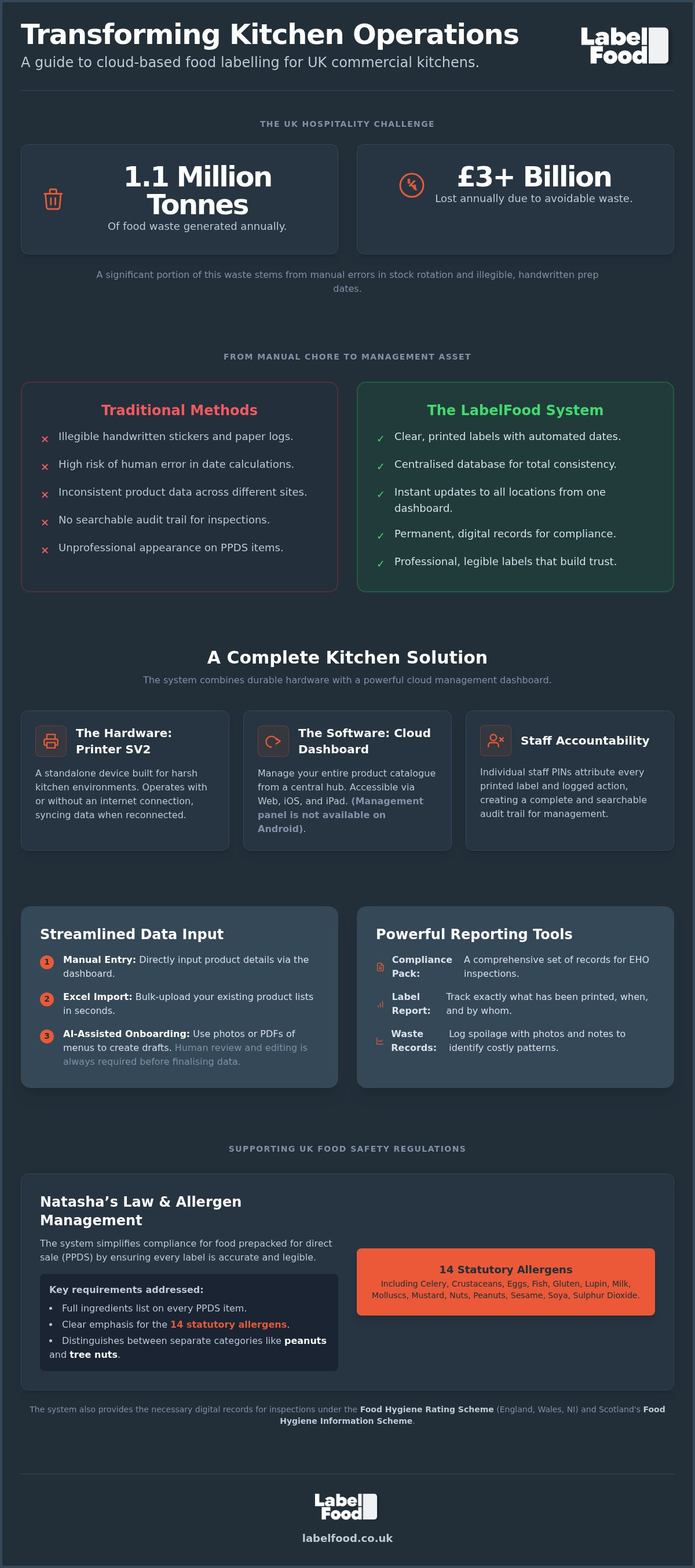
The UK hospitality sector generates 1.1 million tonnes of food waste annually, representing a loss of over £3 billion across the industry. A significant portion of this waste is avoidable, often caused by manual errors in stock rotation and illegible prep dates. Implementing cloud-based food labeling replaces unreliable handwritten stickers with a centralised digital record. It's a pragmatic shift from guesswork to total operational precision.
Maintaining a professional kitchen requires constant vigilance to meet safety standards whilst protecting narrow margins. You're likely navigating the complexities of Natasha's Law for PPDS items and the distinct requirements of the Food Hygiene Rating Scheme or Scotland's FHIS. This guide demonstrates how a digital system organises product data to reduce compliance anxiety and streamline daily prep. We'll examine how the LabelFood Printer SV2 and its cloud dashboard provide the specific reporting tools needed for EHO inspections and accurate waste tracking. You'll learn how to transform your labelling from a manual chore into a high-performance management asset.
Key Takeaways
- Learn how a centralised database ensures consistency across multiple sites, removing the risk of conflicting product information.
- Understand the role of cloud-based food labeling in managing Natasha’s Law requirements for PPDS items and the 14 statutory allergens.
- Discover how digital waste logs with photo evidence identify spoilage patterns to help protect your kitchen’s narrow profit margins.
- Explore the efficiency gains of moving from manual "day dots" to automated prep date labels using the LabelFood Printer SV2.
- Identify how individual staff PINs and specific reporting tools like the Compliance Pack support accurate record-keeping for EHO inspections.
What is Cloud-Based Food Labelling?
Cloud-based food labelling is a digital management system. It replaces local, isolated data with a centralised database accessible via web browsers or iOS/iPad apps. For UK kitchen operators, this means product information, shelf-life data, and allergen profiles are stored in the cloud rather than on loose scraps of paper or individual devices. This structure ensures total consistency across multiple sites. If a recipe changes at the head office, the update pushes to every printer in the estate instantly. It removes the risk of "rogue" labels that don't match the current menu.
Traditional paper logs and manual "day dots" are prone to human error. Illegible handwriting and miscalculated expiry dates create unnecessary risk. Digital records provide a permanent, searchable audit trail. This transition is driven by increasingly complex food labeling regulations that demand high precision. Real-time updates allow managers to adjust ingredient lists or price points without visiting each kitchen. It's about control and reliability. You gain a single source of truth for every item your kitchen produces.
The Mechanism: How Data Moves from Cloud to Kitchen
The system relies on a seamless sync between the management dashboard and the LabelFood Printer SV2. You manage your product catalogue on the web panel or iPad app. The printer then downloads this data. If the internet fails, the SV2 continues to function using its offline mode. It syncs the data once the connection returns. This ensures prep shifts never stall. You can import data via Excel or use the AI-assisted onboarding tool. This tool reads PDFs or photos of menus, but it acts only as a draft. A human must always review and edit the data before it's finalised. It isn't an autonomous publisher; it's a tool for user-led accuracy.
Addressing Natasha’s Law and PPDS Requirements
Natasha's Law applies specifically to food prepacked for direct sale (PPDS). This is food packaged on-site before a customer orders it. These items must carry a label with a full ingredients list and the 14 statutory allergens emphasised. Cloud systems help organise these allergens, including celery, crustaceans, and the distinct categories of peanuts and tree nuts. The SV2 produces clear, printed labels that eliminate the legibility issues of handwritten notes. It's a support tool for record-keeping that simplifies the management of complex ingredient data. Accuracy here is essential for consumer safety and maintaining high operational standards.
Benefits of Digital Labelling for Kitchen Operations
Accuracy is the foundation of food safety. Cloud-based food labeling eliminates the mental maths associated with shelf-life calculations. Calculating "three days from today" seems simple, but in a high-pressure environment, it's a frequent source of error. Manual date marking leads to inconsistent stock rotation and increased waste. The system automates this by calculating the expiry date based on pre-set shelf-life parameters. Prep shifts move faster. One-touch printing allows staff to generate accurate labels in seconds. This speed is critical when the sector is facing labour shortages 48% above pre-pandemic levels.
Presentation matters for prepacked for direct sale (PPDS) items. Handwritten labels don't just look unprofessional; they often become unreadable when exposed to moisture. Printed labels maintain a consistent, professional aesthetic that builds customer confidence. For PPDS items, a legible font and clear allergen emphasis for the 14 statutory allergens, including the distinct categories of peanuts and tree nuts, are essential for safety. When your packaging looks professional, it reflects the standards of your kitchen. The AI-assisted onboarding tool supports this by digitising your menu quickly. It reads your PDFs or photos, allowing you to review and edit the data. This eliminates the need for tedious manual entry whilst maintaining total control over the output.
Reliability in High-Pressure Environments
Commercial kitchens are harsh environments. Steam, heat, and grease destroy generic office printers and consumer tablets. The LabelFood Printer SV2 is built for durability. It operates as a standalone tool. It requires no complex IT infrastructure or third-party tablet integration. You'll avoid the connectivity pitfalls of generic solutions. This reliability ensures that your labelling process remains a stabilising force during the busiest service periods. You don't need a dedicated I.T. department to maintain this system. It's designed to work out of the box.
Centralised Control for Multi-Site Operators
Managing multiple locations requires a single source of truth. The cloud management dashboard allows head office to organise the entire product catalogue from one location. When a recipe changes, the update is pushed to every site simultaneously. Implementing cloud-based food labeling across your estate ensures that your brand standards are upheld everywhere. Managers can monitor staff activity via individual PINs. This provides a clear record of who labelled what and when, which is vital for multi-site operators who can't be in every kitchen at once. If you want to streamline your multi-site operations, you can explore the complete food labelling system today.
Comparing Cloud Management with Traditional Methods
Manual "day dots" have been the industry standard for decades. They are inexpensive to purchase but costly to manage. Handwritten dates are often illegible or incorrectly calculated. Cloud-based food labeling replaces this ambiguity with automated precision. Transitioning from static Excel-based allergen lists to an integrated digital database removes the need for cross-referencing multiple documents. Your product data lives in one place. It's updated once and reflected everywhere. This shift reduces the administrative burden on kitchen managers and ensures that front-of-house staff have access to the most current information.
Labour costs are a significant factor in kitchen profitability. WRAP data from February 2026 indicates that food waste costs the UK hospitality sector over £3 billion per year. Much of this stems from poor stock rotation caused by labelling errors. A digital system reduces the time spent on manual marking. It also eliminates the financial hit of discarding perfectly good stock because a handwritten date was misread. Efficiency here is a direct contributor to your bottom line. It's a pragmatic investment that pays for itself by protecting your margins and reducing avoidable waste.
Audit Readiness and the Compliance Pack
Preparing for an EHO inspection is a rigorous process. In England, Wales, and Northern Ireland, the Food Hygiene Rating Scheme (FHRS) uses a 0-5 scale. In Scotland, the Food Hygiene Information Scheme (FHIS) provides a "Pass" or "Improvement Required" status. Digital logs simplify these inspections by providing a clear, historical record. The Compliance Pack and Label Report tools replace messy, grease-stained compliance diaries with professional digital exports. You can demonstrate a consistent approach to food safety with a few clicks. These reports provide the definitive answers an inspector requires, proving that your kitchen operates with disciplined precision.
Staff Accountability and PIN Attribution
Anonymous labelling makes it difficult to address recurring mistakes in a busy kitchen. The LabelFood system uses individual PINs for every team member. This creates a Staff Activity report that attributes every label to a specific person. It isn't about surveillance; it's about accountability and professional discipline. When staff know their work is recorded, label accuracy improves. You can identify specific training gaps before they lead to a safety incident. This level of oversight is impossible with traditional manual methods. It turns a chaotic prep session into an organised, professional operation where every action is logged and verifiable.
Integrating Food Waste Recording into Your Workflow
Food waste costs the average UK outlet £10,000 every year. According to WRAP data from February 2026, roughly 75% of this waste is avoidable. Most kitchens rely on vague tally marks or memory to track what goes in the bin. This lack of data makes it impossible to identify whether the problem is over-ordering, poor storage, or excessive portion sizes. Integrating waste recording into your cloud-based food labeling workflow provides the visibility needed to protect your margins. It turns a hidden cost into a manageable data point. You gain total control over your inventory lifecycle.
Capturing data at the point of disposal is the only way to ensure accuracy. When waste is unrecorded, your dish costing and inventory levels become skewed. This leads to further ordering errors and financial loss. A digital system ensures that every discarded item is accounted for, allowing you to refine your procurement strategy based on actual usage rather than estimates. It's a pragmatic approach to kitchen management that prioritises long-term profitability over short-term habits.
Visual Evidence and Waste Reports
Simple tally marks on a clipboard are easily ignored. They lack context and accountability. The LabelFood system requires staff to capture photos and notes for every waste entry. This visual evidence is indisputable. It allows managers to distinguish between prep waste, plate waste, and genuine spoilage. If you see consistent photos of spoiled produce, you can adjust your ordering frequency immediately. Reports generated by the dashboard show the true cost of these losses over weeks or months. You move from guessing to knowing exactly where your money is being wasted. By categorising waste, you can target specific operational weaknesses. Prep waste might indicate a training need; spoilage often points to storage issues or over-purchasing.
Streamlining the Data Entry Process
Recording waste must be fast, or staff won't do it. The system allows for manual input or AI-assisted reading of documents. This AI acts as a tool for user review. It suggests entries that you then edit and confirm. It never publishes data autonomously. This integration reinforces the utility of cloud-based food labeling by linking product data with disposal records. Because the management panel is available on web and iOS/iPad, you can record waste at the point of disposal. There is no Android version available. This ensures the data is captured in real-time rather than at the end of a long shift when details are forgotten.
The cloud dashboard aggregates this data across your entire operation. It provides a unified view of your kitchen's efficiency. Individual staff PINs ensure every entry is attributed to a specific team member. This improves discipline and ensures the data remains accurate, addressing the accountability gap found in generic systems. If you are ready to reduce your avoidable waste, you can start recording food waste with a professional system today.
The LabelFood System: A Complete Kitchen Solution
The LabelFood system is a unified ecosystem. It bridges the gap between digital data management and physical kitchen operations. Most generic alternatives offer software that must be adapted to third-party tablets or office printers. This creates friction and reliability issues. LabelFood provides a complete solution. It includes the LabelFood Printer SV2 and a dedicated management dashboard. This integration ensures that your cloud-based food labeling process is stable and efficient. You manage your product data via the web panel or iPad app. There is no Android version available. This focus on specific platforms ensures a high-performance experience for professional operators.
Onboarding your menu is simplified through AI-assisted tools. You can upload photos or PDFs of your current menus. The AI reads this data to create a draft catalogue. It's a tool for user review and editing. You maintain total control over the final data. This accuracy supports the broader objectives of allergen management software UK. By centralising your 14 statutory allergens and product specifications, you remove the fragmentation that leads to safety risks. It's a pragmatic way to ensure your product data is audit-ready at all times.
Hardware Reliability: The SV2 Printer
The SV2 is a professional-grade printer. It's designed for the heat and moisture of a commercial kitchen. It operates as a standalone tool. It doesn't rely on consumer-grade tablets or complex local networks. This removes the risk of hardware conflicts during a busy service. The device is included with your subscription. You don't have to source or maintain your own printing hardware. This approach provides peace of mind. You have a single point of contact for both your software and your physical labelling tool. It's a reliable, expert tool that is indispensable to your success.
Next Steps for Your Kitchen Compliance
Transitioning to a digital system is a methodical process. You can start by organising your product data into an Excel spreadsheet for bulk import. Alternatively, use the manual input tool for smaller catalogues. This organisation should happen well before your next EHO audit. It allows your team to familiarise themselves with the new workflow. You'll be able to present clear, digital records of your prep shifts and waste logs. LabelFood acts as a support tool for your record-keeping. It doesn't guarantee compliance, but it provides the professional framework needed to achieve it. You can Contact LabelFood to discuss a tailored solution for your site. This ensures your kitchen is equipped with the specific tools required for your unique operation.
Standardising Your Kitchen Operations
Adopting a digital ecosystem removes the ambiguity of manual day dots and handwritten prep dates. You gain a single source of truth for your product data, ensuring total consistency across every site in your estate. This transition isn't just about stickers; it's about establishing a disciplined framework for record-keeping. By integrating photo-based waste logs and individual staff PINs, you address the hidden costs of spoilage and the accountability gaps of generic systems. Implementing cloud-based food labeling transforms your kitchen from a reactive environment into a controlled, professional operation.
LabelFood acts as your expert partner, providing the tools needed to generate audit-ready reports for EHO inspections. Our system includes the LabelFood Printer SV2 with your subscription, so you don't have to manage third-party hardware. We provide specific UK-based support for London kitchens, ensuring you have reliable assistance when it's needed most. You can Book a demo of the LabelFood Printer SV2 today to see how a unified system simplifies your workflow. Take the first step toward a more efficient, organised kitchen today.
Frequently Asked Questions
Is cloud-based food labelling mandatory for UK restaurants?
No, it is not a legal requirement to use a digital system, but the safety standards it supports are mandatory. UK food businesses must comply with allergen labelling laws and Retained EU Regulation 1169/2011. Using cloud-based food labelling provides a professional framework for maintaining the accurate records required during EHO inspections. It replaces unreliable manual logs with a searchable, digital audit trail that supports your Food Hygiene Rating Scheme or FHIS targets.
Does the LabelFood system work if the kitchen Wi-Fi goes down?
Yes, the system is designed for commercial reliability. The LabelFood Printer SV2 features offline functionality that allows you to continue printing labels even when your internet connection is interrupted. The device stores your product data locally and syncs with the cloud management dashboard once the Wi-Fi is restored. This ensures that prep shifts are never delayed by connectivity issues, providing a stabilising force in high-pressure kitchen environments where uptime is critical.
How does the system help with Natasha’s Law and PPDS compliance?
Natasha’s Law requires all food prepacked for direct sale (PPDS) to have a label with a full ingredients list and the 14 statutory allergens emphasised. The LabelFood system organises this data centrally, ensuring that every printed label is clear and legible. It treats peanuts and tree nuts as separate categories to maintain high legal accuracy. The software acts as a support tool for record-keeping, allowing you to manage complex ingredient profiles across your entire menu.
Can I manage multiple kitchen locations from one dashboard?
Yes, the system is built for multi-site kitchen labelling management. You can organise your product catalogues and shelf-life data from a single head-office dashboard on the web or iPad. Any changes made centrally are pushed to every printer in your estate instantly. This ensures total consistency across all locations. Managers can also use individual staff PINs to monitor activity across different sites, providing a cohesive narrative of your entire operation's efficiency and safety.
What allergens are tracked by the LabelFood software?
The software recognises all 14 statutory allergens required under UK food safety regulations. These include celery, cereals containing gluten, crustaceans, eggs, fish, lupin, milk, molluscs, mustard, sesame, soybeans, and sulphur dioxide. It correctly treats peanuts and tree nuts as separate categories. You can assign these allergens to any product in your database, ensuring that your PPDS labels provide the specific information needed for consumer safety and meeting your professional record-keeping duties.
Is there an Android version of the management dashboard?
No, the LabelFood management panel is available exclusively on web browsers and iOS/iPad. There is no Android version of the software. This focus ensures a high-quality, professional register for the management layer, allowing for seamless integration with the SV2 hardware. Users can access their Compliance Pack, Label Reports, and Staff Activity logs through these supported platforms. This pragmatic approach prioritises a reliable and stable user experience for busy kitchen operators and managers.
How does the food waste recording feature work with photos?
The food waste recording feature requires staff to provide visual evidence for every entry. When wasting an item, the staff member enters their individual PIN and takes a photo of the product. They can also add specific notes regarding the reason for disposal. This data is synced to the cloud dashboard, where it is aggregated into waste reports. This process identifies patterns in spoilage or over-production, helping you refine your ordering and protect kitchen margins.
Can I import my existing menu data from Excel?
Yes, you can organise your product data via Excel import, manual input, or AI-assisted reading. The Excel import tool is designed for the quick setup of large catalogues. For individual items, the AI onboarding tool can read PDFs or photos of your menus. This AI is a tool for user review and editing, never an autonomous publisher. You maintain total control over the data, ensuring it is accurate before it is pushed to your printers.