
Handwriting allergen labels isn't just a slow process; it's a liability that your kitchen cannot afford in 2026. You know the pressure of a lunch rush when a missing ingredient on a prep label could lead to a serious incident or a failed EHO inspection. Managing 14 statutory allergens across multiple sites whilst ensuring every label is legible is a relentless task for any busy chef.
An allergen information printer provides the precision and speed that manual entry lacks. This guide offers a pragmatic look at how professional labelling systems help UK kitchens manage product data and meet statutory requirements. We will examine how a unified hardware and cloud system reduces manual errors and keeps your kitchen audit-ready, even if your internet connection is patchy. You'll learn how to transition from chaotic handwritten notes to a streamlined, digital workflow that secures your reputation and protects your customers. We focus on the practical realities of the physical workspace, ensuring your compliance is handled with absolute reliability.
Key Takeaways
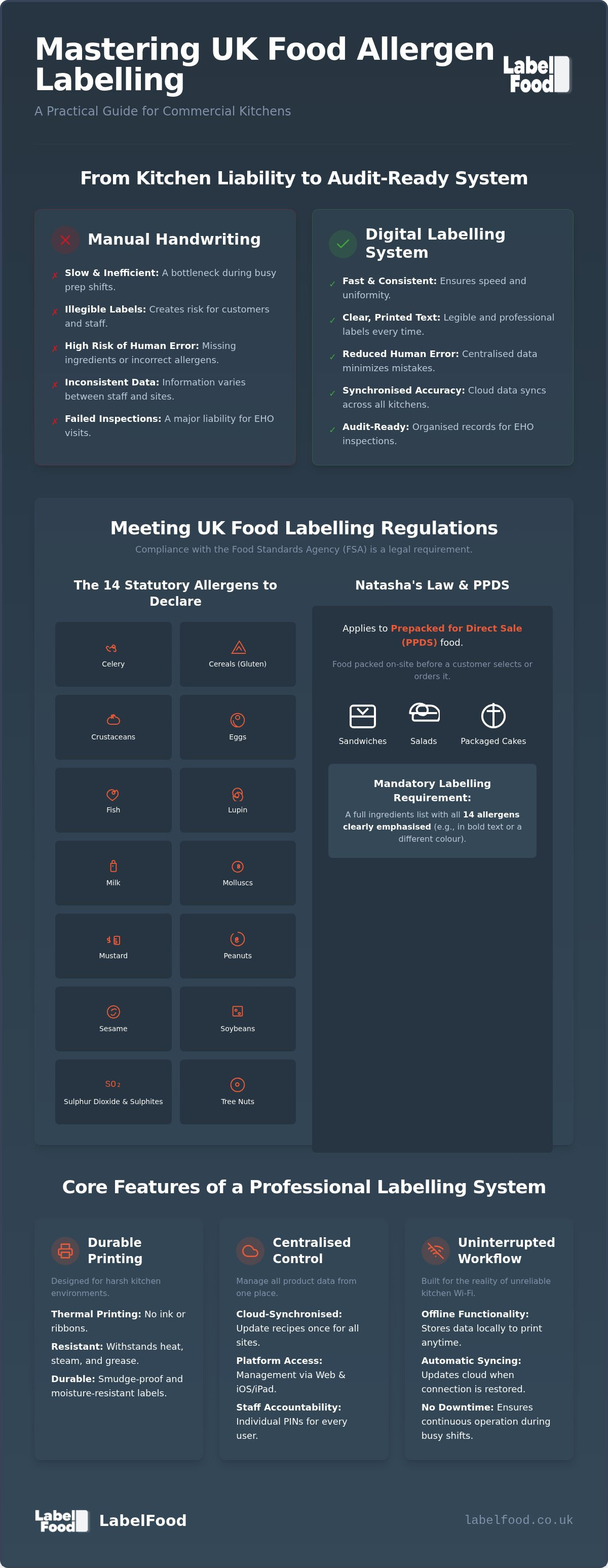
- Understand the 14 statutory allergens and how Natasha’s Law affects your labelling requirements for prepacked for direct sale (PPDS) food.
- Transition from slow, handwritten labels to a dedicated allergen information printer to ensure legibility and speed during busy prep shifts.
- Reduce the risk of human error by using a digital system that synchronises cloud-based product data with physical labels.
- Learn how to organise your product catalogue and conduct regular audits to maintain accurate ingredient information for EHO inspections.
- Discover the benefits of a complete labelling system that operates offline and provides detailed staff activity reports for better kitchen management.
Understanding UK Allergen Labelling Regulations
Managing food safety in a professional kitchen requires absolute precision. The Food Standards Agency (FSA) provides the framework for these standards, which are legally binding across the country. Following the UK Food Information Regulations is the only way to avoid heavy fines and protect your customers. Compliance isn't a suggestion; it's a core operational requirement that demands a systematic approach.
The 14 Statutory Allergens
UK law recognises 14 specific allergens that must be declared whenever they are used as ingredients. These include:
- Celery
- Cereals containing gluten
- Crustaceans
- Eggs
- Fish
- Lupin
- Milk
- Molluscs
- Mustard
- Peanuts
- Sesame
- Soybeans
- Sulphur dioxide and sulphites
- Tree nuts (such as almonds, hazelnuts, walnuts, and cashews)
Professional kitchens must treat peanuts and tree nuts as separate categories. Peanuts are legumes and grow underground, whilst tree nuts grow on trees. This distinction is critical for accurate record-keeping. Highlighting these allergens on your packaging is a legal necessity. Clear, legible text ensures that both staff and customers can identify risks instantly. Every ingredient must be cross-referenced against supplier specifications to ensure no hidden allergens enter the production line.
Natasha's Law and PPDS Requirements
Since October 2021, Natasha's Law has mandated full ingredient labelling for Prepacked for Direct Sale (PPDS) food. This category includes any item packed on-site before a customer orders it. Common examples include sandwiches, salads, or cakes prepared in the morning and placed in a display fridge for later purchase. These items must feature a full ingredients list with the 14 allergens clearly emphasised, usually in bold or a different colour.
Cafes and bakeries in London and across the UK face high scrutiny during EHO inspections. Manual handwriting for these labels is often illegible and prone to human error. Using a dedicated allergen information printer allows you to produce labels that meet these rigorous standards every time. Whilst loose foods (food sold without packaging) only require a verbal or written notice directing customers to staff, PPDS items leave no room for ambiguity. You must provide the data on the label itself to stay on the right side of the law.
The Role of a Dedicated Allergen Information Printer
Transitioning from manual handwriting to a digital system is a matter of operational safety. In a high-pressure kitchen, handwriting is often the first thing to suffer. Illegible labels are useless to customers and a red flag for inspectors. An allergen information printer removes this variability. It ensures every label is clear, consistent, and contains the exact data required by the FSA Allergen Guidance. This hardware acts as a stabilising force, allowing chefs to focus on production rather than paperwork.
Thermal Printing vs Traditional Ink
Kitchens are harsh environments. Heat, steam, and grease destroy standard ink-jet labels. Thermal printing is the professional standard because it uses no ink or ribbons. Instead, it uses heat to create the image directly on the label. This makes the text resistant to smudging and moisture. It also eliminates the hidden costs and maintenance of replacing ink cartridges. When you use a dedicated allergen information printer, you get a durable solution that survives the walk-in fridge and the heat of the pass. It is a tool designed for the physical realities of the workspace.
Integration with Cloud Management Dashboards
The hardware is only one component of a unified system. To maintain total control, your printer must link to a central data source. Managing ingredient lists across multiple sites via a web or iOS dashboard ensures consistency. When a supplier changes a recipe, you update the record once; every kitchen is updated instantly. The management panel is accessible via web and iOS or iPad, providing a sophisticated management layer without the need for Android devices. This centralisation prevents the data silos that lead to dangerous labelling errors.
Standalone functionality is equally vital. Kitchen Wi-Fi is notoriously unreliable, often dropping out during the busiest shifts. A professional system stores data locally on the device, allowing for offline printing during internet outages. Once the connection returns, the device syncs with the cloud automatically. This creates a frictionless workflow where the technology supports the chef rather than hindering them. For kitchens requiring this level of reliability, a complete food labelling system provides the necessary stability to manage complex product catalogues with ease.
Manual Labelling vs Digital Systems
Manual methods rely on the focus and handwriting of tired staff. In a commercial environment, this is a weak point. A digital system replaces guesswork with a standardised process. It ensures every label leaving the kitchen meets the same high standard, regardless of who is on shift. Moving away from handwritten logs creates a more stable, professional kitchen operation.
Reducing Human Error in Allergen Declaration
Statutory requirements mandate that allergens are emphasised in the ingredients list. Doing this manually is time-consuming and error-prone. An allergen information printer automates this task. It identifies specific keywords and bolds them instantly. This removes the risk of a chef forgetting to highlight milk or celery during a busy prep session. It ensures that your labelling remains consistent even when the kitchen is under pressure.
Onboarding a large menu can be a daunting task. Modern systems use AI tools to read PDFs or photos of supplier spec sheets. This data isn't published autonomously; it's presented to the user for review and editing. This ensures the final record is accurate and verified by a human expert. It eliminates the data entry fatigue that leads to typos in critical safety information. By simplifying the data entry process, you reduce the likelihood of missing a statutory allergen on a label.
Operational Speed and Staff Attribution
Speed is the primary driver in morning prep. Handwriting fifty labels for a grab-and-go fridge takes significant time. A digital system prints these in seconds. This efficiency allows staff to focus on food quality rather than admin. When you reduce manual data entry, you reclaim hours of labour every week. This isn't just about safety; it's about the bottom line of your business.
Accountability is another major advantage of digital transition. Every staff member uses an individual PIN to access the system. This creates a clear audit trail. You can see exactly who printed which label and when. If an error occurs, you have the data to provide targeted training. Staff Activity reports offer a level of kitchen discipline that manual logs cannot match. This data is invaluable during an EHO inspection, proving that you have a controlled system in place.
Standardising your label formats also protects your brand. Professional, printed labels signal to customers and inspectors that you take food safety seriously. It transforms a messy, handwritten container into a compliant, professional product. This consistency is essential for maintaining trust across multiple sites. When every kitchen uses the same allergen information printer, the output is identical, regardless of the location.
Best Practices for Allergen Management in Your Kitchen
Establishing a robust workflow is the only way to ensure long-term compliance. An allergen information printer is a professional tool; however, its effectiveness depends on the quality of the data you provide. You must organise your product catalogue logically so staff can find and print labels without hesitation during a rush. This requires a disciplined approach to data management from the outset. A well-structured system creates a stabilising force in the kitchen.
Data Accuracy and Supplier Management
Accuracy begins with your suppliers. Whenever a specification changes, your digital records must reflect that immediately. Importing data via Excel allows for bulk updates, saving hours of manual entry. If you use AI-assisted onboarding to read new product sheets or PDFs, always treat the output as a draft. You must review and edit this data before publishing it to the printer. Cross-referencing your labels against physical kitchen recipes ensures that the final product matches the digital record. This verification step is a critical safety barrier that prevents errors before they reach the customer.
Preparing for the EHO Inspection
Environmental Health Officers (EHO) look for evidence of a functioning system, not just a clean kitchen. You must be able to demonstrate how you manage allergen information with precision. Generating a Compliance Pack or a Label Report provides auditors with the documentation they need instantly. These reports show a clear history of your labelling activity and ingredient accuracy. It is a level of transparency that manual logs cannot provide. A digital system proves you have total control over your food safety protocols.
Understand the specific scheme used in your region. In England, Wales, and Northern Ireland, the Food Hygiene Rating Scheme provides a score from 0 to 5. In Scotland, the Food Hygiene Information Scheme uses "Pass" or "Improvement Required". Whilst your labelling system supports your record-keeping, your overall rating depends on your total management of food safety. Using a dedicated allergen information printer ensures that your allergen documentation is always audit-ready and legible. This professional approach reassures inspectors of your competence.
Training your team on the hardware is straightforward but essential. Because the system uses individual PINs, you can monitor staff activity and identify who needs additional support. This creates a culture of accountability. When every chef knows how to operate the system and verify the data, the risk of a labelling error drops significantly. To implement these best practices with a unified solution, consider a complete food labelling system for your kitchen.
The LabelFood Printer SV2 System
Generic office hardware often fails in the humid, high-temperature conditions of a commercial kitchen. The LabelFood Printer SV2 is a standalone hardware solution built specifically for these environments. It isn't just a peripheral. It's the core of a complete food labelling system. When you subscribe, the device is included. This provides a dedicated allergen information printer that remains reliable during peak service hours.
Hardware and Software Synergy
Direct thermal technology eliminates the need for expensive ink or toner. This reduces long-term operational costs and removes the risk of smudging on food packaging. The SV2 syncs with a cloud management dashboard accessible via web and iOS or iPad. This synergy allows managers to update ingredient data from a central office whilst the kitchen staff print labels on-site. It is the preferred choice for London hospitality because it offers a unified management layer across multiple sites. The management panel is available on web and iOS or iPad only. There is no Android version, ensuring a focused and stable user experience. The system remains functional offline, ensuring that your labelling workflow never stops if the internet drops.
Beyond Allergens: Waste and Compliance
Food safety is one part of kitchen management; profitability is another. The SV2 system includes integrated food waste recording features. Staff can use the device to record waste items, including photos and specific notes. This data provides kitchen managers with a clear view of where losses are occurring, helping to improve overall ROI. Data entry is simplified through AI-assisted photo and PDF reading. This tool is strictly for user review and editing, never acting as an autonomous publisher of data. By digitising these records, you move away from messy paper logs and toward a more disciplined, data-driven operation.
The system generates specific reporting tools such as the Compliance Pack and Staff Activity reports. These documents are essential for maintaining professional standards and demonstrating due diligence to auditors. You can track exactly which labels were printed and by whom using individual staff PINs. This level of oversight acts as a stabilising force in any professional kitchen. It provides the definitive answer to complex data management challenges. To understand how this hardware integrates into your daily workflow, you can learn more about the LabelFood Printer SV2 and its capabilities.
Securing Your Kitchen's Operational Standards
Managing allergen data manually isn't a viable strategy for professional UK kitchens anymore. The complexity of Natasha's Law and the 14 statutory allergens requires a system that removes human error and provides absolute legibility. By adopting a dedicated allergen information printer, you transition from a reactive approach to one of total control. You gain a stabilising force that protects your customers and your reputation during every shift.
The LabelFood Printer SV2 System is designed specifically for UK food law compliance. It's used by professional kitchens across London to manage multi-site operations with ease. With individual staff PINs for accountability and comprehensive reporting for EHO inspections, you're always audit-ready. The added benefit of digital waste tracking with photo evidence helps improve your ROI whilst maintaining rigorous safety standards. This unified system ensures that your kitchen remains efficient, compliant, and focused on quality.
Explore the LabelFood Printer SV2 System to simplify your kitchen operations and provide your team with the tools they need to succeed.
Frequently Asked Questions
What are the 14 allergens that must be labelled in the UK?
UK law recognises 14 statutory allergens: celery, cereals containing gluten, crustaceans, eggs, fish, lupin, milk, molluscs, mustard, peanuts, sesame, soybeans, sulphur dioxide or sulphites, and tree nuts. Every ingredient must be cross-referenced against these categories. An allergen information printer ensures these are highlighted correctly on every label. Highlighting these specific ingredients is a legal necessity for all prepacked products and protects your customers from serious harm.
Does Natasha’s Law apply to all food sold in a restaurant?
Natasha’s Law specifically applies to Prepacked for Direct Sale (PPDS) food. This includes items prepared and packed on-site before a customer orders them, such as sandwiches in a display fridge. It does not apply to food prepared to order or loose items sold without packaging. However, you must still provide allergen information for all menu items via other means, such as a notice or verbal declaration from staff.
Can I use an Android tablet with the LabelFood management system?
No, the LabelFood management panel is exclusively available on web browsers and iOS or iPad devices. There is currently no Android version of the software. This focus ensures a stable and secure environment for managing sensitive product data across your sites. Kitchen staff access the system via the dedicated SV2 hardware, whilst managers use the cloud dashboard on Apple devices or desktop computers to maintain total control.
Is an internet connection required to print allergen labels?
An active internet connection is not required for the actual printing process. The system features offline functionality, storing your product data locally on the device. This allows your kitchen to continue labelling during internet outages without interruption. Once the connection is restored, the printer automatically syncs with the cloud management dashboard. This ensures your staff activity and label reports are always up to date for your records.
How does an allergen information printer improve food safety audits?
A dedicated allergen information printer provides legible, standardised labels that demonstrate total control to Environmental Health Officers. You can generate specific reports, including the Compliance Pack and Staff Activity logs, which prove your due diligence. Individual staff PINs create a clear audit trail of who printed which label and when. This professional approach to record-keeping is far more robust than manual paper logs during a high-pressure audit.
What is the difference between peanuts and tree nuts for labelling?
Peanuts and tree nuts are distinct legal categories under UK food safety regulations. Peanuts are legumes that grow underground, whereas tree nuts include almonds, hazelnuts, walnuts, and cashews. You must treat them as separate allergens on your labels and in your kitchen management system. Accurate categorisation is essential for protecting customers with specific allergies and ensuring your business meets the statutory requirements set by the Food Standards Agency.
Can the system help with food waste management as well?
Yes, the LabelFood system includes integrated food waste recording features. Staff can record waste directly on the device, adding photos and notes to explain the loss. This data syncs to your dashboard, allowing you to monitor kitchen ROI and identify patterns of inefficiency. By digitising waste logs alongside your labelling, you create a more disciplined workspace and reduce the administrative burden on your management team during busy shifts.
How do I update ingredient lists if a supplier changes their recipe?
You update ingredient lists through the cloud management dashboard via web or iOS. You can import supplier data using Excel for bulk changes or use the AI-assisted tool to read new specification sheets. Every update must be reviewed and edited by a user before it is published to the printer. This ensures that your kitchen staff always have access to the most current and accurate ingredient information for every product.