
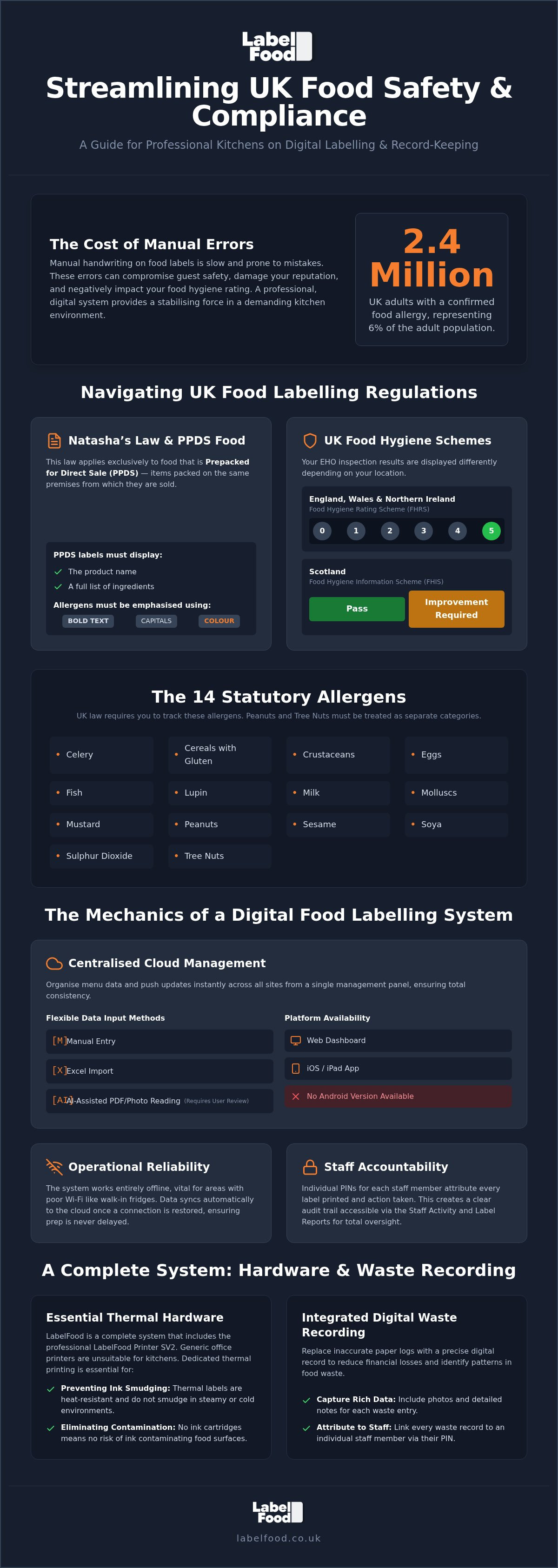
2.4 million adults in the UK have a confirmed food allergy. This is 6% of the adult population. Managing this risk in a high-pressure kitchen is difficult. Manual handwriting is slow. It creates errors. These mistakes threaten guest safety and your hygiene rating. Professional food labeling solutions remove this uncertainty. They provide a stabilising force in a demanding environment.
You know the cost of food waste and the complexity of Natasha’s Law. EHO inspections are stressful when your paperwork is inconsistent. This guide shows you how to streamline compliance using integrated digital systems. You will learn to manage the 14 statutory allergens and automate waste tracking. We detail the specific rules for prepacked for direct sale (PPDS) items and the regional differences between the FHRS and FHIS. Adopting a digital system of record-keeping ensures your kitchen stays organised and efficient. This transition replaces manual guesswork with a reliable, professional workflow.
Key Takeaways
- Identify the legal requirements of Natasha’s Law by distinguishing between Prepacked for Direct Sale (PPDS) and non-prepacked food items.
- Discover how digital food labeling solutions eliminate manual handwriting errors and streamline prep workflows across multi-site kitchens.
- Understand why dedicated thermal hardware is essential in commercial environments to prevent ink smudging and food contamination.
- Learn to reduce financial losses by replacing paper logs with digital waste recording that includes photos and individual staff PIN attribution.
- Explore how AI-assisted tools and cloud dashboards allow you to organise and review menu data for rapid deployment on iOS and web platforms.
Navigating UK Food Labelling Regulations and Natasha's Law
UK food safety laws are rigid. They define how commercial kitchens must operate to protect consumers. Understanding the UK Food Labelling Regulations is the first step toward total kitchen compliance. Operators must distinguish between food that is prepacked for direct sale (PPDS) and non-prepacked food. This distinction determines your legal labelling obligations. Non-prepacked food, such as meals cooked to order, requires allergen information to be available. Full ingredient labels are not mandatory for these items. PPDS food is different. It requires specific, detailed documentation.
Understanding PPDS Requirements for UK Operators
Natasha’s Law applies exclusively to PPDS food. This is food packed on the same premises from which it is sold before a customer orders it. Common examples include sandwiches or salads made and boxed in the kitchen for a grab-and-go fridge. These items must display a label with the product name and a full ingredients list. Any of the 14 statutory allergens present must be emphasised. Most kitchens use bold, CAPITALISED, or contrasting colours to meet this requirement. Accuracy is vital. A single missing ingredient can lead to severe legal consequences and safety risks. Manual systems often fail here because they lack the necessary precision.
Allergen Management: Peanuts, Nuts, and the Other 12
The law recognises 14 statutory allergens. You must treat peanuts and tree nuts as separate categories. The full list includes: celery, cereals containing gluten, crustaceans, eggs, fish, lupin, milk, molluscs, mustard, peanuts, sesame, soya, sulphur dioxide (sulphites), and tree nuts. Managing these risks manually is difficult. Handwriting labels increases the chance of error. It slows down prep. Professional food labeling solutions automate this process. They ensure every ingredient is accounted for every time. This removes the risk of cross-contamination through mislabelling.
Environmental Health Officers (EHO) look for consistent record-keeping during inspections. In England, Wales, and Northern Ireland, your performance dictates your Food Hygiene Rating Scheme (FHRS) score. In Scotland, the Food Hygiene Information Scheme (FHIS) uses a Pass or Improvement Required system. Clear, digital labels provide the evidence EHOs need. They show you have a controlled system for allergen management. Relying on generic methods often leads to inconsistencies that surface during inspections. Digital food labeling solutions provide a stabilising force. They replace manual guesswork with precision and reliability.
The Mechanics of Digital Food Labelling Management
Traditional day dots are prone to human error. Handwriting is often illegible. Dates are frequently miscalculated. Transitioning to digital prep labels replaces this manual guesswork with precision. Integrated food labeling solutions ensure that every label produced contains accurate dates, shelf-life information, and allergen warnings. This shifts the focus from administrative tasks to kitchen prep efficiency. It provides a stabilising force in a high-pressure environment.
Centralised Data: Managing Multi-site Kitchens
Managing multiple sites requires total consistency. A cloud management dashboard allows you to organise menu data from a single web-based portal. You can push updates to all locations instantly. This ensures that a bakery in London uses the same allergen profile as a site in Manchester. Onboarding large product catalogues is straightforward. You can use Excel imports or AI-assisted PDF reading to populate your system. It is important to remember that AI tools assist in data entry; they require user review and editing to ensure accuracy. The management panel is accessible via web browsers and iOS or iPad devices. There is no Android version available.
Operational Reliability and Accountability
Kitchen environments are demanding. Wi-Fi signals in basements or walk-in fridges are often unreliable. The system must maintain offline functionality to prevent prep delays. Data syncs with the cloud automatically once the connection is restored. Accountability is equally critical. Every label printed is attributed to a specific staff member through individual PINs. This creates a clear record of kitchen activity. If an error occurs, you can trace it back to the specific event. You can monitor these trends through the Staff Activity and Label Reports. This level of oversight is essential for maintaining Mandatory Food Labelling Information across your estate.
The Workflow: From Cloud Dashboard to Printer SV2
Adopting a digital system involves a logical four-step progression. This process ensures frictionless operation from the office to the kitchen floor.
- Step 1: Organise product data and allergen info in the web panel.
- Step 2: Sync data to the LabelFood Printer SV2 via the iOS app.
- Step 3: Select the product on the device and print accurate labels during prep.
- Step 4: Review Staff Activity reports to monitor kitchen behaviour and ensure standards are met.
Implementing a unified food labeling solutions framework reduces the stress of manual record-keeping. If you want to see how this system fits your specific workflow, you can explore the complete food labelling system online.
Evaluating Food Labelling Hardware: Beyond Generic Printers
Standard office or retail printers are unsuitable for commercial kitchens. High temperatures, steam, and grease cause standard ink to smudge or bleed. This compromises the legibility of your food labeling solutions. Thermal printing is the industry standard for a reason. It uses heat rather than ink. This eliminates the risk of ink contamination and ensures labels remain clear throughout the product's shelf life. The LabelFood Printer SV2 is built specifically for this purpose. It is a dedicated hardware solution provided as part of the complete system. Unlike generic third-party alternatives, it is designed to function reliably in the physical realities of a high-pressure workspace.
Kitchen-Hardened Hardware Requirements
Professional environments require resistance to heat and humidity. A printer failing during peak service disrupts the entire prep workflow. Reliability is essential for peace of mind. The SV2 operates as a standalone device once synced. It does not require a constant internet connection to print labels. This offline capability is vital for basement kitchens or sites with poor connectivity. Its compact footprint also suits small prep stations in busy London cafes where space is at a premium. Reliable hardware ensures you consistently meet UK food labelling requirements without technical delays or hardware failures.
Software Integration: iOS vs. Android in the Kitchen
Stability is the priority for kitchen software. LabelFood focuses exclusively on iOS and iPad platforms for mobile management. This closed ecosystem offers better security and consistent performance compared to the fragmented Android market. There is no Android version of the management panel. Web-only systems without dedicated local hardware often struggle with lag or print driver errors. Adopting a hardware-as-a-service model ensures your equipment is always functional and supported. Subscription models also simplify your supply chain. You can manage label roll supplies through the same integrated service. This prevents shortages that could stall your compliance efforts or force a return to manual handwriting.
Choosing a unified system means the software and hardware are designed to work together. Generic printers often require complex setup or third-party drivers that fail after software updates. A dedicated system removes these technical hurdles. It allows kitchen managers to focus on food quality rather than troubleshooting devices. This integrated approach creates a frictionless operation that scales easily across multiple sites. It provides a reliable record-keeping tool that supports your daily operations without unnecessary complexity.
Integrating Food Waste Recording into Daily Workflows
The UK hospitality sector generates approximately 1.1 million tonnes of food waste annually. This costs the industry over £3 billion. On average, a single outlet loses £10,000 every year to wasted stock. These figures represent a significant drain on profitability. Traditional paper waste logs are often incomplete or ignored. They lack the detail needed to drive change. Digital food labeling solutions solve this by integrating waste recording directly into the kitchen workflow. This transition replaces vague estimates with precise, digital records that help recover lost margins.
The Digital Waste Log: Accuracy and Attribution
Manual logs rely on memory. They're often filled out at the end of a shift when details are hazy. Digital recording is different. It happens in the moment. Staff enter a unique PIN to record waste on the device. This ensures every entry is attributed to a specific individual. Accountability increases when actions are recorded. The system allows for photos and notes to be attached to each record. Visual evidence identifies recurring issues, such as poor storage or over-prepping. You can analyse these trends by site, shift, or product category. This provides a clear audit trail for management. It moves the kitchen from guesswork to data-driven management.
Boosting Profitability Through Waste Insights
Waste data is only useful if it's actionable. Integrated food labeling solutions generate specific reports to help refine your operations. The Label Report allows you to audit prep accuracy against actual sales. If you consistently prep 50 salads but waste 20, the data shows you exactly where to adjust. Refined prep levels lead to more accurate ordering. This reduces 'hidden' costs that erode your margins. Management can review these metrics through Compliance Packs and Staff Activity reports. These documents are vital during management reviews or EHO inspections. They prove you're monitoring and managing food safety and waste effectively. Setting reduction targets becomes possible when you have real-time data. This integrated approach ensures your kitchen remains both compliant and profitable. It provides the peace of mind that comes from total oversight. You can take control of your kitchen margins by implementing a food waste recording system that works alongside your labelling.
Implementing the LabelFood Printer SV2 System
Implementing a digital system should not disrupt your existing kitchen operations. It should stabilise them. The transition from manual methods to professional food labeling solutions is designed to be frictionless. This final stage focuses on populating your database and preparing for external scrutiny. It moves your kitchen from reactive fixes to proactive management. The focus remains on utility and peace of mind.
AI-Assisted Onboarding and Menu Setup
Setting up a product catalogue is often the most time-consuming part of adopting new software. LabelFood uses AI-assisted tools to accelerate this process. You can upload existing menus or PDFs. The system reads the data and populates your dashboard automatically. It also supports bulk Excel imports for large-scale catering operations. The role of the chef is critical during this phase. AI is a tool for speed; it is not an autonomous publisher of data. You must review and edit all generated data to ensure its accuracy before it goes live. This human-led verification maintains the high standards required in a professional environment. Once verified, your data is pushed to the LabelFood Printer SV2: The Standalone Solution for UK Kitchen Compliance.
Audit-Ready: Using the Compliance Pack
EHO inspections are a source of stress when evidence is missing. Digital record-keeping replaces lost paper folders with a centralised, searchable database. The Compliance Pack provides an instant overview of your kitchen’s performance. You can generate reports on staff activity and labelling accuracy with a few clicks. These documents prove you have a robust system of record-keeping in place. Whilst LabelFood does not guarantee a specific rating, it provides the tools needed to demonstrate due diligence to inspectors. The management panel is available on web and iOS or iPad only. There is no Android version. This ensures a stable and secure environment for your sensitive compliance data.
Labels can be customised to include your brand logo and specific fonts. However, legal requirements remain the priority. You must ensure the product name and emphasised allergens remain clear and legible. Thermal printing ensures these details do not fade or smudge over time. Modernising your labelling is a logical step for 2026. It reduces waste, improves workflow, and ensures your records are always audit-ready. UK operators should start by auditing their current PPDS processes and identifying where manual errors occur most frequently. Moving to an integrated food labeling solutions framework provides the control and peace of mind necessary for long-term success.
Future-Proofing Your Kitchen Operations
Operating a successful commercial kitchen requires total control over safety and efficiency. Digital record-keeping replaces the unreliability of manual methods with a stabilising, professional system. Adopting professional food labeling solutions ensures your data is accurate and consistent across every site. This integrated approach manages the 14 statutory allergens whilst simultaneously capturing the data needed to reduce food waste costs. It moves your kitchen from reactive administration to proactive management.
The LabelFood Printer SV2 system is used by leading UK hospitality brands to maintain high standards and operational precision. It provides a complete framework of hardware, cloud dashboards, and dedicated UK-based support. Every label printed and every gram of waste recorded becomes a verifiable data point for management review. This transition simplifies your workflow and provides the peace of mind necessary for long-term growth.
Your team deserves tools that match their professional standards. You can request a demo of the LabelFood Printer SV2 system to see how these tools integrate into your daily prep. Modernising your labelling is a practical investment in the future of your business.
Frequently Asked Questions
What is Natasha's Law and does it apply to my business?
Natasha’s Law mandates that all food prepacked for direct sale (PPDS) must display the product name and a full ingredients list with the 14 statutory allergens emphasised. It applies to any London food business that packs items on-site before a customer orders them, such as sandwiches or salads. If you sell food cooked to order, the specific labelling requirements of Natasha’s Law do not apply, though you must still provide accurate allergen information upon request.
Can the LabelFood Printer SV2 work without a Wi-Fi connection?
The LabelFood Printer SV2 includes full offline functionality to ensure your prep workflow never stops. Kitchens in London basements often suffer from unreliable Wi-Fi, so the system allows you to select products and print labels without a constant connection. Once the device reconnects to the network, all print data and staff activity sync automatically with the cloud management dashboard. This ensures your digital records remain accurate for future EHO inspections.
How does the system handle the 14 statutory allergens?
Our food labeling solutions recognise all 14 statutory allergens required by UK law, including the specific distinction between peanuts and tree nuts. The system automatically highlights these ingredients in bold or capitals on your labels to ensure legal clarity. This automation removes the risk of manual handwriting errors. It helps you manage complex ingredient profiles across your entire menu whilst maintaining consistent standards for guest safety and professional record-keeping.
Is there an Android version of the LabelFood management app?
There is no Android version of the LabelFood management app. We prioritise the iOS and iPad ecosystem to ensure maximum stability and security within high-pressure kitchen environments. You can manage your product data and view reports via any standard web browser or through our dedicated iOS application. This focus allows us to provide a more reliable and streamlined experience for professional operators across the UK who require consistent hardware performance.
How does digital waste recording help reduce kitchen costs?
Digital waste recording identifies 'hidden' costs by replacing vague paper logs with precise data. Staff use individual PINs to record wasted items, often including photos and notes to explain the cause. This transparency allows London managers to identify recurring issues like over-prepping or storage failures. By refining your prep levels based on these insights, you can recover significant margins and reduce the £10,000 average annual loss reported by many UK outlets.
What happens if we have multiple sites across London or the UK?
The cloud management dashboard is designed for multi-site kitchen labelling management across London and the wider UK. You can organise your entire product catalogue from a single central portal and push updates to every Printer SV2 in your estate instantly. This ensures that every branch follows the same allergen protocols and labelling standards. It provides a unified system of record-keeping that simplifies oversight for group executive chefs and operations managers.
How do I onboard my existing menu into the LabelFood system?
You can onboard your existing menu using AI-assisted tools that read your current PDFs or photo data. The system also supports bulk Excel imports for faster setup of large catalogues. It is important that a chef or manager reviews and edits the data after the initial import to ensure total accuracy. The AI serves as a high-speed data entry tool rather than an autonomous publisher of your legal information or ingredient lists.
Does the SV2 printer require ink or toner cartridges?
The LabelFood Printer SV2 is a thermal device and does not require ink or toner cartridges. It uses heat-sensitive label rolls to create clear, smudge-proof text that withstands the steam and grease of a professional kitchen environment. This reduces your ongoing maintenance requirements and prevents the risk of ink contamination in food prep areas. You can manage your supplies through our integrated label roll supply subscription to ensure you never run out during service.