
A printer alone won’t keep product information accurate through a busy delivery service. The right ghost kitchen labelling solution London operators need connects reliable product data with repeatable preparation and record-keeping workflows.
In a delivery-led kitchen, menus can change, staff and shifts can vary, and orders still need clear allergen information. The rules depend on how food is prepared and packed. Natasha’s Law applies to food prepacked for direct sale, such as items packed before a customer orders. Food made to order isn’t PPDS, but allergen information must still be available. The 14 statutory allergens need careful management across both types of service.
This guide explains the UK responsibilities to consider, then sets out a practical labelling workflow for a London ghost kitchen. It covers how to keep labels, allergen details and records usable across staff or sites, and what to assess when deciding whether a digital system fits your operation. The aim is a clear process, not a promise of automatic compliance.
Key Takeaways
- Map products and preparation steps to create a labelling workflow that holds up during delivery-led service.
- Check which labelling and allergen information applies to each product before setting up labels.
- Assess a ghost kitchen labelling solution London operation by looking beyond the printer to product data and record management.
- Give someone clear ownership of product information updates to support accurate handovers when menus or staff change.
- Compare your needs with a complete system such as LabelFood, where subscriptions include the Printer SV2 and cloud management dashboard.
Why a London ghost kitchen needs a repeatable food labelling workflow
Delivery orders arrive while preparation is under way. Recipes or ingredients may change, and different staff can handle product information, packing and dispatch during a shift. If label details live in separate documents or depend on one person’s memory, it can be harder for the team to identify prepared products and find current information during a busy service.
A consistent workflow links product setup to preparation and packing. It gives staff a clear way to identify a product and find its current information. The right level of detail depends on the operation. A kitchen serving one brand may have a single menu and product set to manage. A shared kitchen or a site preparing several brands may need to keep separate recipes, product details and labels organised. Don’t assume one setup fits every kitchen.
A ghost kitchen, also called a virtual restaurant, may operate without a customer-facing dining room. That model doesn’t remove the need for a clear process. A ghost kitchen labelling solution London operators assess should support their actual workflow, but it doesn’t take on the food business’s legal responsibilities.
Where labelling fits into delivery-led kitchen operations
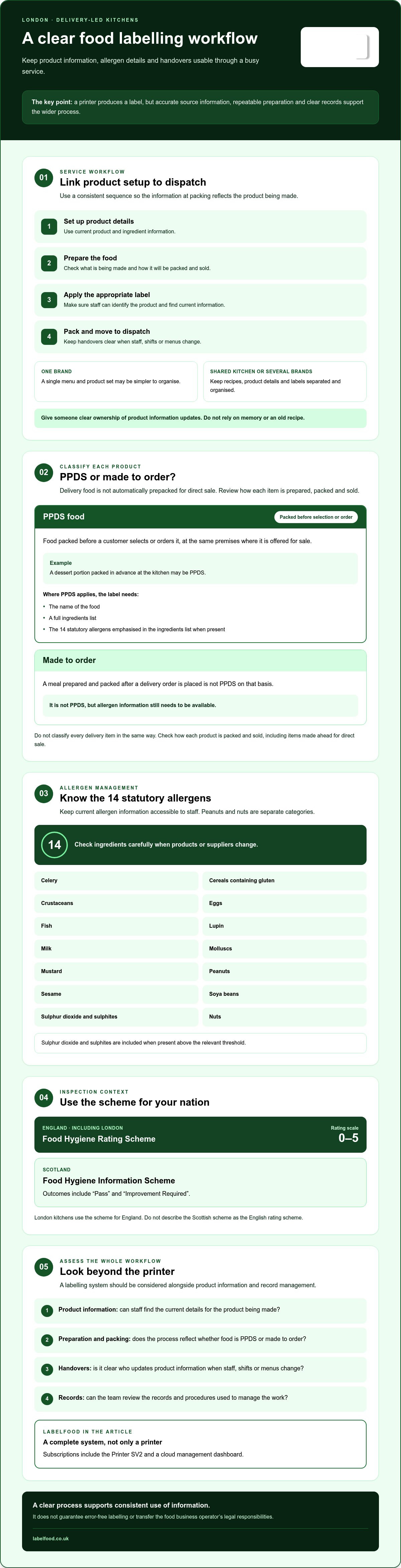
Start with the flow of information: product details are set up, food is prepared, the appropriate label is applied where needed, and packed orders move to dispatch. Handovers matter. The person packing an item needs information that reflects the product being made, not an old recipe or a different brand’s version. Being in London doesn’t create a separate national food labelling regime. Check the requirements that apply to the food and how it is sold.
Which records and labels should an operator review?
Labels are not the same as wider food safety records or operating procedures. First, map what the kitchen makes, what it packs and whether it is sold directly to customers. Then review product labels and the records or procedures used to manage the work. Which items are prepared to order? Which are packed in advance? These distinctions help identify what needs closer review. Check current official guidance before deciding that a specific legal duty applies.
Keep the process practical. Identify who maintains product information and how staff can check for updates during service. A printer can produce a label, but the wider workflow needs accurate source information, clear handovers and a way to review records. These working practices help the team use information consistently. They don’t guarantee error-free labelling or transfer responsibility away from the food business operator.
UK food labelling rules London ghost kitchens should understand
How food is packed and sold affects which labelling rules apply. Delivery food isn’t automatically prepacked for direct sale (PPDS), and Natasha’s Law doesn’t apply to every item prepared in a kitchen. Before setting up labels, classify each product by its preparation, packaging and point of sale. Check the current UK food labelling rules and relevant official allergen guidance for your products.
When Natasha’s Law applies to ghost kitchen food
PPDS food is packed before a customer selects or orders it, at the same premises where it is offered for sale. For example, a dessert portion packed in advance at the kitchen may be PPDS. A meal prepared and packed after a delivery order is placed isn’t PPDS on that basis. Don’t classify every delivery item in the same way. Review how each product is packed and sold, including items made ahead for direct sale.
Where food is PPDS, the label needs the food’s name and a full ingredients list, with the 14 statutory allergens emphasised in that list when present. Food made to a customer’s order isn’t PPDS, but allergen information still needs to be available. Keep the distinction clear in product information and staff guidance.
Allergen information and London inspection context
UK rules recognise 14 statutory allergens: celery; cereals containing gluten; crustaceans; eggs; fish; lupin; milk; molluscs; mustard; peanuts; sesame; soya beans; sulphur dioxide and sulphites; and nuts. Peanuts and nuts are separate categories. Sulphur dioxide and sulphites are included when present above the relevant threshold. Check ingredient details carefully when products or suppliers change, and make sure staff can access current allergen information.
A London kitchen falls under the Food Hygiene Rating Scheme used in England, which has a rating scale from 0 to 5. Scotland operates a separate Food Hygiene Information Scheme, with outcomes such as “Pass” and “Improvement Required”. Don’t use the Scottish scheme to describe a London premises. Labels and records can help an operator organise information, but they don’t guarantee a particular inspection outcome or rating.
A ghost kitchen labelling solution London operators assess should support the process of maintaining product and allergen information, not replace checking the rules or the operator’s responsibilities. The LabelFood food labelling system is one example of a system combining labelling with records.
How to assess a ghost kitchen labelling solution in London
A printer produces labels, but it may not manage the product information behind them or help organise records. Compare a printer-only setup with a connected system across the whole workflow: entering and updating data, printing, recording activity and reviewing information. The aim is to see whether the system suits your kitchen, not to assume technology prevents every mistake.
Use these questions to structure a supplier conversation. Check that label output can be reviewed against the UK food labelling rules that apply to your products. A system can support the process, but your team still needs to verify product details and label content.
| Area | Printer-only setup | Connected system to assess |
|---|---|---|
| Data entry | Ask how product details are supplied and updated. | Check for manual entry, Excel import and any AI-assisted reading, including who reviews and edits the result. |
| Reporting | Confirm what information, if any, is recorded beyond printing. | Ask which reports are available and what each one contains. |
| Waste records | Check whether waste information is recorded elsewhere. | Ask whether entries can include context such as photos and notes. |
| Management access | Confirm what device or software is needed. | Check support for web, iOS/iPad and Android against the devices your team uses. |
Questions to ask about product data and staff attribution
Can staff enter product information manually or import an existing Excel file? If photos or PDFs can be read with AI assistance, does this create draft information for a person to check and edit before use? It should not publish product data without review. Ask how staff actions are attributed, too. Individual PINs can help identify who made an entry or change, but confirm how this works in the system you’re considering.
What reporting and waste records should cover
Ask for the names of available reports and a clear explanation of their contents. For example, LabelFood provides Compliance Pack, Label Report and Staff Activity reporting tools. Its waste records can include photos and notes. Check whether these functions match the records your operation wants to maintain, rather than assuming a report covers every procedure or legal duty.
Test practical details before choosing. If service continues during an internet interruption, ask what remains available offline and how cloud syncing works when the connection returns. LabelFood can work offline and sync with the cloud, but confirm the behaviour that matters to your team. Its management panel is available on web and iOS/iPad, not Android. A ghost kitchen labelling solution London operators select should fit their devices, handovers and review process. The LabelFood food labelling system can be compared against those requirements.
Plan a practical labelling workflow for a London ghost kitchen
A workable process connects product information to what staff do at the bench, during packing and at handover. Set it up in stages, then test it in the kitchen before relying on it across service.
- Map the products. List what each brand makes, how items are prepared, when they’re packed and how they’re sold. Note where recipes or product details vary between sites.
- Check applicable requirements. Identify which products may be PPDS and review current official guidance for the labels and allergen information that apply. Don’t assume every item follows the same route.
- Organise product data. Bring together current product names, ingredients and allergen information from reliable business records. Set a clear owner for updates so recipe or supplier changes prompt a review of the relevant information.
- Test labels and the workflow. Check that labels are legible and match the product being packed. Ask staff to find, print and check the information they need as they would during service.
- Review records. Check that information remains usable across shifts and that changes or recorded activity can be reviewed by the people responsible for maintaining it.
Prepare product information before configuring a system
Start with verified source information, not a label template. For PPDS products, check required details against current official guidance before using a label in service. If data is imported from Excel or read from a photo or PDF with AI assistance, treat the result as a draft. A staff member must review and edit it before use. Don’t let an unverified entry become the version used at the packing bench.
Keep the review practical. Compare the prepared label with the product information your team uses, including ingredients and allergen details. If something doesn’t match, pause and resolve the source information before printing labels for operational use.
Introduce the workflow across shifts or sites
Show staff how to find the correct product record, print the relevant label and check it against the item they’re handling. Use individual PIN attribution where available to make recorded activity easier to review. For kitchens working across sites, agree how shared product data will be maintained and how local variations will be identified. Don’t assume every site uses an identical recipe or process.
Test with the staff and devices that will use the system. Record questions or unclear steps, make adjustments, then review how the workflow performs across handovers. A ghost kitchen labelling solution London operators choose should fit that tested process. The LabelFood food labelling system can be compared with your workflow needs.
Inspection arrangements can depend on the relevant local authority. Check current borough-specific information directly with the council before relying on any local process or inspection claim.
How LabelFood supports ghost kitchen labelling in London
After checking which rules apply and mapping your workflow, compare those needs with a complete food labelling system. LabelFood is more than a printer: subscriptions include the LabelFood Printer SV2 alongside a cloud management dashboard, food waste recording and support for Natasha’s Law labelling. Product information, labels and records sit within the wider system rather than relying on a printer alone.
The system can work offline and sync with the cloud. Its reporting tools include Compliance Pack, Label Report and Staff Activity. These can help operators review information and recorded activity. Check how each report fits your own record-keeping process. The tools don’t replace your checks or establish that every legal requirement has been met.
What the LabelFood system can support
Product details can be entered manually, imported from Excel or read from photos and PDFs with AI assistance. AI reading is a starting point, not an autonomous publisher. Staff must review and edit the information before using it for kitchen operations. This distinction matters when source documents are unclear or product details have changed.
Waste records can include photos and notes, adding context to an entry. Individual staff PINs can attribute actions to users, which can make activity easier to review across shifts. These functions support record-keeping. They don’t guarantee compliance, prevent every error or secure a particular food hygiene rating. Responsibility for checking product information and following applicable requirements remains with the food business operator.
Check fit before choosing a solution
Assess the system against the way your kitchen works. Consider the number of menus or brands, product changes, shift handovers and whether information needs to be managed across more than one site. LabelFood supports multi-site kitchen labelling management, but operators should confirm that the way product data is organised suits their sites and any local variations.
Check devices before making a decision. The management panel is available on web and iOS/iPad only. There’s no Android version. Confirm that these options work for the staff who will manage product data and records.
For more detail on the included device and its place in the system, read the LabelFood Printer SV2 guide. Then compare the system with your menu, staff workflow, records and device requirements. A ghost kitchen labelling solution London operators choose should suit the process they have established, not rely on assumptions about how their kitchen runs.
Explore the LabelFood system to assess whether it fits your kitchen workflow.
Put a clear labelling process into practice
A dependable ghost kitchen labelling solution London operators can use starts with accurate product information, a clear understanding of which requirements apply and a repeatable way for staff to check details during service. Assign ownership for product updates, test labels with the team and review records across shifts. A digital system can support these steps, but it can’t replace your checks or guarantee compliance or a food hygiene rating.
LabelFood is a complete food labelling system, with the LabelFood Printer SV2 included with subscriptions alongside the cloud management dashboard. It can work offline and sync with the cloud. Reporting tools include Compliance Pack, Label Report and Staff Activity, while waste records can include photos and notes. These features may suit kitchens looking to manage labels and records together.
Check the system against your menu, staff workflow, records and devices before deciding. Explore the LabelFood system to assess whether it fits your kitchen. With a practical process in place, your team can manage product information more clearly through busy service.
Frequently Asked Questions
Does Natasha’s Law apply to every meal sold by a London ghost kitchen?
No. Natasha’s Law applies to food that is prepacked for direct sale (PPDS), not every meal prepared in a kitchen or sold for delivery. A product packed at the premises before a customer orders it may be PPDS. Food prepared and packed after a customer places an order generally isn’t PPDS on that basis. Classify each product by how and when it’s packed and sold, then check the current official guidance.
What information should a ghost kitchen include on a PPDS label?
A PPDS label must show the food’s name and a full ingredients list, with any of the 14 statutory allergens present emphasised in that list. For example, an allergen can be highlighted in bold. Check current official UK guidance for the requirements that apply to your product and how the information should be presented. Don’t assume a delivery label is a PPDS label without first checking how the food is packed and sold.
How many statutory allergens must a London kitchen manage?
UK rules recognise 14 statutory allergens. They are celery, cereals containing gluten, crustaceans, eggs, fish, lupin, milk, molluscs, mustard, peanuts, sesame, soya beans, sulphur dioxide and sulphites, and nuts. Peanuts and nuts are separate categories. A London kitchen should keep ingredient and allergen information accurate for its products and make relevant information accessible to staff. Check official guidance for details on how allergen information must be provided.
Can a food labelling system guarantee a good food hygiene rating?
No. A labelling or record-keeping system can support how a kitchen organises information, but it can’t guarantee compliance or a particular rating. London premises fall under England’s Food Hygiene Rating Scheme, which uses a scale from 0 to 5. A rating reflects an inspection, not simply the use of a particular tool. The food business remains responsible for its practices and for checking that its records and labels are suitable.
Can LabelFood work if the kitchen loses its internet connection?
Yes. LabelFood can work offline and sync with the cloud. This may help a London kitchen continue using the system during an internet interruption, with data syncing when connectivity is available. Check which parts of your workflow need to be available offline and confirm the details with the supplier. Don’t assume every function behaves identically without a connection. A planned test can help staff understand how the system fits their service process.
Does LabelFood’s AI publish food label information automatically?
No. AI-assisted reading can extract product information from photos or PDFs, but it supports staff review and editing. It doesn’t autonomously publish data for kitchen use. Treat the result as a draft: check it against your current product information, correct any errors and confirm it before relying on it. This review step is important if recipes, ingredients or allergen details have changed since the source document was created.
Can kitchen staff manage LabelFood from an Android device?
No. The LabelFood management panel is available on web and iOS/iPad, but there’s no Android version. Before choosing a ghost kitchen labelling solution London, check that the devices used by staff responsible for product data and records are supported. The LabelFood Printer SV2 is included with subscriptions, alongside the cloud management dashboard. Confirm how the available management options fit your staff handovers and kitchen workflow.