
What if recording food waste fitted into the kitchen routine instead of becoming another task to catch up on after service? For a digital food waste recording commercial kitchen process to work, staff need a simple, repeatable way to log what’s discarded while the details are still clear.
Food waste separation requirements are already in force, with rules that vary across the UK. Mandatory business food waste reporting is not currently in effect as of September 2026. Keeping useful records is still a practical way to see what’s being thrown away and where kitchen workflows may be contributing to it. Paper notes can be missed or difficult to compare across shifts, and staff may not know what details to capture.
This guide explains how to build a consistent recording routine, which details can help reveal recurring patterns and how digital tools can support the process. It also covers LabelFood’s digital food waste recording as part of a complete food labelling system, including records with photos and notes, and staff attribution using individual PINs. Digital records can make information easier to review, but they don’t guarantee compliance or reduce waste on their own.
Key Takeaways
- Build digital food waste recording commercial kitchen routines around clear categories and details staff can record consistently.
- Choose practical fields, such as food type, quantity where practical, date and reason, to help investigate recurring patterns.
- Compare paper and digital logs by how easily your team can access, complete and review them. Paper may still suit a small, stable operation.
- Introduce the process across shifts: assign responsibility, brief staff, test the routine, then review and adjust before adding more fields.
- See how LabelFood’s complete food labelling system includes the LabelFood Printer SV2 with subscriptions, alongside digital food waste recording.
Why record food waste in a commercial kitchen? Start with a repeatable process
A useful food waste record does more than note that something was thrown away. It captures what was discarded and why, in a consistent format the team can review. Recording captures the event; reviewing looks for patterns; action changes a process in response. Keeping those steps distinct matters: a record can inform decisions, but it doesn’t reduce waste by itself.
For a digital food waste recording commercial kitchen process, the first step is not choosing software. It’s agreeing what staff should record and making the routine manageable during preparation and service. Consistent entries give managers a clearer basis for investigating recurring issues, such as why certain ingredients are regularly discarded or why unsold food builds up.
Food waste rules vary across the UK. Requirements currently address the physical separation of food waste for collection, with differences between nations. As of September 2026, mandatory food waste reporting for businesses is not in effect. A kitchen’s internal recording process is an operational tool, not proof of compliance or a universal legal duty. Check current guidance for your nation and local area when reviewing waste arrangements.
What counts as useful food waste information?
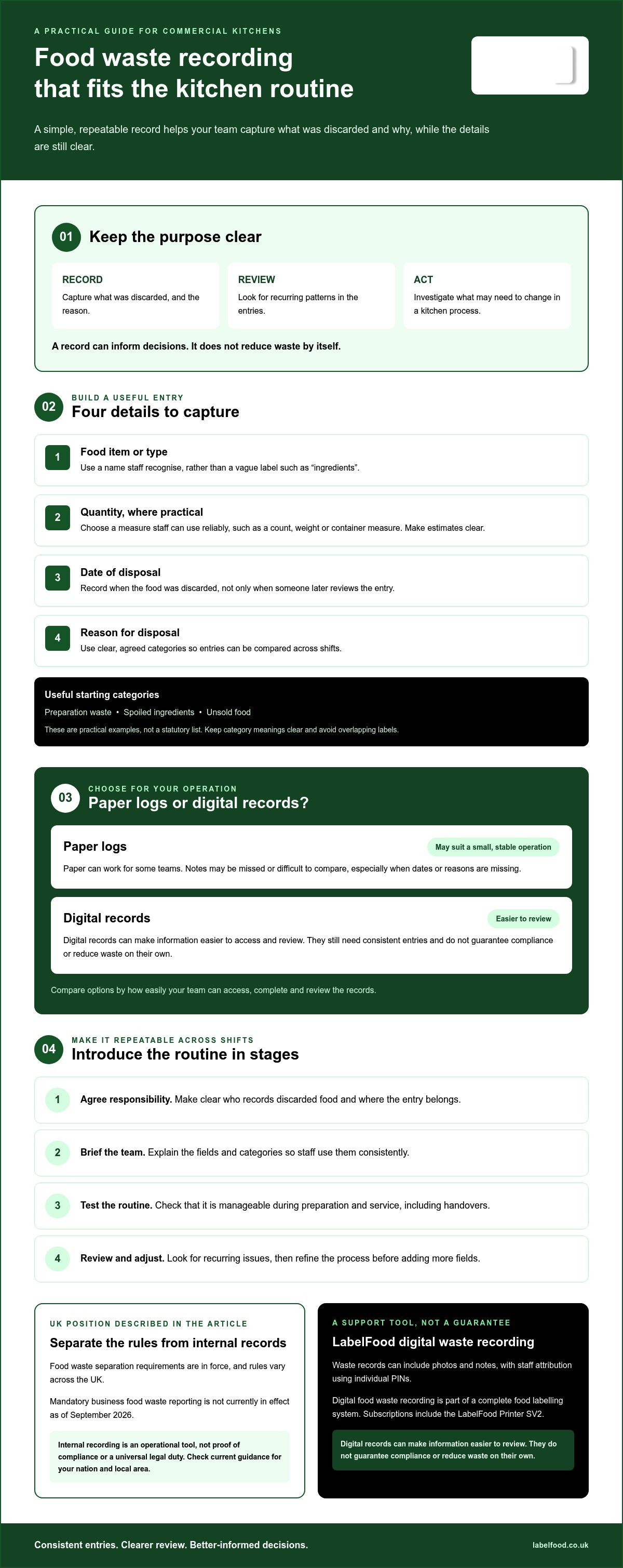
Start with categories that reflect what happens in your kitchen. These might include preparation waste, spoiled ingredients and unsold food. They’re practical examples, not a statutory list. Choose labels staff can apply in the same way across shifts; too many overlapping categories make records harder to compare.
Useful categories put an entry in context. A note that an item was discarded is less informative than one that identifies the food type and a clear reason. For a broader introduction to the subject, see the overview of one-third of the world's food is thrown away.
Why informal notes are hard to act on
A scrap of paper may capture a detail in the moment, but missing dates or reasons can make it difficult to understand later. Without staff attribution, a manager may also be unable to clarify what an entry refers to. The aim isn’t to assign blame. It’s to retain enough context to investigate a pattern.
Gaps often appear at handover. One shift may record discarded food while the next assumes it’s already been logged. During a busy service, a note may be delayed, left incomplete or written in terms another person interprets differently. A repeatable process sets a shared expectation: record the event in the agreed place, using the agreed categories. That gives the team a more useful starting point for review, without treating the record as a guaranteed fix.
What should a digital food waste record capture?
A record needs enough detail to make sense later, but it shouldn’t slow down service. Start with four core fields: the food item or type, quantity where practical, date and reason for disposal. Keep the format consistent so entries can be compared over time.
A useful food waste entry identifies the item or food type, quantity and unit where practical, date, and reason for disposal.
- Item or food type: Use a name staff will recognise, rather than a vague label such as “ingredients”.
- Quantity: Record an amount when it’s practical to do so.
- Date: Include the date of disposal, not just the date someone later reviews the record.
- Reason: Note why the food was discarded, using the team’s agreed categories.
There’s no need to impose a complicated measurement system. Choose units the team can apply reliably, such as a count, weight or container measure where suitable. Consistency matters more than using a particular unit as if it were universally required. If staff estimate, make that clear rather than presenting an estimate as an exact measurement.
Choose categories staff can apply during service
Keep labels short, clear and relevant to your kitchen. Preparation waste, spoilage and unsold food may be useful starting points, but they aren’t statutory categories. Before making them part of routine recording, check that staff understand each label in the same way.
Separate entries that could point to different issues. For example, food discarded after over-preparation may call for a different review from ingredients spoiled before use. Don’t assume the cause from the category alone. Use the record to decide what needs investigating.
Add context without slowing the kitchen down
A brief note can explain an unusual event, a change in preparation or why an item spoiled. A photo may help when the written description isn’t enough, but it needn’t be compulsory for every entry. Keep extra detail focused on what someone reviewing the record would need to understand.
LabelFood’s digital food waste records can include photos and notes. These add context for staff to review; they don’t automatically analyse the waste or determine its cause. This supports a practical measure-and-review process, similar to WRAP’s Target-Measure-Act approach.
If you’re comparing ways to capture these fields digitally, explore LabelFood food waste recording as part of its complete food labelling system.
Paper logs or digital food waste recording: what changes in practice?
Digital food waste recording in a commercial kitchen can make entries easier to organise and compare, but staff still need to record what they discard. A digital record won’t automatically explain why waste is recurring or what to change. Recording creates the information; reviewing it helps identify patterns; operational follow-up is where decisions are made.
The practical difference is how records are captured, accessed and reviewed. Neither format works well if the process is unclear or routinely missed.
| Consideration | Paper log | Digital record |
|---|---|---|
| Access | Available where the log is kept; entries may be harder to find across shifts or sites. | Can make records easier to access and organise, depending on the tool and access arrangements. |
| Consistency | Staff can use a shared template, though handwriting and entry detail may vary. | Set fields can guide staff to enter information in a consistent format. |
| Review | Records may need to be gathered and read manually. | Records can be easier to review together, but staff still need to interpret them. |
| Staff effort | Simple to start, but entries may be missed or difficult to read. | Can reduce handling of paper records, but still requires a clear, workable entry step. |
When can a paper log be sufficient?
Paper may suit a small, stable operation if there’s clear ownership, staff use the same format, entries remain legible and someone reviews them regularly. If logs are complete and easy to retrieve, changing format may not solve a real problem.
Check any applicable business or local requirements when deciding how to keep records. Paper isn’t inherently inadequate or non-compliant; the question is whether your process meets your needs and any relevant requirements.
What does digital recording add?
Digital tools can make records easier to find and compare across shifts. Consistent fields can help reduce variation in how entries are captured. LabelFood’s system supports offline functionality with cloud syncing, so digital waste recording can sit alongside kitchen tasks. Waste records can also include photos and notes for added context.
Technology helps only when the recording step fits service. Choose a point in the workflow when staff can log waste without disrupting their work, and keep the process short enough to use consistently. A digital system doesn’t replace staff judgement: someone still needs to review entries, investigate relevant patterns and decide whether an operational change is appropriate.
How to introduce digital waste recording across kitchen shifts
A digital food waste recording commercial kitchen process is useful only if staff can follow it during real service. Keep the first version simple. Test it on every shift, identify where entries are missed or misunderstood, then adjust before adding extra fields.
Make recording part of existing prep and close-down routines
Choose a natural moment to log discarded food, such as during a prep task or close-down check, without interrupting service. Set out who records entries, who reviews them and how relevant context passes between shifts. A short briefing and clear written instructions give staff the same starting point.
- Choose categories. Start with a short set that reflects your kitchen’s workflow.
- Assign responsibility. Decide who records waste and who checks the records.
- Brief staff. Explain what to enter, where to enter it and when.
- Record across shifts. Use the agreed process during preparation, service and close-down as appropriate.
- Review entries. Look for repeated items, reasons or time periods.
- Adjust the process. Discuss findings with the team, make a manageable change and check later records.
Keep the first set of fields lean. Test the routine across different shifts before expanding it. If staff interpret a category differently or regularly miss the recording moment, simplify the process before adding detail.
Review records and choose one practical response
Look for recurring patterns before drawing conclusions. A repeated reason may be worth discussing, but the record alone may not explain its cause. Ask staff who handled the task, then choose one proportionate workflow change to test. Review later entries to see whether the pattern appears to have changed. Treat that as useful feedback, not a guaranteed result.
For broader prevention ideas, consult a guide to reducing food waste in a commercial kitchen alongside your own records. In London, check the relevant borough’s food waste collection arrangements. Collection instructions can vary by borough, so confirm the details with your local council.
Looking for a digital option to support the recording step? Explore LabelFood’s food waste recording system as part of its complete food labelling system.
How a complete food labelling system can support digital waste records
Digital food waste recording commercial kitchen teams can use sits within a wider routine of recording and reviewing kitchen information. LabelFood is a complete food labelling system, not just a printer. The LabelFood Printer SV2 is included with subscriptions, alongside a cloud management dashboard and digital food waste recording.
How LabelFood supports waste recording and review
Waste records can include photos and notes, giving staff a way to add context to an entry. Individual staff PINs support attribution, so teams can identify who recorded information and follow up if clarification is needed.
Information can be entered manually, imported from Excel, or read from photos or PDFs with AI assistance. Any AI-assisted reading produces information for staff to review and edit; it doesn’t publish data autonomously. The system also supports offline functionality with cloud syncing.
LabelFood’s reporting tools include Compliance Pack, Label Report and Staff Activity. These have different purposes, so don’t assume each one is a food waste report. Check which information each tool covers and whether it supports the review your kitchen needs.
Check fit before choosing a digital workflow
Before adopting a process, check how it fits your kitchen’s devices, shifts and staff responsibilities. The management panel is available on web and iOS/iPad only. There’s no Android version. Consider who will enter records, who will review them, and whether the agreed method works during service as well as at close-down.
A digital system can make records easier to organise, but it can’t replace staff judgement or follow-up. The useful test is whether your team can enter information consistently and use it to investigate patterns.
For more detail, read the food waste recording software guide and the LabelFood Printer SV2 guide. Choose a workflow that supports your recording routine without adding steps your team can’t maintain.
Make waste recording a routine your team can maintain
Effective digital food waste recording commercial kitchen teams can use starts with a consistent process, not a long list of fields. Record the food, quantity where practical, date and reason. Then review entries for patterns and decide whether a small workflow change is worth testing.
Choose paper or digital based on what your staff can use reliably across shifts. Digital tools can make records easier to organise, but they still depend on staff input and follow-up. Keep the first routine manageable, assign responsibility and adjust it after the team has tested it in service.
LabelFood brings digital food waste recording into a complete food labelling system, rather than offering only a printer. Waste records can include photos and notes, with individual PINs supporting staff attribution. The system also supports offline functionality with cloud syncing, and the LabelFood Printer SV2 is included with subscriptions.
If you’re assessing whether this approach fits your kitchen, explore LabelFood’s complete food labelling system. Start with a routine your team can follow consistently, then use the records to guide your next practical step.
Frequently Asked Questions
What should a commercial kitchen include in a food waste record?
A useful record identifies the food item or type, quantity where practical, date and reason for disposal. Choose units staff can use consistently, rather than treating one unit as compulsory. Short notes can explain unusual circumstances, such as a change to preparation. A photo may help when a written description isn’t enough. Keep fields clear and limited so staff can complete entries during normal kitchen routines.
Is digital food waste recording a legal requirement for UK kitchens?
Mandatory food waste reporting for businesses isn’t in effect in the UK as of September 2026. That’s distinct from rules on separating food waste for collection, which differ across the nations. In England, requirements have applied since 31 March 2025, with a temporary exemption for micro-businesses until 31 March 2027. Wales and Scotland have rules based on a 5kg weekly threshold. In London, check your borough’s collection arrangements.
How do you start tracking food waste in a commercial kitchen?
Start with a small set of categories that reflect your kitchen, such as preparation waste, spoilage and unsold food. Decide who records entries, when they’re made and who reviews them. Brief staff on the fields and test the routine across shifts before adding more detail. For London kitchens, check the relevant borough’s collection arrangements separately. Keep recording practical, then use the entries to investigate repeated items or reasons.
Can food waste be recorded digitally when the kitchen Wi-Fi is unavailable?
Yes, if the digital system supports offline functionality. LabelFood supports offline functionality with cloud syncing. Staff can use its food waste recording without an active connection, with information syncing to the cloud when connectivity is available. Check how any system you’re considering handles offline access and syncing, and make sure staff understand what to do if a record needs clarification before it syncs.
How often should a kitchen review its food waste records?
There isn’t one review frequency that suits every kitchen. Set a regular review point that matches your recording volume and staffing routine, then keep to it. A review might look for recurring items, reasons or periods when waste appears more often. If entries are too sparse to show a pattern, check whether staff can complete them consistently before drawing conclusions. Adjust the review routine as your operation changes.
Can photos and notes make food waste records more useful?
Yes. A short note can explain an unusual event, a change in preparation or why food spoiled. A photo can add context when a written description alone is unclear, but it doesn’t need to be compulsory for every entry. LabelFood waste records can include photos and notes. These details support staff review; they don’t automatically determine what caused the waste or what action the kitchen should take.
Does food waste recording software automatically reduce waste?
No. Software can help staff capture and organise records, but it doesn’t automatically prevent food from being discarded. A digital food waste recording commercial kitchen process still relies on staff entering useful information, managers reviewing it and the team deciding whether to adjust a workflow. Check later records to see whether the pattern appears to have changed. Treat the data as a tool for investigation, not a guaranteed outcome.